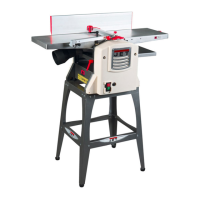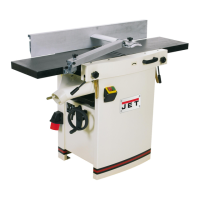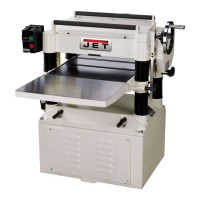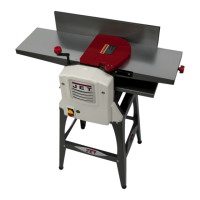
Why is the finished stock from my Jet Power Tool concave on the back end?
- Aallison99Sep 18, 2025
If the finished stock from your Jet Power Tool is concave on the back end, it's because the knife is higher than the outfeed table.
Why is the finished stock from my Jet Power Tool concave on the back end?
If the finished stock from your Jet Power Tool is concave on the back end, it's because the knife is higher than the outfeed table.
What to do if I notice torn grain when using my Jet Planer?
If you're experiencing torn grain with your Jet Planer, it could be due to several reasons: * The cut might be too heavy, so adjust the depth of cut. * The knives might be cutting against the grain, so ensure you cut along the grain. * Dull knives can also cause this, so sharpen them.
How can I minimize snipe when using my Jet JJP-10BTOS?
Snipe on your Jet Planer can be minimized by: * Supporting long boards with extension rollers. * Ensuring knives are sharp. * Butting each piece of stock end to end as they pass through the planer.
Why am I getting rough or raised grain with my Jet Planer?
If you're getting a rough or raised grain finish with your Jet Planer, consider these factors: * Dull knives could be the culprit, so sharpen them. * The cut might be too heavy, so adjust the depth. * High moisture content can also cause this, so dry the wood.
Why is the finished stock from my Jet Power Tool concave on the front end?
If the finished stock from your Jet Power Tool is concave on the front end, it's because the outfeed table is higher than the knife.
What causes 'chatter' marks on my Jet Power Tool?
If your Jet Power Tool is leaving “chatter” marks on the workpiece, ensure the knives are correctly set and the knife slots are clean and free of dust or debris. Also, make shallower cuts.
What to do if my Jet Power Tool is causing chip out?
If your Jet Power Tool is producing chip out, try these solutions: 1. Cut with the grain whenever possible. 2. Sharpen or replace dull knives. 3. Use a slower feed rate. 4. Make shallower cuts. 5. Inspect the wood for imperfections, and use different stock if necessary.
Why my Jet Power Tool won't start or keeps tripping the circuit breaker?
If your Jet Power Tool won't start, restart, or repeatedly trips the circuit breaker or blows fuses: 1. Verify the unit is connected to power and the Start/Stop switch is in the Start position. 2. If the planer frequently trips, try taking a lighter cut. 3. Verify the planer is on a circuit of the correct size. If the circuit size is correct, there is probably a loose electrical lead. 4. If the electric motor is suspect, have a qualified electrician test the motor for function or take the machine to a service center and have it tested. 5. Adjust the dust chute, making sure that the key on the dust chute depresses the micro-switch on machine.
What causes an uneven depth of cut side to side on a Jet JJP-10BTOS?
If you notice an uneven depth of cut from side to side with your Jet Planer, the knives may be incorrectly set. You should adjust the knives.
Why are there uneven knife marks on the workpiece from my Jet JJP-10BTOS Planer?
If you're seeing uneven knife marks on your workpiece from the Jet Planer, it's likely that the knives are nicked or out of alignment. Align the knives and replace any that are nicked.
Comprehensive list of safety rules for operating the jointer-planer.
Procedures for configuring the machine for jointer operation.
Procedures for configuring the machine for planer operation.
Procedure for setting and adjusting the cutterhead knives for optimal performance.
Step-by-step guide for safely removing and replacing cutterhead knives.
How to accurately set the jointer fence to 0° or 90° positions.
Correct operating position and basic jointer procedures like surfacing.
Guidelines for setting depth of cut and safety precautions for planer use.
Procedures for blade maintenance, sharpening, and cutterhead care.
Common jointer problems and their remedies, including chip out and fuzzy grain.
Comprehensive list of safety rules for operating the jointer-planer.
Procedures for configuring the machine for jointer operation.
Procedures for configuring the machine for planer operation.
Procedure for setting and adjusting the cutterhead knives for optimal performance.
Step-by-step guide for safely removing and replacing cutterhead knives.
How to accurately set the jointer fence to 0° or 90° positions.
Correct operating position and basic jointer procedures like surfacing.
Guidelines for setting depth of cut and safety precautions for planer use.
Procedures for blade maintenance, sharpening, and cutterhead care.
Common jointer problems and their remedies, including chip out and fuzzy grain.
| Type | Benchtop Planer |
|---|---|
| Motor Power | 1.5 HP |
| Amperage | 15 A |
| Voltage | 120V |
| Cutterhead Speed | 10, 000 RPM |
| Number of Knives | 2 |
| Planing Thickness | 6 in |
| Dust Port Diameter | 4 in |
| Maximum Cutting Depth | 1/8 in |
| Maximum Material Removal | 1/8 in. |
| Planing Width | 10 inches |
| Maximum Cutting Width | 10 inches |
| Feed Rate | 26 ft/min |
Loading...