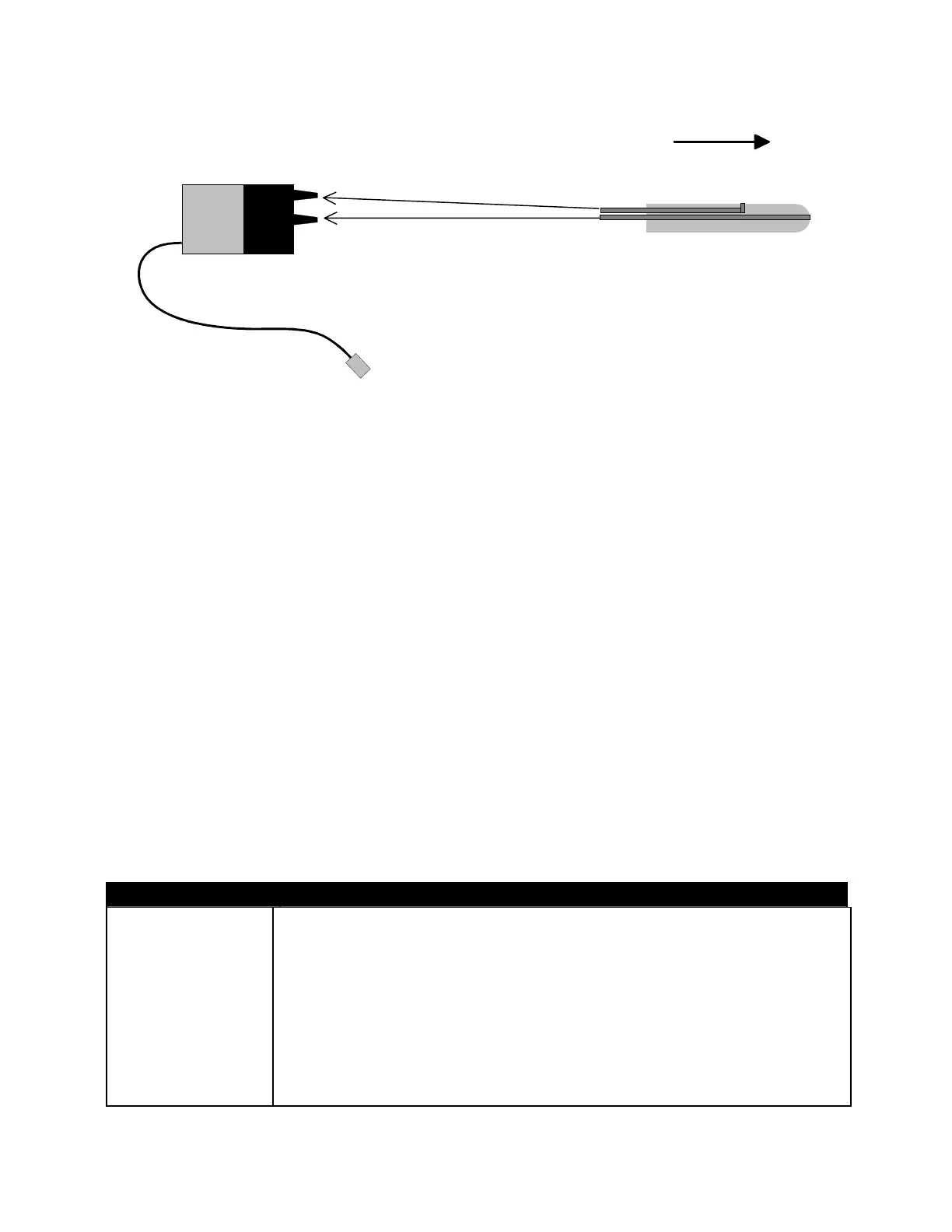
Airspeed
Sensor
Dynamic pressure
Static pressure
Pitot tube
1
1
2
2
flight direction
ECU connection cable
Connection diagram for the Airspeed Sensor:
Connect the air lines from the pitot tube to the airspeed sensor, using the 1/16
th
inch ID
vinyl tubing.
1 = Dynamic pressure input
2 = Static pressure input
Note: Tubing length and/or cross sectional area has no influence on measurement
precision
Connect the Airspeed Sensor cable to the appropriate socket, where indicated on the
ECU (see: engine diagram in the Operation Manual). The orange wire is aligned to the
pulse symbol. Once the Airspeed Sensor is connected, the ECU controls additional
functions:
• under the Run menu, measurement of current air speed (“Airspeed”) and
desired flight speed (“SetSpeed”), can be displayed
• under the Min/Max menu, the measured maximum speed (“MaxAirSpd”) and the
average flight speed (“AvgAirSpd”), can be displayed
• under the Limits menu, speed limits and the parameters of speed regulation can
be predetermined
Limits menu parameters assigned to the Airspeed Sensor :
Value Explanation
SpdCtrl SW0 Act
With the Airspeed Sensor connected to the ECU – by moving the
AUX switch to the Off (SW0) position, while maintaining a model air
speed > 40km/h, the following options are available:
Hold-Speed = momentarily sustains the current flight speed
DISABLED/NONE = no function, thrust control remains active
Turbine OFF = turbine will immediately shut off
LrnSpeed Lo/Hi = learn minimum or maximum flight speeds
Lrn Speed Lo = learn minimum flight speed
Lrn Speed Hi = learn maximum flight speed
Page 65/74


 To Next Page