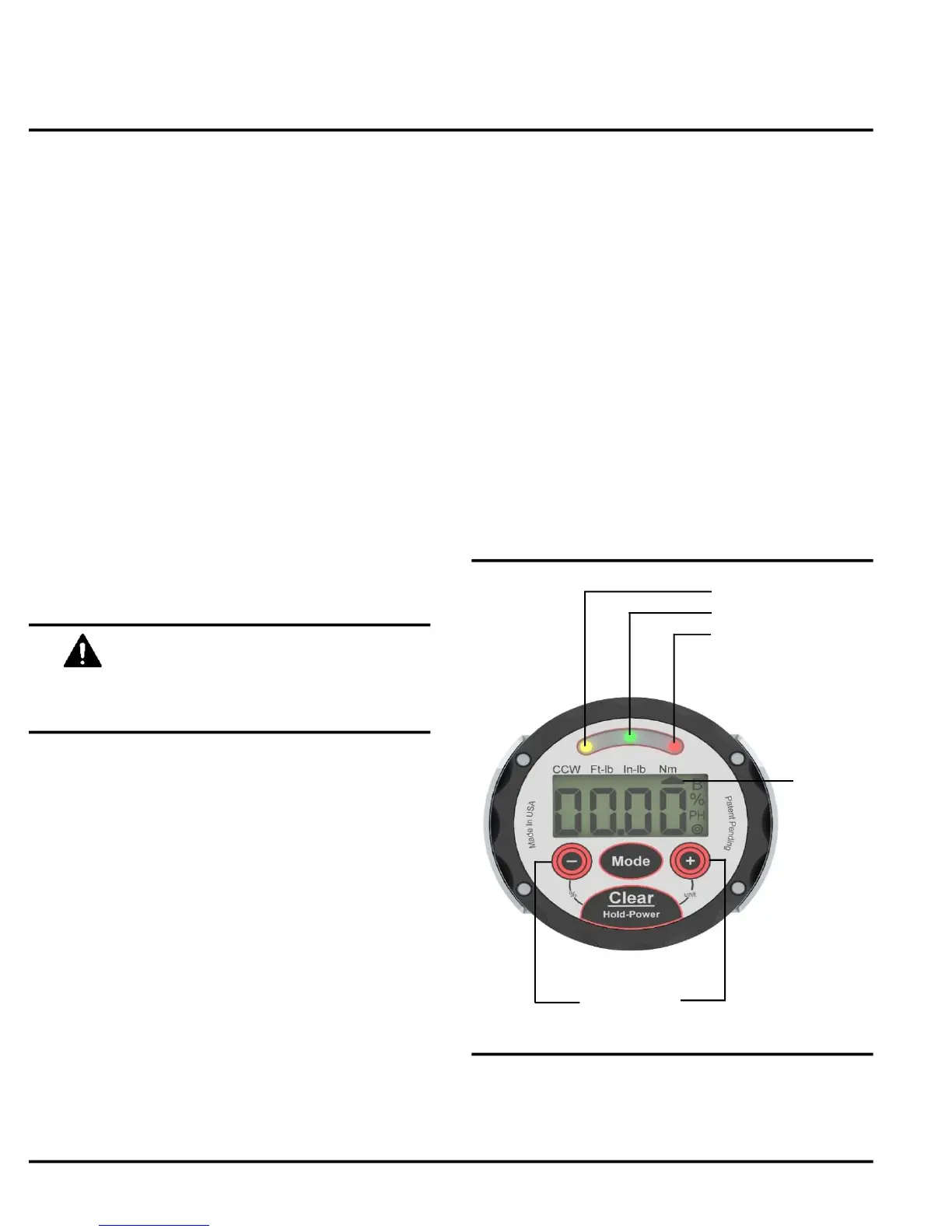
Yellow
Green
Red
Target Keys
Jetco Torque Tools 4 www.itorque.com
For security, it takes two key presses to
change the units.
Unit
Indicator
See Figure 4
■ With the wrench on, press and hold the
power/clear button for no more than 3 seconds.
(holding it for more then 3 seconds will turn off the
wrench). Then press the Target + button to change
units.
See Figure 4
■ The YELLOW LED on the display will turn on to
notify the user the applied torque is approaching
the target value. This will occur at
approximately 85% of the target value.
■ The GREEN LED will turn on when the applied
torque is within tolerance of the target value.
Default tolerance is ±1%.
■ The RED LED will turn on when the applied
torque has exceeded the maximum tolerance.
NOTE:
■ There are three ways the user can determine
when the target torque has been reached:
1. Looking directly at the LCD
2. Looking at the LED lights
3. Listening for the buzzer
OPERATION
See Figure 4
■ Press and hold the + target key to increase the
target value and - target key to decrease the target
value.
NOTE:
■ Press either target key once to see the current
value without making any changes. The target
vlaue will show for 3 seconds.
■ The longer you press and hold the target key the
faster the display will change.
See Figure 2
■ Press and hold the clear button for 1.5 seconds.
■ Display will show " ---- " indicating the wrench has
taken a new zero point (zero tare).
NOTE:
■ When you change the units, the target setting will
convert to the new units (makes a great torque
conversion calculator)
■ The units selected will become the default units
when the wrench is turned off and on again.
■ Units can be set to ft-lb, in-lb, and N-m as well
as in-oz and dN-m in some models.
■ The arrow will indicate what unit is being used


 To Next Page