Need help?
Do you have a question about the JETI model Duplex DS-12 and is the answer not in the manual?
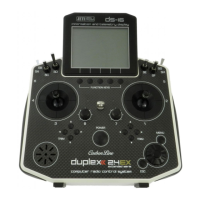
Provides a description of the DS-12 transmitter, its design goals, and key features.
Step-by-step guide on how to activate software modules for JETI model transmitters.
Explains how important parts of the instructions are separated and highlighted for importance.
Details on how to get technical support via website, distributor, or manufacturer.
Lists all items included in the DS-12 transmitter package.
Provides basic technical parameters and specifications for the DS-12 transmitter.
Identifies and labels all the controls and physical parts of the DS-12 transmitter.
Guide on how to adjust the length of the control sticks for user preference.
States that the angle of rotation for control sticks is not adjustable on the DS-12.
Instructions on adjusting the tension of the control stick gimbals for personalized feel.
Guidance on adjusting the travel limits of the throttle stick for flight style.
Explains how to adjust the transmitter's mechanical mode for different gimbal configurations.
Step-by-step instructions for safely removing switches from the transmitter.
Describes the function and use of the programmable digital trim buttons.
Information about the Li-Ion battery pack and how to charge it using various methods.
Detailed steps for safely replacing the transmitter's internal battery pack.
Description of the PPM connector and its capabilities.
Guidance on handling the transmitter and positioning antennas for optimal signal.
Instructions on how to safely remove and install the micro SD card.
Step-by-step guide on how to power on the DS-12 transmitter.
Procedure for safely turning off the DS-12 transmitter.
Instructions on how to restart the transmitter in case of issues.
Covers the initial power-on sequence and confirmation process.
Details the information displayed on the main screen and its sections.
Explains how to navigate between the main display and menus using controls.
Describes how to move through menu items using the 3D control selector.
Outlines the hierarchical structure of the transmitter's main menu system.
Step-by-step guide for creating and configuring a new airplane model profile.
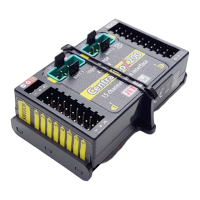
Details the components and connectors of the JETI Duplex receiver.
Guidance on properly installing the receiver in a model for optimal performance.
Explains the process of pairing the transmitter with a receiver.
Step-by-step instructions for the standard transmitter-receiver binding process.
Describes an alternative method for binding via the transmitter's menu.
Instructions on performing a range test to verify transmitter-receiver functionality.
Details how to configure fail-safe modes for receiver outputs.
Guide on using the Device Explorer to wirelessly configure receivers and EX Bus devices.
Details support for remote commands for devices compatible with EX Bus protocol.
Information on managing transmitter files via a PC connection.
Step-by-step guide for updating the transmitter's firmware via PC.
Customizing sounds, alarms, and acoustic feedback on the transmitter.
Guidance on backing up transmitter configuration and model settings.
Instructions on using the transmitter as a PC joystick interface.
Information on logging and viewing telemetry data using the internal SD card.
Steps for transferring model configurations between different transmitters.
Essential safety precautions for handling and charging the transmitter battery pack.
General safety guidelines for operating and maintaining the transmitter.
Pre-flight checks to ensure correct operation and safety.
Specifies the intended use of the product for model airplanes and surface vehicles.
Regulatory compliance information regarding FCC and IC standards.
 General
| Brand | JETI model |
|---|---|
| Model | Duplex DS-12 |
| Category | Remote Control |
| Language | English |

 To Next Page