- 8 -
3.2.
3.2.
3.2.
3.2. 6
6
6
6 Back
Back
Back
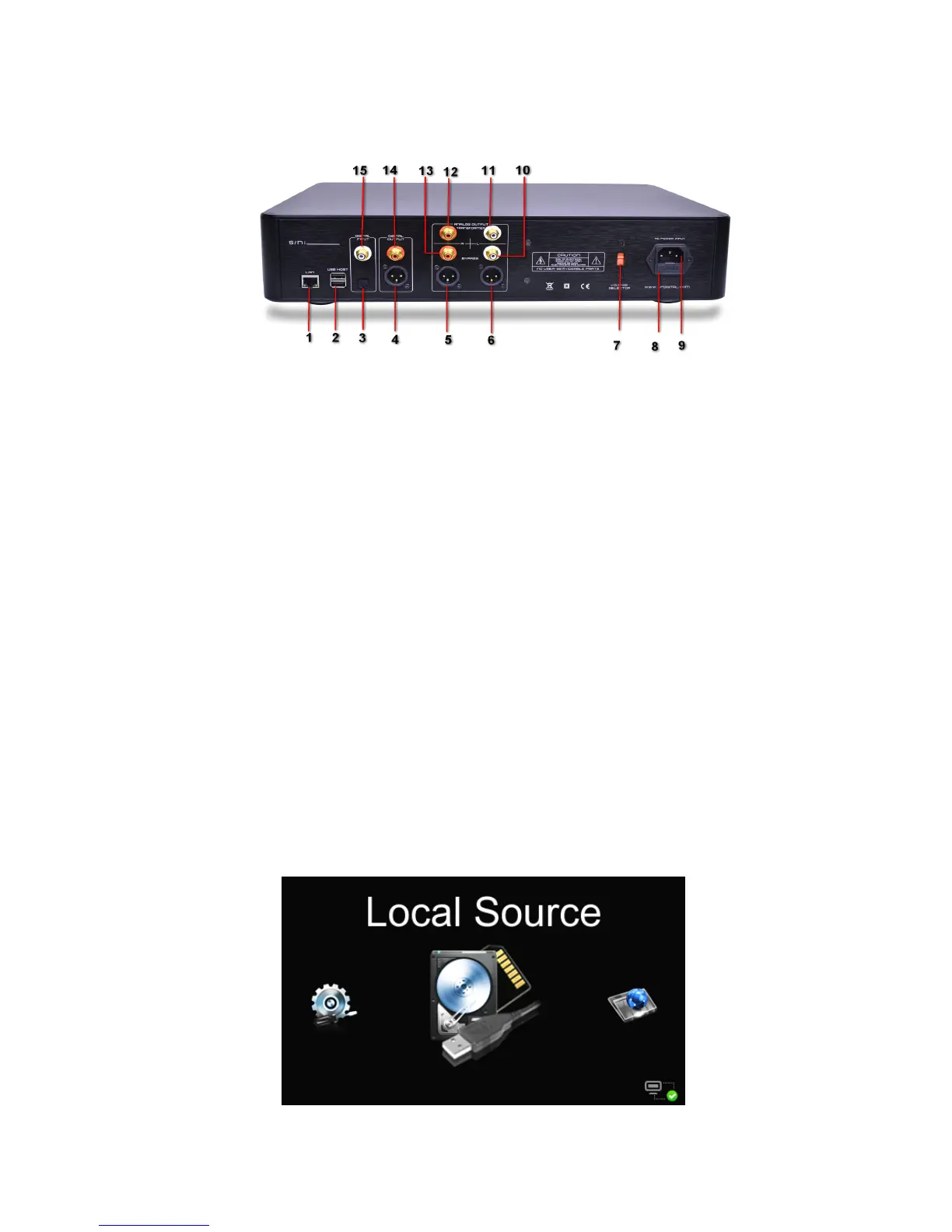
Back Panel
Panel
Panel
Panel HDM-03
HDM-03
HDM-03
HDM-03
1. RJ-45 LAN interface
2. USB HOST port s , to connect with USB storage device such as USB flash
disk or mobile HDD.
3. Digital input Optical jack
4. Balanced Digital output AES jack
5. R-Channel analog output AES jack
6. L-Channel analog output AES jack
7. AC commercial-use power input options switch:220V or 110V
8. Power Fuse block(250V/1A)
9. AC commercial-use power jack
10. L-Channel analog output direct RCA jack
11.
L-Channel analog output transformer RCA jack
12. R-Channel analog output transformer RCA jack
13. R-Channel analog output direct RCA jack
14. Digital output RCA jack
15. Digital input RCA jack
3.3
3.3
3.3
3.3 The
The
The
The Feature
Feature
Feature
Feature o
o
o
o f
f
f
f Display
Display
Display
Display Screen
Screen
Screen
Screen
3.3.1
3.3.1
3.3.1
3.3.1 【
【
【
【 Main
Main
Main
Main Menu
Menu
Menu
Menu 】
】
】
】



 To Next Page