Once FIRST device is connected, turn off Bluetooth in
device settings. JLab Flex will auto enter Bluetooth Pairing.
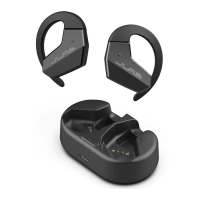
With earbuds in case,
press hold button 3 sec.
Case blinks 3x times
indicating reset.
1
Enter your SECOND device Bluetooth settings and connect
to JLab Flex.
2
Enter your FIRST device Bluetooth settings.
Turn on Bluetooth and connect to JLab Flex.
3
Connect the JLab Flex into a computer
or USB-C 5V 1A (or less) output device.
GET CHARGED (CASE)
MULTIPOINT TROUBLESHOOTING
CONNECTION FAILURE/ISSUES
(MANUAL RESET)
OR
Shop products | Product alerts | Burn-in your headphones
JLab Store + Burn-in Tool
JLAB.COM
Charging
Blinks Blue
Fully Charged
Solid Blue
FITTING
Back
Front
Adjusting up/down position
will improve comfort and
sound quality.
JLab Flex Connect
Bluetooth
Settings
JLab JBuds Air Pro Connected
Bluetooth
Settings
JLab Flex
DOWNLOAD THE APP
Customize JLab Flex with features like an interval
timer and update to the latest software.
Download the JLab App in Apple/Google Play Store.
JLab
Instructional videos at: JLAB.COM/SUPPORT/FLEX



 To Previous Page