Need help?
Do you have a question about the JLab Open Sport and is the answer not in the manual?
Remove stickers from earbuds and place them back in the charging case.
Blue case lights indicate charging. Remove earbuds from case to proceed.
One earbud blinks blue/white. Select "JLab Open Sport" in device Bluetooth settings.
Turn off Bluetooth on old device, turn on for new device. Earbuds auto-pair.
Volume down, activate voice assistant, and track back.
Volume up, answer/hang up calls, play/pause, and track forward.
Tap earbuds 3 times to cycle between JLab Signature and Balanced sound.
Turn off Bluetooth from device settings; earbuds power off after 3 minutes.
Attach earbuds to glasses frames by removing clips and sliding them on.
Bend ear hooks for preference, place behind ear, and adjust for a secure fit.
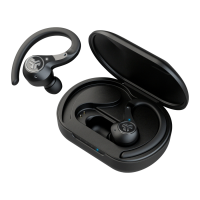
Place earbuds in case to charge; blue lights indicate charging, turn off when full.
Connect USB-C cable; LEDs pulse white when charging, solid white when fully charged.
Connect to a second device while the first is connected. JLab Open Sport auto-pairs.
Forget device, quick tap 7x on each earbud in case, then remove both earbuds.
Avoid extreme temperatures, dropping, crushing, and clean ear tips carefully.
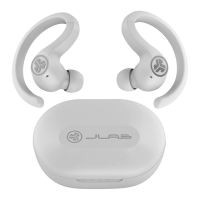
This document provides a comprehensive guide for the JLab Open Sport earbuds, covering their functions, usage, and maintenance.
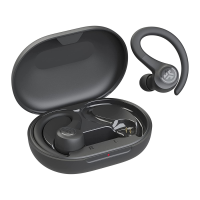
The JLab Open Sport earbuds are designed for audio playback and communication, featuring Bluetooth connectivity for wireless use. They offer two distinct sound modes: JLab Signature, which provides amplified bass and vocals, and Balanced, for an even sound without additional enhancements. The earbuds are equipped with touch controls for managing audio playback, calls, and activating voice assistants. They also support multipoint connection, allowing simultaneous pairing with two devices. The charging case not only protects the earbuds but also charges them, with LED indicators to show charging status for both the earbuds and the case itself.
To begin, remove the earbuds from the case, take off any stickers, and place them back in the case. Blue lights on the case indicate charging. Remove the earbuds from the case again; one earbud will blink blue/white, signifying it's ready to pair. To connect, open your device's Bluetooth settings and select "JLab Open Sport." For new or additional Bluetooth devices, first turn off Bluetooth on any previously connected device, then turn on Bluetooth on the new device. The earbuds will automatically enter pairing mode, and you can select "JLab Open Sport" from the new device's settings.
The earbuds feature intuitive touch controls on both the left and right earbuds:
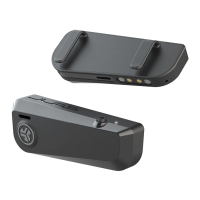
The JLab Open Sport earbuds are designed to be worn with glasses or other frames. First, slide the ear hooks sideways to remove them. Next, remove the clips from the bottom of the charging case and slide them onto each Open Sport earbud. When wearing, slip the earbuds over your frames and adjust the clip tension by pinching them in while on the frames. For optimal performance, move the Open Sport closest to your ear.
If you prefer to use the ear hooks, you can bend and form them to your desired preference. Place the hook behind your ear and move it back toward your ear, then rotate and adjust for the best fit.
To connect to two devices simultaneously:
If you experience no audio in one earbud or if the earbuds become disconnected:
To ensure the longevity and optimal performance of your JLab Open Sport earbuds, follow these maintenance guidelines:
For additional support and instructional videos, visit jlab.com/manuals. You can also shop for JLab products, receive product alerts, and access the Burn-in Tool via the JLab Store app, available on the App Store and Google Play.
 General
| Charging Case Battery Life | 24 hours |
|---|---|
| Water Resistance | IPX4 |
| Wireless | Yes |
| Frequency Response | 20Hz - 20kHz |
| Charging Time | 2 hours |
| Type | Open-ear |
| Impedance | 32 ohms |
| Wireless Range | 10 meters |

 To Next Page