EasyManua.ls Logo

JLL S300 - Monitor Configuration; Display Information

JLL S300
30 pages
Print Icon
To Next Page IconTo Next Page
To Previous Page IconTo Previous Page
Loading...
13
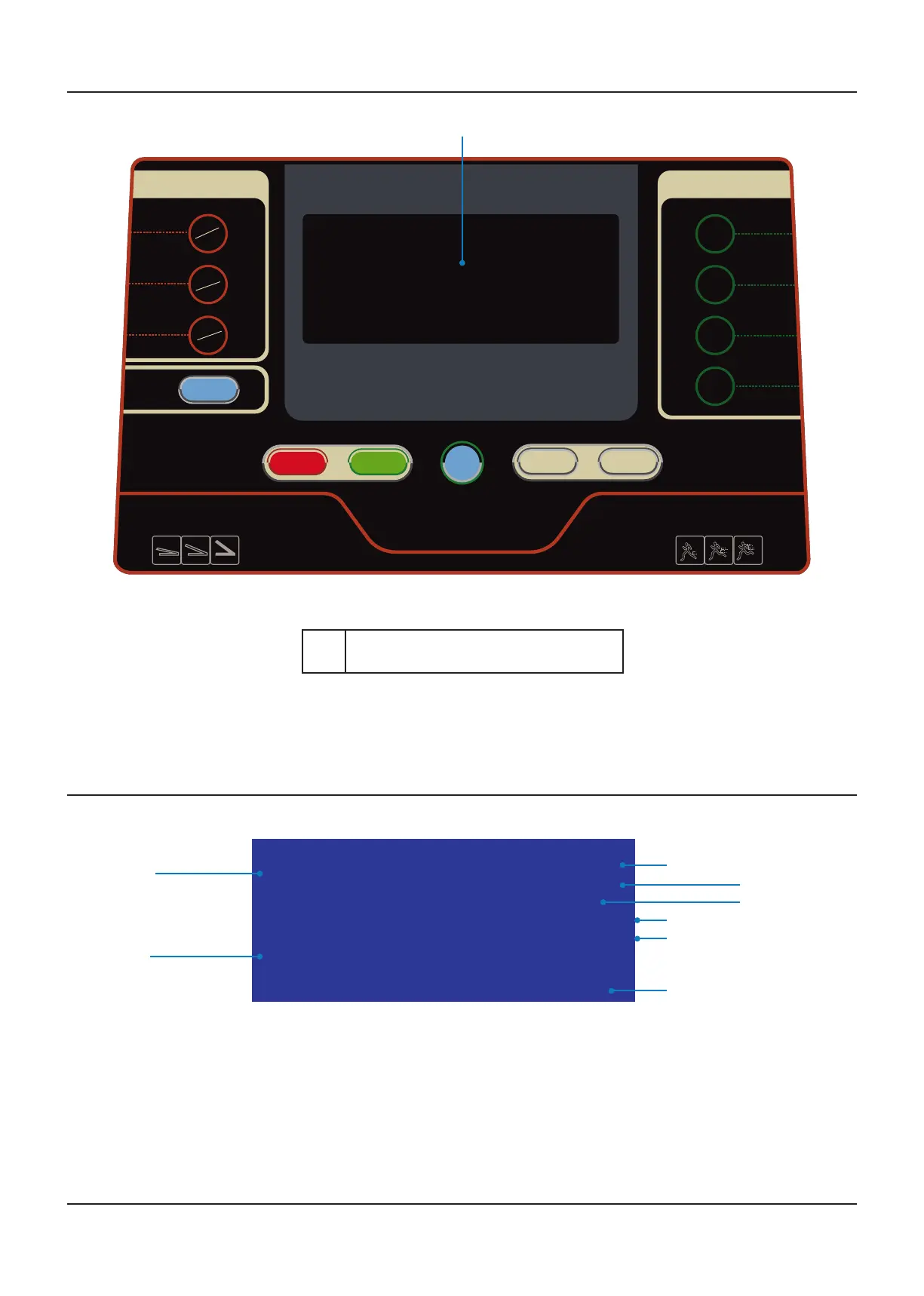
MONITOR CONFIGURATION
AUDIO CONTROL
CONTROL BUTTONS
INSTANT
SPEED
INCLINE
PROGRAM
STOP START
SET
SLOW FAST
PLAY
PAUSE
SOUND+
NEXT
SOUND-
LAST
DOWN
UP
5
km/h
8
km/h
Before starting any
exercise program
consult your
physician.
Remove safety key
when not in use and
store out of reach of
children.
1
1 LCD display
00 00
000
0000
000
00
:
.
.
min:sec
km/h
km
CALORIE
%
.
T / min
kg
DISPLAY INFORMATION
The Weight and Total Distance are shown in the same area of the display. When holding
the handlebars a flashing dot will appear on the Pulse signal section on the display and
the Calorie reading will change and display your Heart-rate (T/min).
Total Time
Speed
Weight
Total Distance
Calories
Incline
Heart-rate
Flashing dot

Other manuals for JLL S300

Related product manuals