12 ©2016 Johnson Level & Tool - Rev. 3
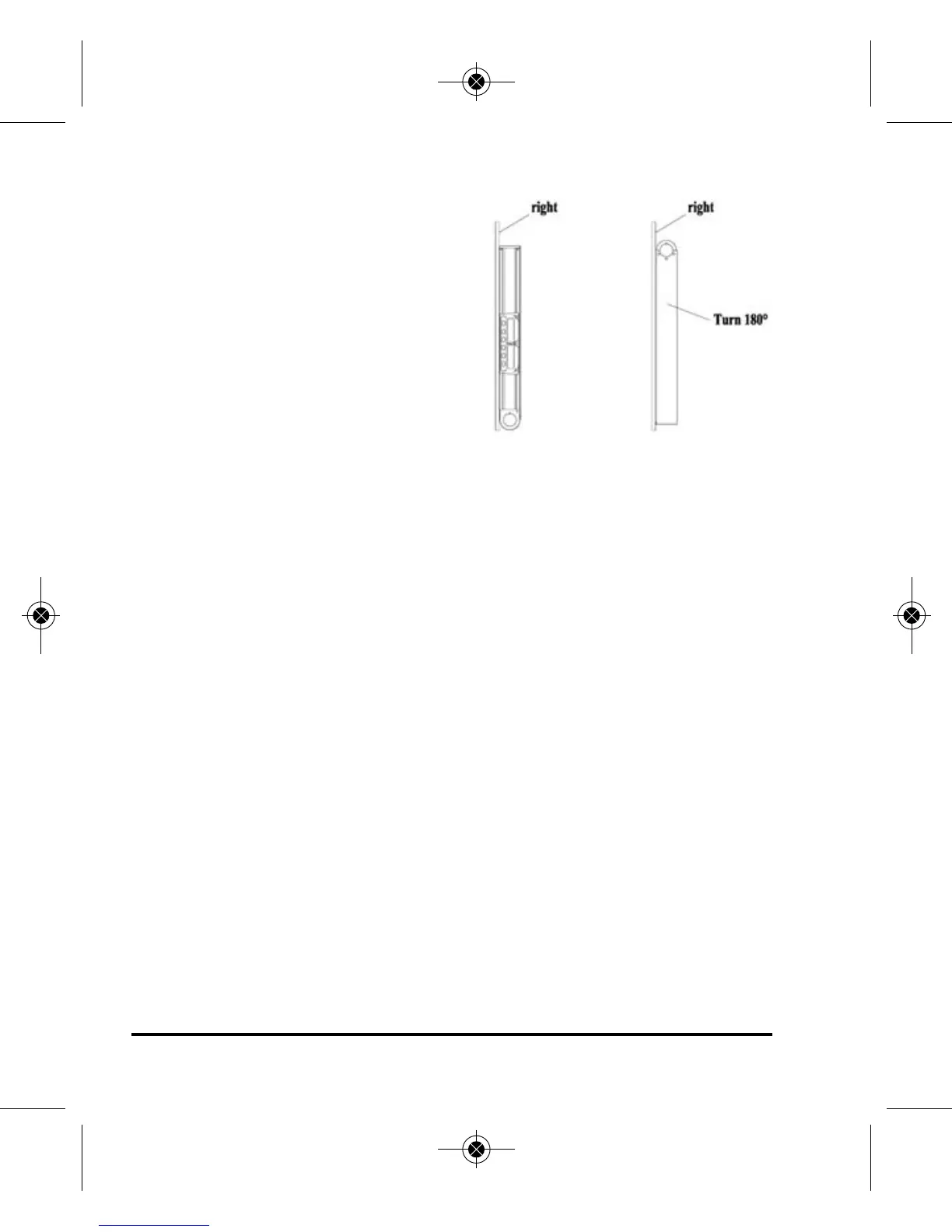
Vertical Calibration Check
Put the angle level on a smooth
vertical plane and observe the LCD
display. Note the reading after 10
seconds. Then turn the angle level
180° on the same plane. After another
ten seconds note the second angle
reading. The calibration is necessary
if the difference between the two
measuring readings is over 0.2º.
Calibration in the Horizontal Direction
1. Put the level on a flat surface and press the “CAL” button. -0- will
be displayed. Wait 10 seconds.
2. Press the “CAL” button again and -1- will be displayed. Turn the
level 180º on the same surface. Wait another 10 seconds.
3. Press the “CAL” button once again. If it beeps once the calibration
is completed, it is correct. If it beeps twice the calibration is not
completed and the procedure should be repeated. If it continues
to beep twice the sensor may have been damaged and unit
should be serviced.
4. Then do the same thing for the vertical with both the logo on the
top and with the logo on the bottom.
1150i-English_Manuals 6/10/16 9:56 AM Page 12


 To Next Page