Home
Joovv
Medical Equipment
Mini
Page 25 (Set Pairing Modes and Power On)
Joovv Mini - Set Pairing Modes and Power On
51 pages
Manual
Save Page as PDF
To Next Page
To Next Page
To Previous Page
To Previous Page
Loading...
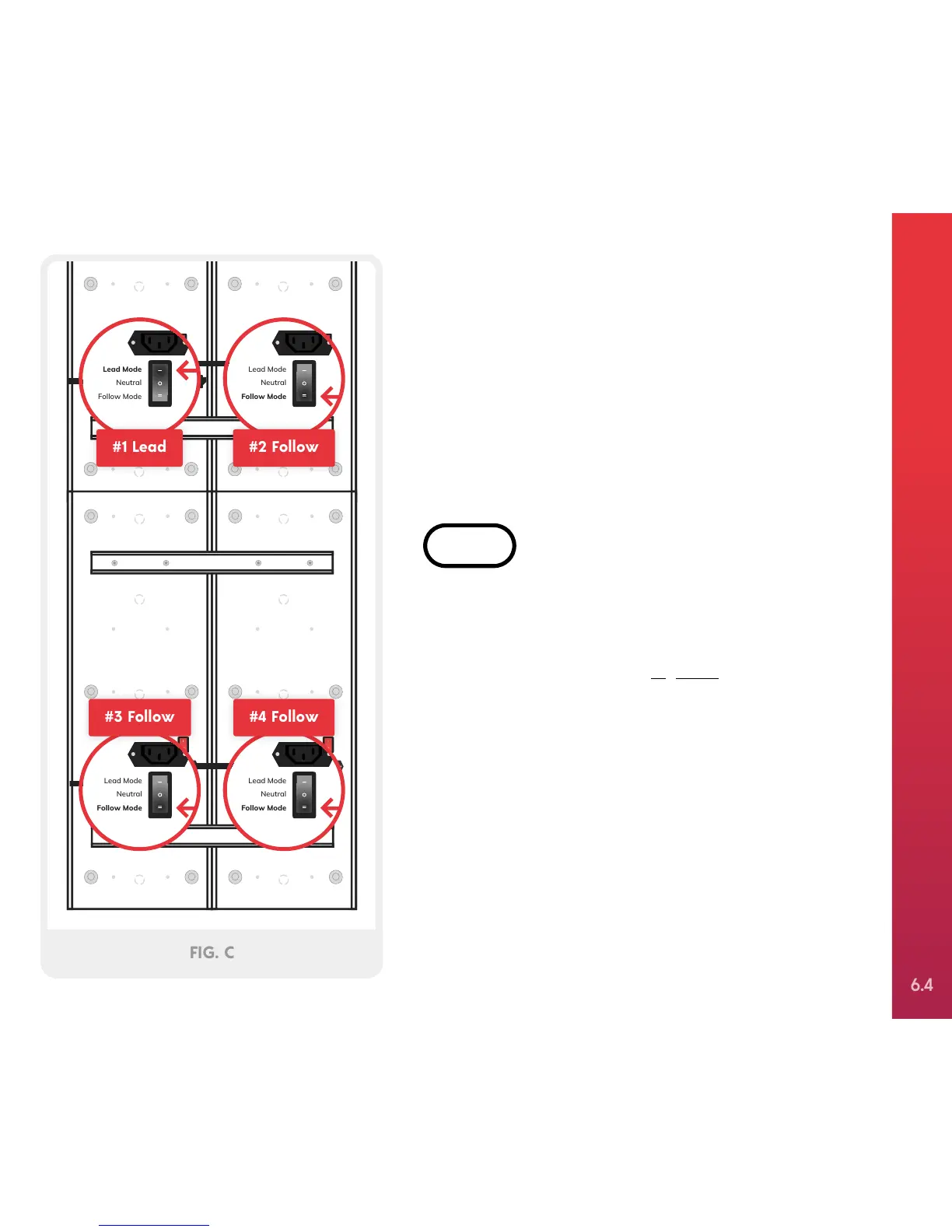
Locate the pairing switch on each of the devices.
Turn the switch on device #1 to “Lead Mode”. Then,
turn the pairing switch on devices #2, #3, and #4 to
“Follow Mode”, as shown in
Figure C
. Turn all power
switches to on.
STEP 4
Lead Mode
Neutral
Follow Mode
Lead Mode
Neutral
Follow Mode
Lead Mode
Neutral
Follow Mode
Lead Mode
Neutral
Follow Mode
#1 Lead
#2 Follow
#3 Follow
#4 Follow
FIG. C
Door Mount
(2 people required)
SETTING UP
Y
OUR JOO
VV
QUAD
6.4
24
26
Table of Contents
Main Page
User Manual
1
Table of Contents
3
Intended Use
4
FDA Indication
4
Light Sensitivity
5
Treatment Instructions
5
Parts List
8
Door Mounting Kit
8
Setting up
9
Patch Cord
14
Parts List — Door Mount
22
Door Mount Steps
23
Parts List — Optional Mounting Systems (Mobile Stand & Wall Setup)
30
Optional Mounting Systems - Steps
31
Joovv Elite Parts List
37
Joovv Elite - Steps
38
Troubleshooting Guide
42
Devices Won’t Pair Together
43
The Unit Won’t Turn on
43
Flashing
43
My Door Hook Is Not Large Enough for My Door
43
Control Panel
43
Frequently Asked Questions
44
General Information
46
Technical Information
47
Warnings and Cautions
47
Electrical Safety
47
Maintenance, Cleaning, and Disposal
48
Corporate Office
51
Other manuals for Joovv Mini
Quick Start Guide
3 pages
Related product manuals
Joovv Go
20 pages


 To Next Page