99213_UM_TR710_D 9
2. OPERATING INSTRUCTIONS
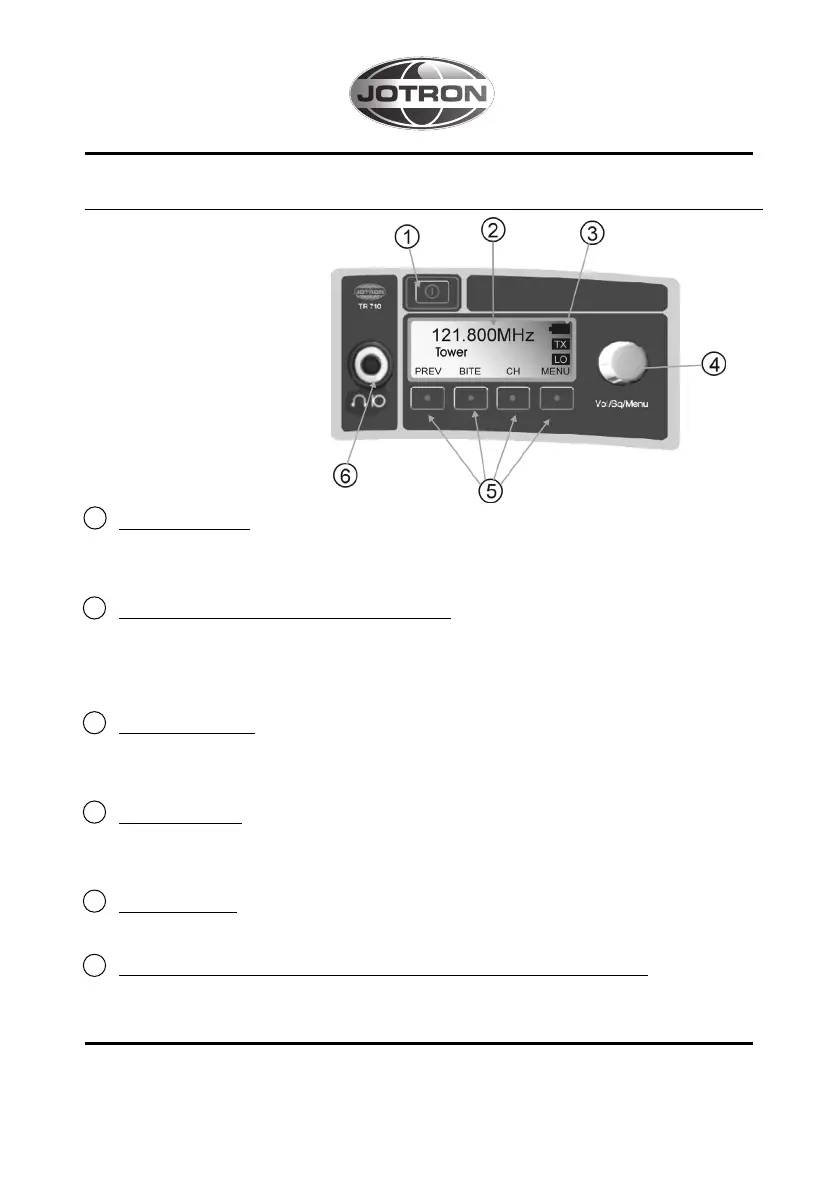
TR-710 has an interface
that is easy to use,
with a self-explanatory
graphical display.
Figure A: Keyboard
and display, TR-710.
1 Power ON/OFF.
Turns the TR-710 on and off. Has to be pushed for more than 1 sec. to power
off, in order to prevent unwanted operation.
2 Graphical LCD (Liquid Crystal Display).
The graphical display gives the user information about the frequency, menu set-
tings, choices and status. The graphical LCD has backlighting, making it easy
to see in the dark.
3 Battery Indicator
Indicate the status of the battery, four steps. The indicator flash when the battery
is close to empty. The battery indicator is only visible in Man Pack (MP) mode.
4 Control Wheel.
For changing frequency, channels, volume, squelch and adjusting selected valu-
es up and down.
5 Function keys.
For moving through menus and adjusting selected values up and down.
6 Connector for headset or hand-held microphone with PTT button.
A headset or hand-held microphone can be connected here. The connector will
also supply a headset which need a voltage supply.



 To Next Page