22 23
JBP-HYPERSCRP-MANUAL |
©
2021 JUICED BIKESJBP-HYPERSCRP-MANUAL |
©
2021 JUICED BIKES
TURNING THE E-BIKE ON AND OFF
HOW TO TURN THE E-BIKE ON
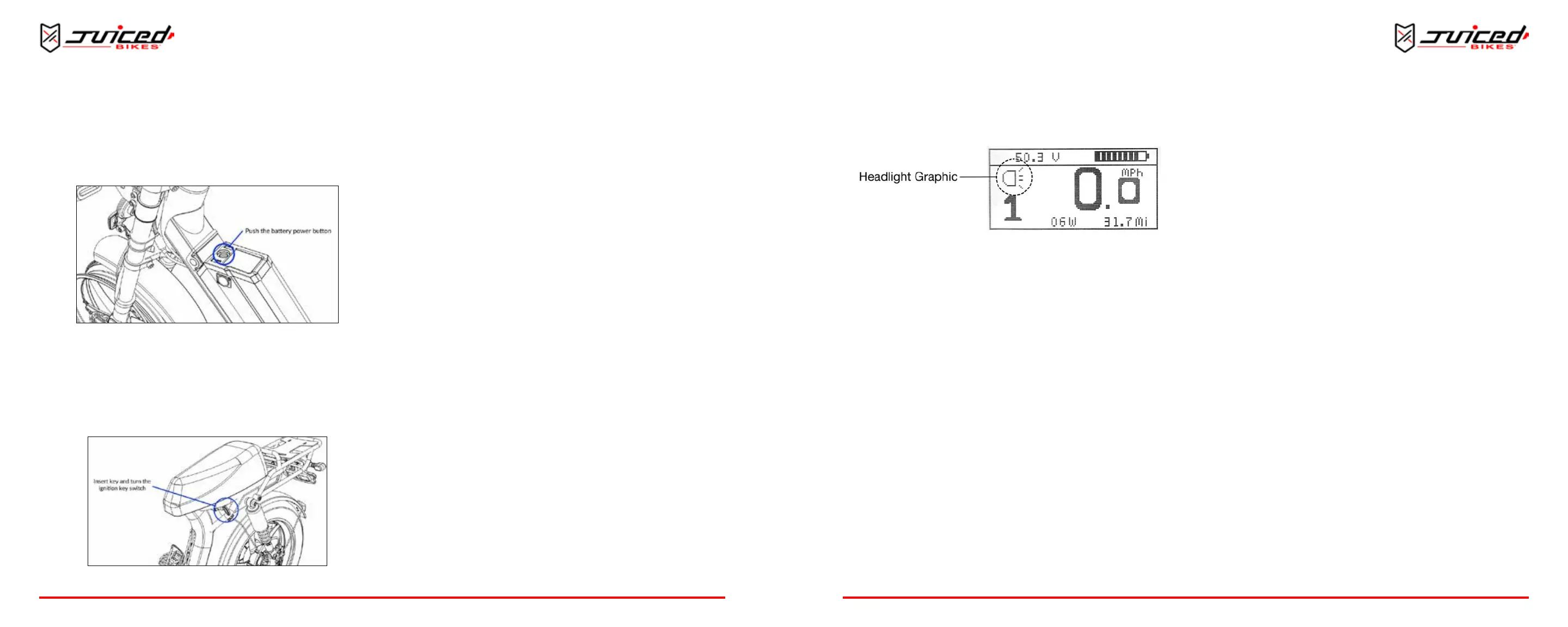
1. Press the baery power buon to turn on the baery.
Fig. 23 - Baery Power Buon
2. Insert the key and turn the ignion key switch. Be sure
to have both feet o the pedals, as the torque sensor will
calibrate when turning on. The LCD display panel will turn
on and indicate the baery’s charge level and selected
pedal assist level.
Fig. 24 - Ignion Key Switch
HOW TO TURN THE E-BIKE OFF
Turn the key and remove it from the ignion. Then press the
baery power buon and the bike will shut o.
AUTOMATIC SHUTOFF
The electronic system will also automacally shut down aer a
preset period of me. This duraon can be adjusted in the
setup menu.
ADJUSTING THE ASSIST LEVELS
HOW TO INCREASE THE ASSIST LEVELS
When the bike is on, push and release the “assist up” buon.
The assist will advance by one level unl SPORT mode is
reached.
HOW TO DECREASE THE ASSIST LEVELS
To decrease the assist level, push and release the “assist down”
buon. The assist will decrease by one level unl ECO mode is
reached.
The default assist seng is assist level 1. This will appear each
me the e-bike is turned o and back on.
OPERATION
ACTIVATING THE HEADLIGHT
Fig. 25 - Headlight Graphic on the Main Display
TO TURN ON THE HALO LIGHT
Aer turning on your bike, the halo headlight will automacally
turn on.
TO TURN OFF THE HALO LIGHT
Push and hold the “assist up” buon for 2 seconds and the halo
headlight will turn o.
TO TURN ON THE FULL HEADLIGHT
Use the combo switch located on the le side of the handlebar
and switch the buon up to turn it on.
TO TURN OFF THE FULL HEADLIGHT
Use the combo switch located on the le side of the handlebar
and move the buon down to turn it o.
ACTIVATING THE TURN SIGNALS
You can nd the turn signal switch just below the headlight
buon. Toggle the switch le to turn on the le turn signals and
right to turn on the right turn signals. To turn them o, posion
the switch back in the center.
ACTIVATING THE WALK MODE
When pushing the bike uphill, use the WALK mode. This mode
will turn the motor at walking speed to assist you in moving the
bike.
TO ACTIVATE THE WALK MODE
To acvate the WALK mode, push and hold the “assist down”
buon. Aer 2 seconds the motor will begin to turn at
walking speed.
TO STOP USING THE WALK MODE
To stop using the WALK mode, release the “assist down” buon.
The motor will stop turning and resume normal operaon. Using
either brake lever will also stop the WALK mode.
ACTIVATING THE CRUISE CONTROL FUNCTION
Use the cruise control feature to maintain a desired speed
without using the throle or pedal assist.
TO ACTIVATE THE CRUISE CONTROL FUNCTION
Use the throle or pedal assist to reach your desired speed.
Push and hold the “assist down” buon for 2 seconds. When the
“C” graphic appears, release the “assist down” buon and the
current speed will be maintained without the need to pedal or
use the throle. In CRUISE mode, the throle is automacally
modulated so that the desired speed is maintained.
To disconnue the use of the cruise control funcon, choose
one of the following acons:
1. Use the brakes by squeezing the brake lever
OPERATION


 To Next Page