Need help?
Do you have a question about the JUKI DLN-9010A-SH and is the answer not in the manual?
Details reverse stitching pattern selection and stitch count adjustment.
Explains constant-dimension stitching pattern operation and stitch settings.
Describes overlapped stitching pattern usage and process repetition.
Covers rectangular stitching pattern setup and operation.
Manages production volume, target/actual pieces, and operation time.
Measures sewing machine availability, pitch time, and revolutions.
Covers detailed settings for production volume management, e.g., thread trimming count.
This document provides an instruction manual for the JUKI CP-180 control panel, a precision instrument designed to enhance the functionality and ease of use of sewing machines, particularly those with direct-drive motors. It covers installation, configuration, operation, and maintenance aspects, ensuring users can effectively utilize its various features for different sewing tasks.
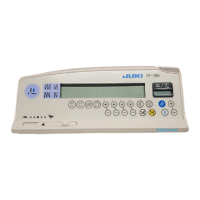
The CP-180 control panel serves as the primary interface for managing and controlling a sewing machine. Its core functions include pattern selection, stitch count management, automatic reverse stitching, thread trimming, and production support. The panel is equipped with an LED power indicator and a variable resistor for limiting maximum speed.
Pattern Selection: The CP-180 offers four distinct stitching patterns: reverse stitching, constant-dimension stitching, overlapped stitching, and rectangular stitching. Each pattern can be selected via a dedicated switch on the control panel.
Reverse Stitching: This pattern allows for double reverse stitching at the start and end of a seam. Users can turn ON/OFF automatic reverse stitching for both start and end points, and also select double reverse stitching for more robust seams. The number of stitches for each process (A through D) can be adjusted from 0 to 19 stitches.
Constant-Dimension Stitching: This mode is designed for repetitive stitching tasks where a consistent number of stitches is required. It supports automatic reverse stitching at the start and end, with adjustable stitch counts for processes A and B (0-19 stitches) and C and D (5-500 stitches). The machine can automatically perform thread trimming after completing the specified number of stitches. If thread trimming is prohibited, the machine will stop with the needle up.
Overlapped Stitching: This pattern enables the machine to repeat normal and reverse stitching for a predetermined number of times. It automatically actuates the thread trimmer and stops upon completion. Stitch counts for processes A, B, and C can be set from 0 to 19, while the number of repeated processes (D) can be adjusted from 0 to 9 times.
Rectangular Stitching: Similar to constant-dimension stitching, this mode allows for precise rectangular patterns. It supports automatic reverse stitching at the start and end, with adjustable stitch counts for processes A and B (0-19 stitches) and C and D (0-99 stitches). The machine stops automatically after each step, and thread trimming can be performed automatically or prohibited.
Thread Management: The control panel includes a bobbin thread counter and a thread trimming counter. The bobbin thread counter indicates the remaining amount of bobbin thread by subtracting from a preset value. It can also count the number of detections from a bobbin thread remaining amount detecting device. The thread trimming counter adds a value each time thread trimming is performed. Both counters can be reset, and the bobbin thread amount can be set.
Needle Up/Down Compensation: This feature allows for precise needle positioning. Pressing the needle up/down compensation switch moves the needle up from its lowest position or down from its highest position, compensating the stitch by half of the predetermined stitch length. The stop position of the needle bar when the pedal is in its neutral position can also be changed between up and down.
Key Lock Function: To prevent accidental changes to stitch counts or process settings, the control panel offers a key lock function. Once activated, a key mark appears on the panel, indicating that the setting keys are locked.
Material Edge Sensor ON/OFF Switch: When an optional material edge sensor is connected, this switch becomes effective. It allows the sewing machine to automatically stop or perform thread trimming when the sensor detects the material edge.
Automatic Thread Trimming Switch: This switch automates the thread trimming process, particularly useful when the machine stops automatically or when the material edge sensor is in use.
One-Shot Automatic Stitching Switch: In constant-dimension or rectangular stitching modes, or when the material edge sensor is specified, this switch enables the machine to automatically perform sewing at a specified speed until the end of the process is reached.
Thread Trimming Prohibition Switch: This switch temporarily disables the thread trimming function, allowing the machine to stop with the needle up without trimming the thread.
Production Support Function: This comprehensive feature includes production volume management and operation measuring functions.
Installation and Setup: The control panel is installed on the machine head using screws, flat washers, and a rubber seat. Specific screw types vary depending on the machine head (e.g., DDL-9000A, DDL-9000B, LH-3500A). Connecting the cord involves passing it through a hole in the machine table and connecting it to the control box.
Machine Head Adjustment (Direct-Drive Motor Type): For direct-drive motor type sewing machines, angle adjustment of the machine head is crucial. This involves simultaneously pressing two switches while turning on the power, then manually turning the handwheel to align a white dot with a concave part of the handwheel cover.
One-Touch Setting: Frequently used function settings can be easily changed in the normal sewing state. By holding down a specific switch for one second, users can enter the function setting mode, adjust values with another switch, and confirm the setting.
Function Setting Switch: This switch allows access to a wider range of function settings. By pressing this switch while turning on the power, users enter the function setting indication mode, where they can navigate through different function numbers and adjust their values.
Optional Input/Output Settings: The CP-180 supports optional input/output connectors. Users can specify input/output function setting connectors and their corresponding pin functions, allowing for customization and integration with other devices.
Automatic Compensation of Neutral Point of the Pedal Sensor: If the pedal sensor or spring is replaced, the neutral point needs to be compensated. This involves pressing a switch while turning on the power, ensuring the pedal is not depressed, and then turning the power off and on again.
Auto Lifter Function: When an auto-lifter device (AK) is attached, this function enables the automatic lifting of the presser foot. It can be activated by pressing a switch while turning on the power, and the type of drive (solenoid or air drive) can be selected.
Initialization of Setting Data: All function settings can be returned to their standard set values. This is achieved by pressing specific switches simultaneously while turning on the power. A buzzer sound confirms the initialization. It is important to note that the neutral position correction value for the pedal sensor and machine-head adjustment values are also initialized during this process, requiring subsequent re-adjustment. Sewing data set by the operation panel cannot be initialized.
Checking Procedure of Error Code: The control panel allows users to check error codes. By holding down a specific switch while turning on the power, the latest error number is displayed. Users can then scroll through previous errors using another switch. This feature aids in diagnosing and troubleshooting issues with the sewing machine.
General Care: The manual emphasizes the importance of not splashing water or oil on the control panel and avoiding shocks, as it is a precision instrument. Regular reference to the instruction manual for the control box and any optional devices is also recommended for proper maintenance and operation.
 General
| Brand | JUKI |
|---|---|
| Model | DLN-9010A-SH |
| Category | Sewing Machine |
| Language | English |

 To Next Page