- 16 -
19. OPTIONAL INPUT/OUTPUT SETTINGS
1
3
2
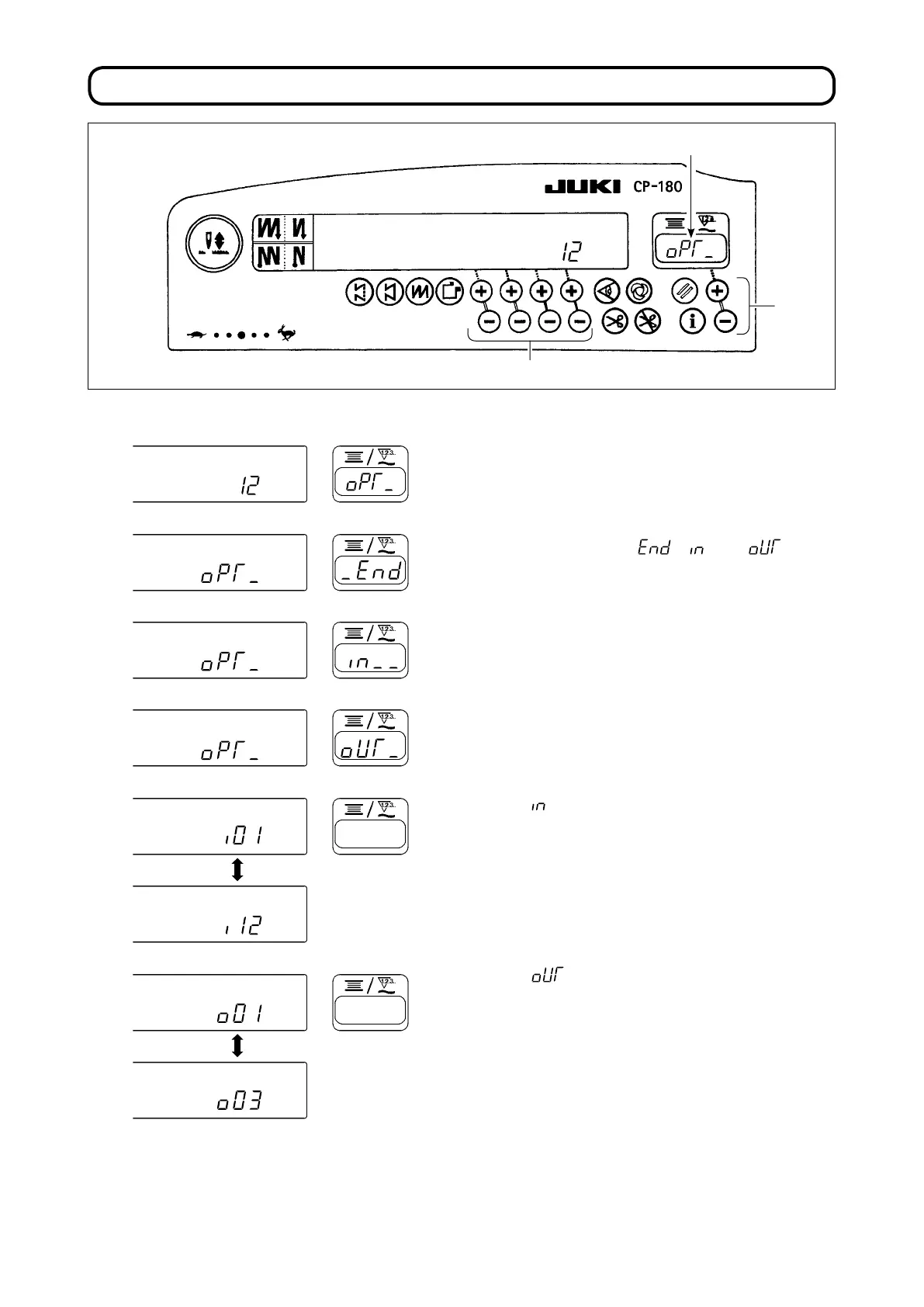
1) Select function number 12.
2) Select the items of " ", " " and " " using
switch
3
.
[When "
" is selected]
Specify the displayed number of the input func-
tion setting connector by means of switch
2
. Then,
specify the connector pin function corresponding to
the displayed number by means of switch
3
.
Function code and abbreviation are displayed alter-
nately in
1
.
[When " " is selected.]
Specify the displayed number of the output func-
tion setting connector by means of switch
2
. Then,
specify the connector pin function corresponding to
the displayed number by means of switch
3
.
Function code and abbreviation are displayed alter-
nately in
1
.
* Refer to the Instruction Manual for the control
box for the displayed numbers of the function
setting connectors and the function codes.
※※※※
※※※※


 To Next Page
 Loading...