Operating procedures
24
6. Operating procedures
6.1. Power connection
Caution:
x Only connect the unit to a power socket with earthing contact (PE – protective
earth)!
x The power supply plug serves as safe disconnecting device from the line and must
be always easily accessible.
x Never operate equipment with damaged mains power cables.
x Regularly check the mains power cables for material defects (e.g. for cracks).
x We disclaim all liability for damage caused by incorrect line voltages!
Check to make sure that the line voltage matches the supply voltage
specified on the identification plate. Deviations of ±10 % are permissible.
6.2. Switching on / Start - Stop
6.2.1. Switching on the circulator
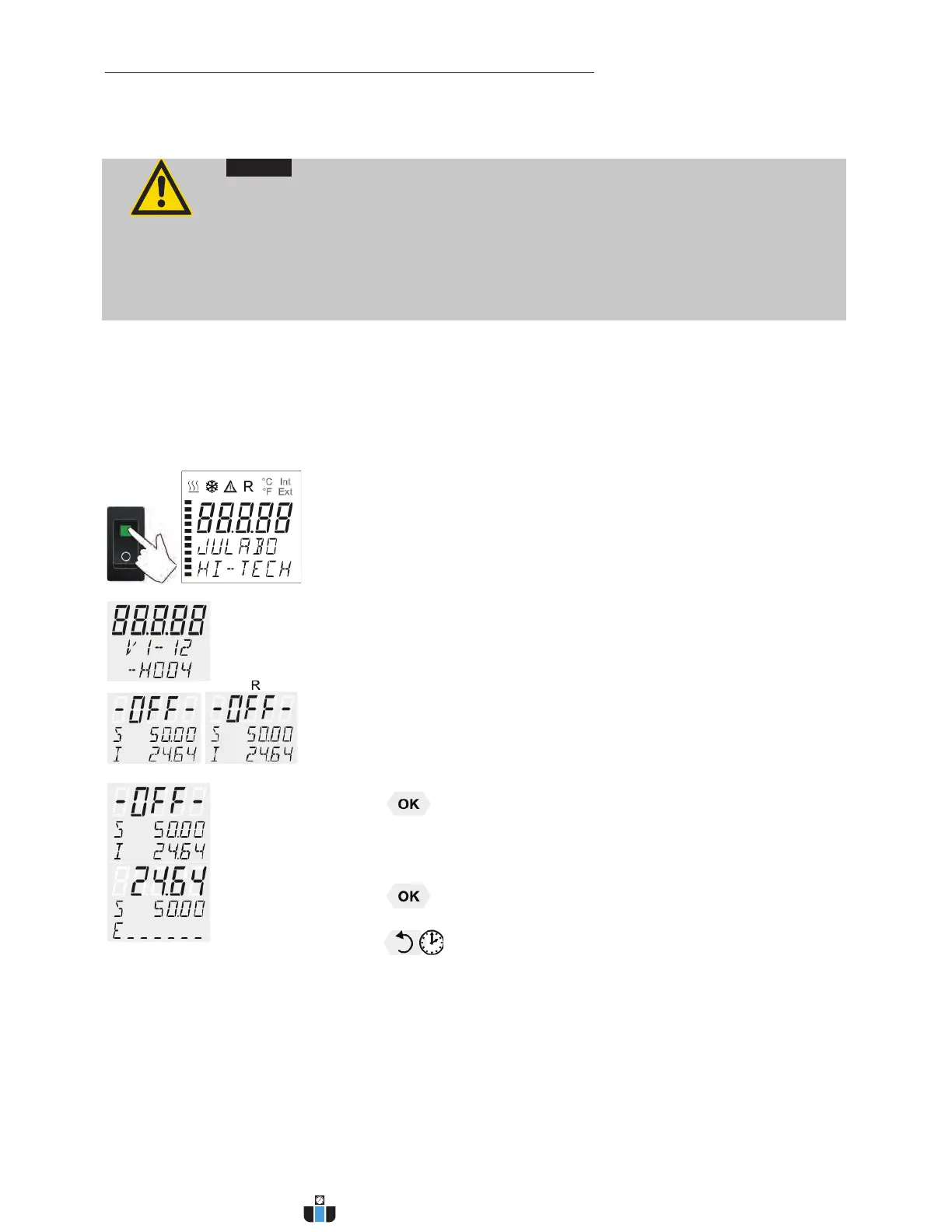
Switching on:
x Turn on the mains power switch (1).
L The unit performs a self-test.
Then the software version (example: V 1.xx) appears. The display
„OFF“ or „R OFF“ indicates the unit is ready to operate.
L The circulator enters the operating mode activated before switching
the circulator off:
keypad control mode (manual operation)
or
remote control mode (operation via personal computer).
Start:
x Press
key.
The actual bath temperature is displayed on the VFD COMFORT-
DISPLAY. The circulating pump starts with a slight delay.
Stop:
L Press key.
or
Keep
key pressed.
The VFD COMFORT-DISPLAY indicates the message "OFF".
www.calcert.com sales@calcert.com1.888.610.7664
0
5
10
15
20
25
30


 To Next Page