Hangzhou Junce Instruments Co., Ltd.
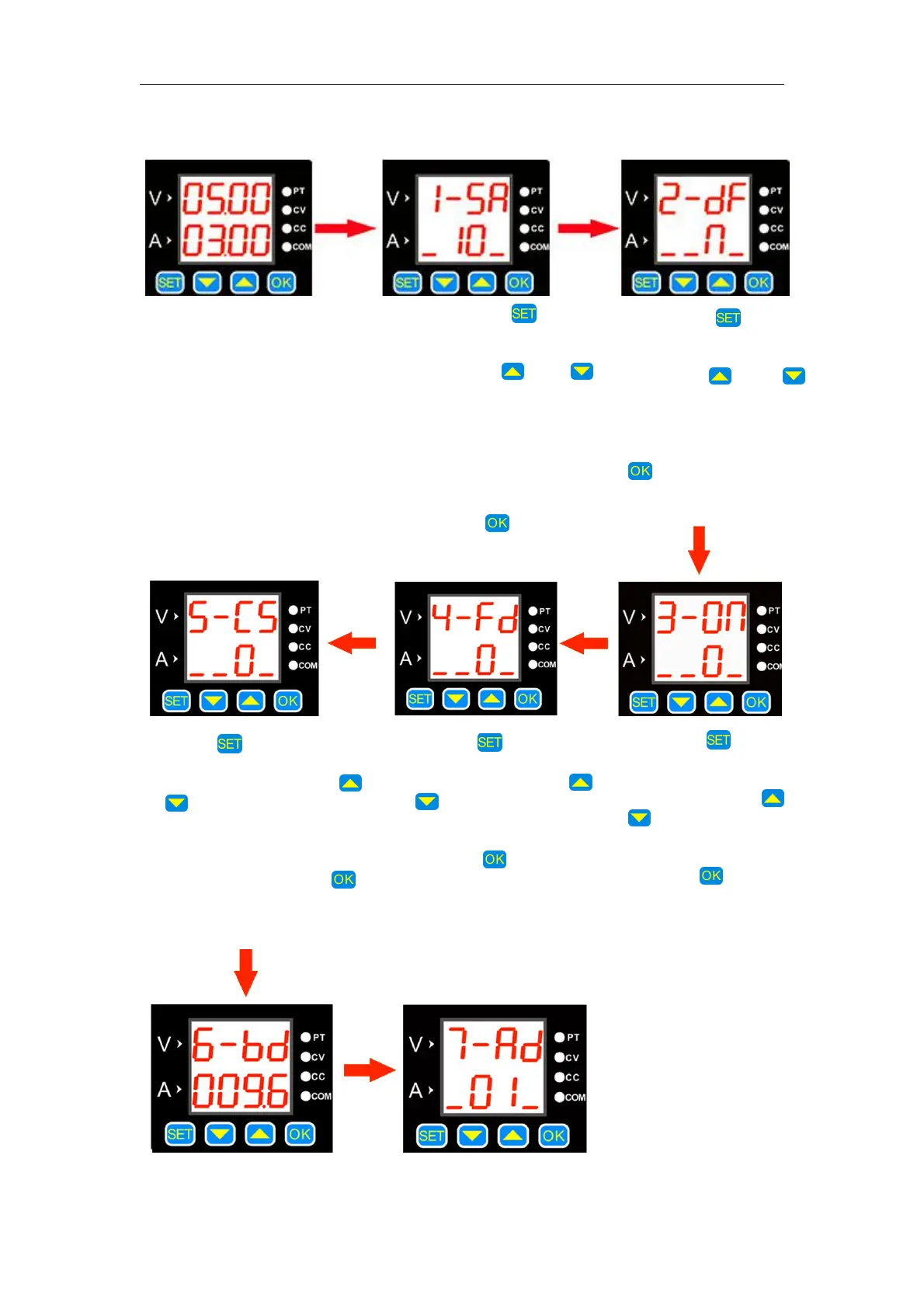
The specific operating are following:
Press the button
shortly to enter the
factory reset interface.
Use the or
button to change the
sub-options. N means
"No" and Y means
"Yes". Then press
, the setting is
finished.
Press and hold the button
to enter the voltage and current
upper and lower limits saving
interface. Use the or
button to change the sub-options.
The storage location 10
represents the upper limit of the
voltage and current settings, 11
represents the lower limit of the
setting, and 12 represents the
cancellation of the upper and
lower limits. Click , the setting
is finished.
Press the button to enter
the communication protocol
selection interface. Use the
or button to change the
sub-options. 0 means "simple
communication protocol", 1
means "MODBUS communication
protocol", and then press .
The setting is finished.
Press the button to
enter the fast discharge
status interface. Use the
or button to change the
sub-options. 0 means "off",
1 means "on", and then
press the button.The
setting is finished.
Press the button to
enter the power-on
default output status
interface. Use the or
button to change the
sub-options. 0 means
"off", 1 means "on", then
press the button. The
setting is finished.


 To Next Page