17
Quick Setup
UDIO OUT
FOR HDMI 1
R
AUD
I
O
I
NPUT
L
INPUT 3
P
R
P
B
V
I
DEO
R
-
AU
D
I
O
-
L
S
-
V
ID
E
O
UDIO OUT
AUDIO OUT
R
-
A
U
D
I
O
-
L
Speaker
Speaker
Amplifier
TV Rear Panel
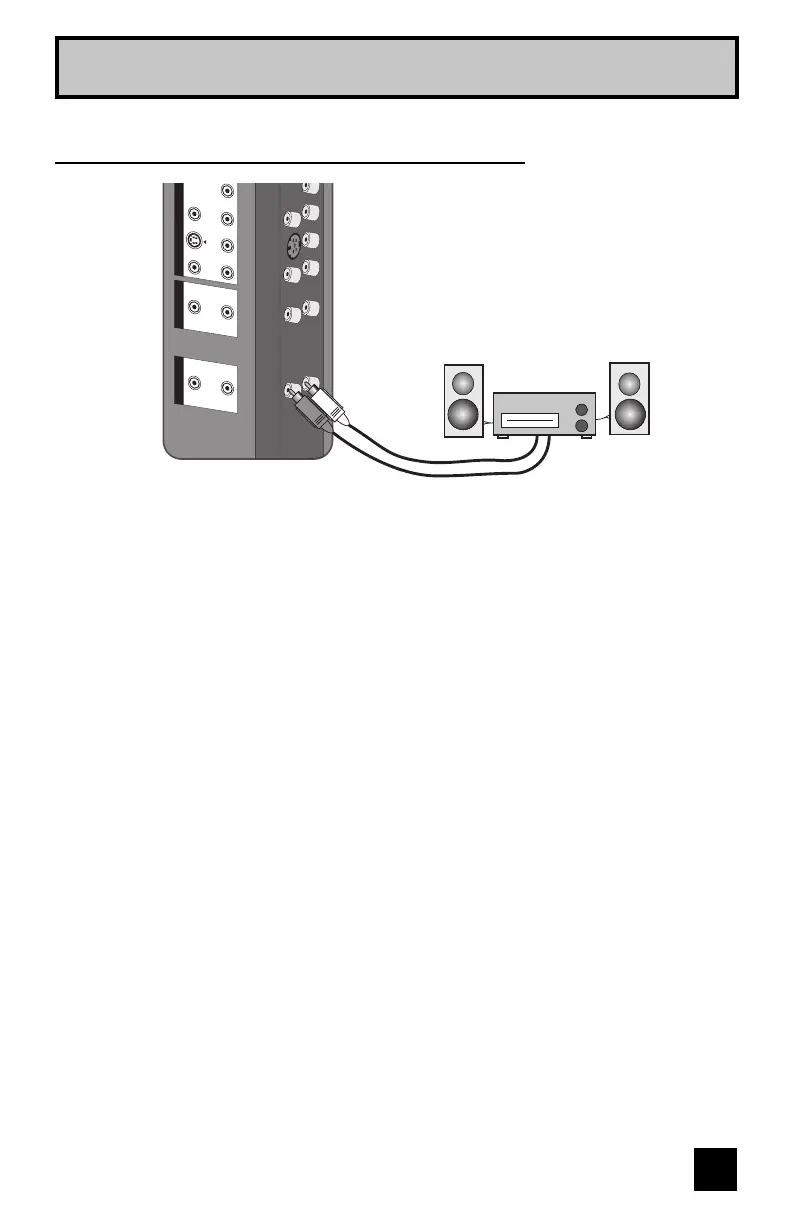
1) Connect a white cable from the LEFT AUDIO OUTPUT on the back of the TV to the
LEFT AUDIO INPUT on the amplifier.
2) Connect a red cable from the RIGHT AUDIO OUTPUT on the back of the TV to the
RIGHT AUDIO INPUT on the amplifier.
Notes:
• Refer to your amplifier’s manual for more information.
• You can use AUDIO OUTPUT for your home theater system.
• If you have a device connected to INPUT-1, INPUT-2 or INPUT-5 (set "V5 INPUT" in the
INITIAL SETUP menu to "HDMI"). You will not be able to hear any audio from the AUDIO
OUT on the back of the TV.
Connecting to an External Amplifier


 To Next Page
 Loading...