35
Initial Setup Menus
Digital Auto Setting
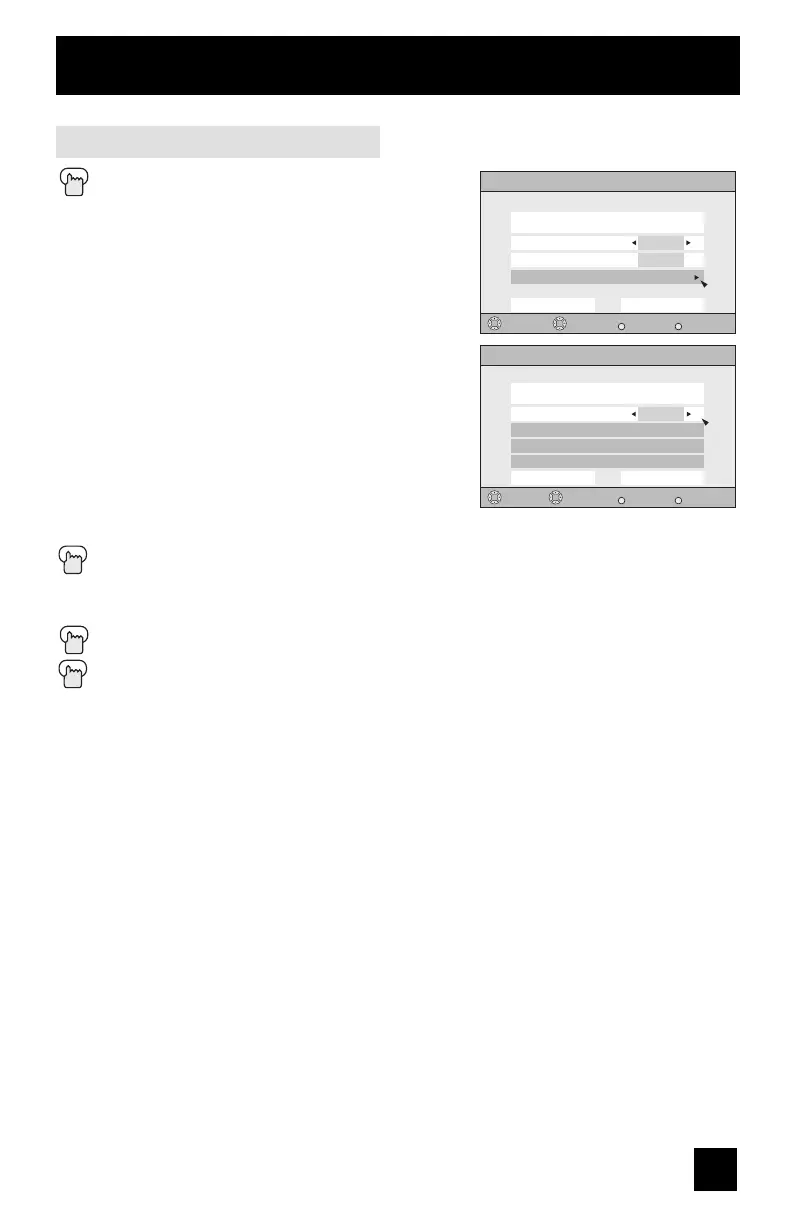
Press the MENU button
π†
To CLOSED CAPTION
è
To enter
π†
To Type
è
To select Auto, Advanced or Basic
Auto: Shows closed caption a priority for
digital channels over analog channels. It is
set automatically.
Advanced: Shows only the digital closed
caption.
Basic: Shows only the analog closed
caption.
π†
To Service
è
To select 1, 2, 3, 4, 5 or 6
π†
To Appearance
è
To enter
è
To select Auto ("Manual, see page 36)
π†
To Set
Press the OK button to save
The font/type and color are set automatically.
π†
To Set
Press the OK button to save
Press the MENU button when finished
Note:
• If you want to cancel the settings, select cancel.
Digital Closed Caption
Preview
Select
Back
BACK
Exit
MENU
Operate
Closed Caption Sample
1
Cancel Set
Auto
Type
Service
Appearance
Digital Closed Caption > Appearance
Preview
Select
Back
BACK
Exit
MENU
Closed Caption Sample
Auto
Cancel Set
Appearance Mode
Font
Colors
Opacities
Operate


 To Next Page
 Loading...