(No.MB177)1-15
3.3 Front panel assembly section
• Remove the front panel assembly from the main body.
(See "Removing the front panel assembly".)
3.3.1 Removing the FL display board & front AV in board
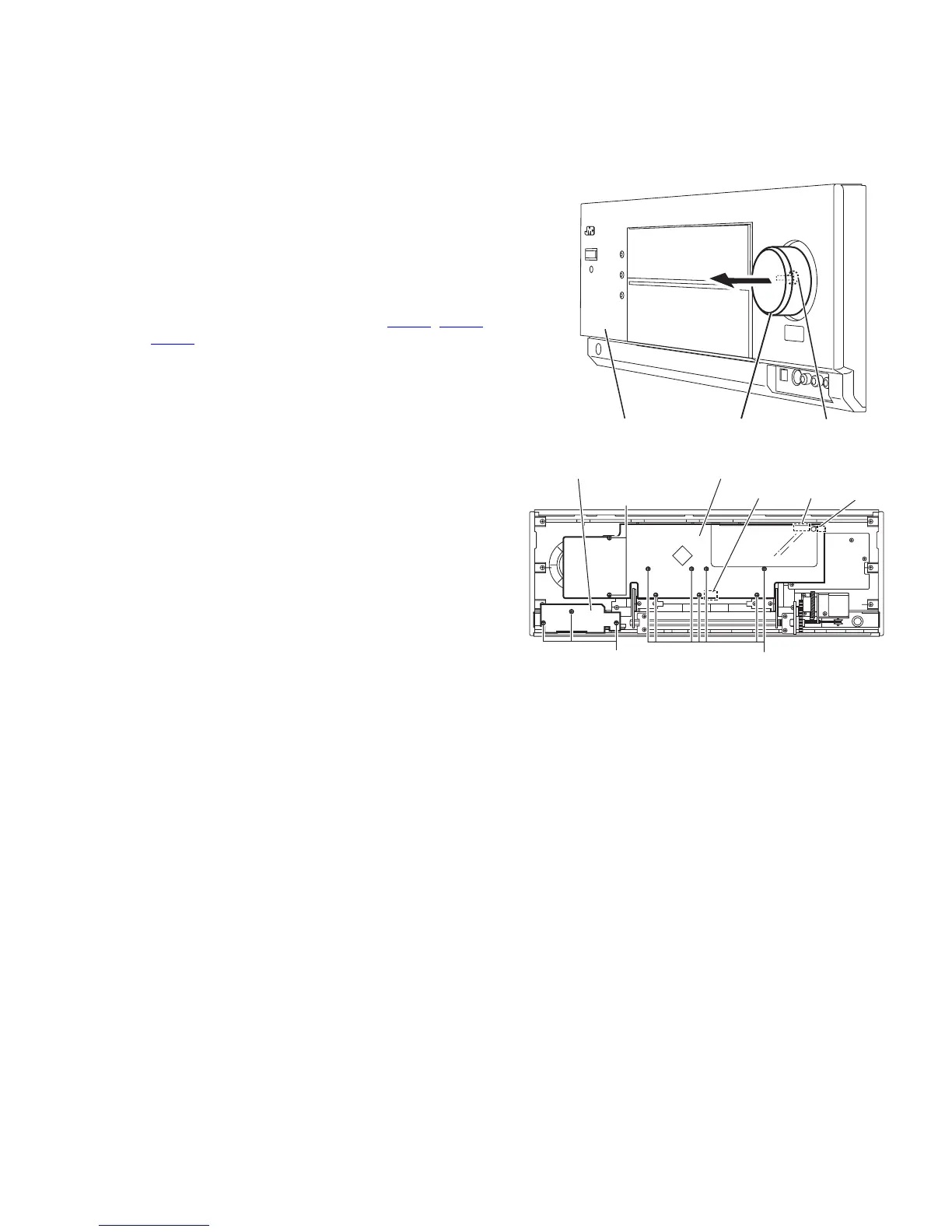
(See Figs.1 and 2)
(1) From the front side of the front panel assembly, pull out the
volume knob to the forward and remove the nut a attaching
the FL display board. (See fig.1)
(2) From the reverse side of the front panel assembly, remove
the three screws A attaching the front AV in board and take
out the front AV in board. (See fig.2)
(3) Remove the nine screws B attaching the FL display board.
(See fig.2)
(4) Disconnect the wires from the connectors CN969
, CN975
and CN982 on the FL display board. (See fig.2)
Fig.1
Fig.2
Front panel assembly
Nut a
Volume knob
A
FL display board
Front AV in board
CN982 CN969 CN975
B
B



 To Next Page
 Loading...