Preparation
8
After connecting a TV, follow the instructions on
page 10.
■ IMPORTANT
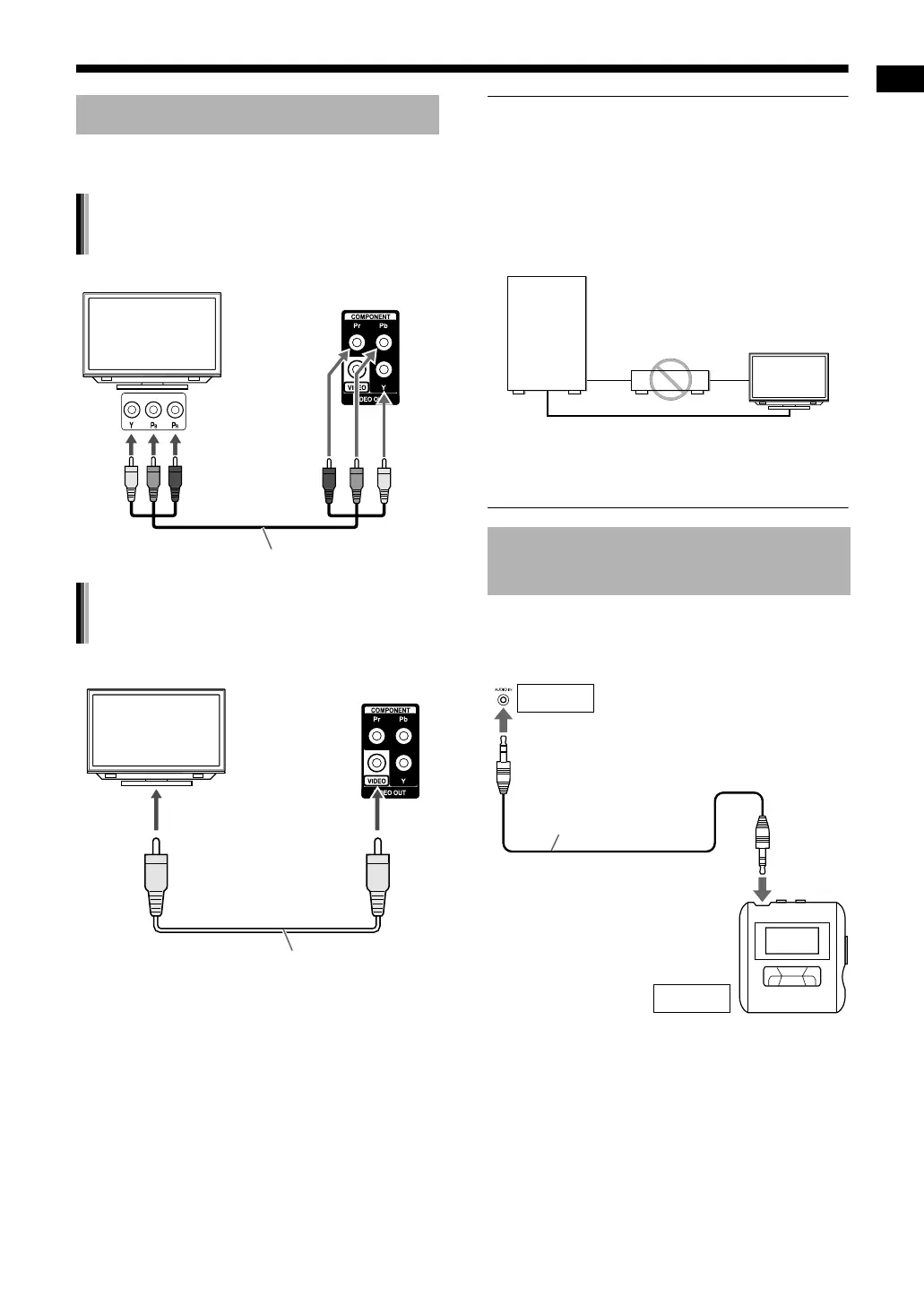
• Connect the main unit directly to a TV (or a mon-
itor) without routing through a video cassette
recorder (VCR). Otherwise picture distortion
may occur during playback. (Routing the con-
nection through a VCR, however, does not affect
the audio quality.)
• Connecting the main unit to a VCR-built-in-TV
may also cause picture distortion during play-
back.
You can listen to analog sound from a connected
portable digital audio player.
Connecting a TV
Connecting a TV with the
[COMPONENT] terminals
Main unit
(rear view)
TV
To component
input terminals
Component video cable (not supplied)
Connecting a TV with the [VIDEO]
terminal
TV
Composite video cable (supplied)
Main unit
(rear view)
To a video input terminal
Connecting a portable digital
audio player
Main unit
Direct connection
TV (or monitor)
VCR
To an audio output terminal
(such as a headphone ter-
minal)
Main unit (front view)
Input
Output
Stereo mini plug cable
(not supplied)
Portable digital audio player
or other audio device
UX-GN7V[US]EN.book Page 8 Monday, January 19, 2009 11:51 AM



 To Next Page