21
Listening to radio broadcasts
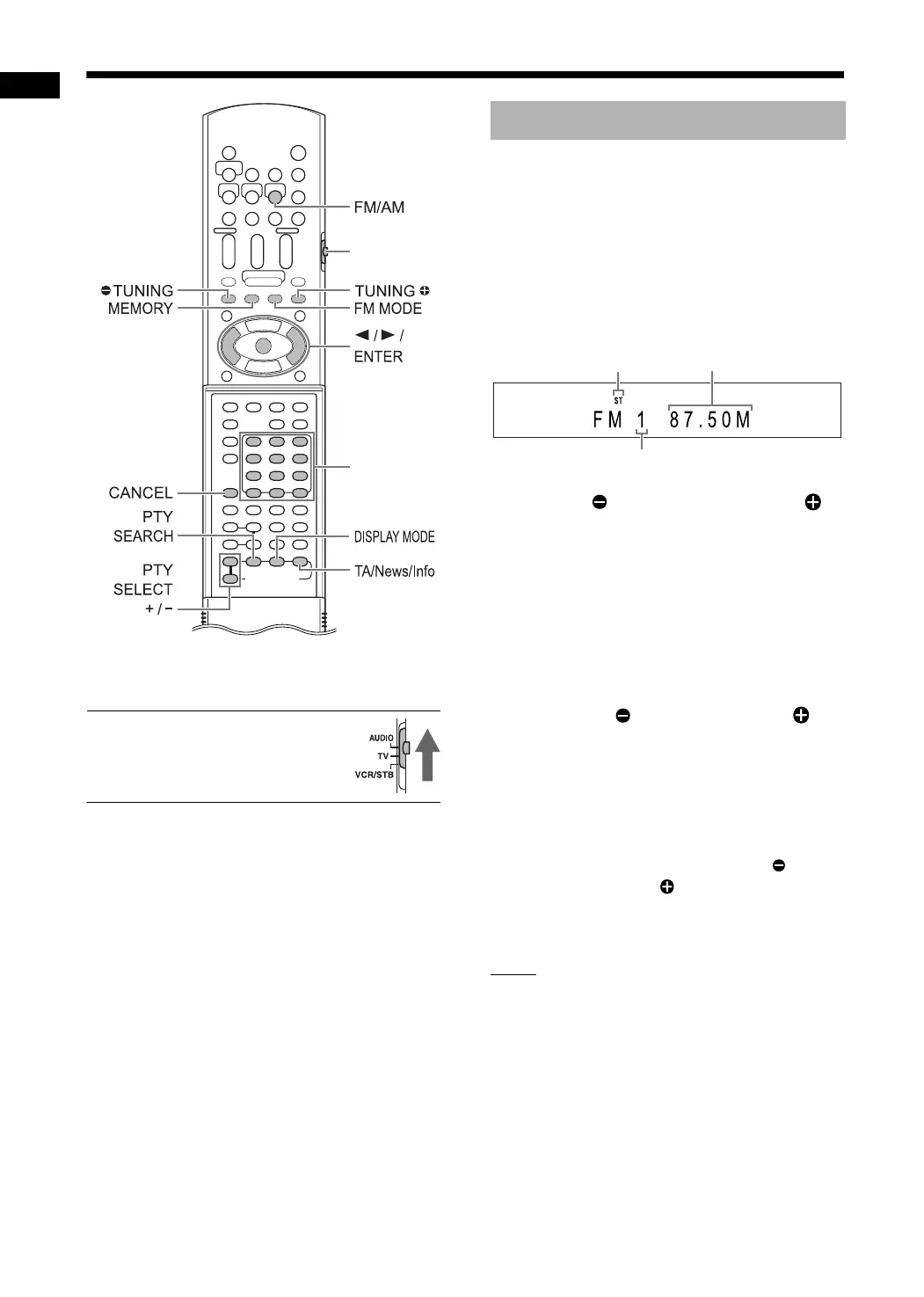
* For the number button usage, refer to “Using the
number buttons” on page 17.
■ CAUTION
• Slide the remote control mode
selector to [AUDIO].
1 Press [FM/AM] to select “FM” or
“AM” in the display window.
• Each time you press [FM/AM], the band tog-
gles between “FM” and “AM”.
• Repeatedly pressing [SOURCE] on the
main unit can also select a radio broadcast
as the source.
Example: Display when an FM radio broadcast
is received
2 Press [ TUNING] or [TUNING ]
repeatedly to select a radio sta-
tion.
• When the main unit has receive an FM ste-
reo broadcast, the “ST” (stereo) indicator
lights up in the display window.
• You can also select a radio station using the
automatic tuning.
■ Automatic tuning
Hold down [ TUNING] or [TUNING ]
until the frequency starts changing, and then
release the button.
• When the main unit has received a broad-
cast, the frequency automatically stops
changing.
• You can select a specific radio station while
searching for a broadcast. Press [ TUN-
ING] or [TUNING ] to stop the automatic
tuning when the desired frequency appears
in the display window.
NOTE
• If an FM stereo broadcast is difficult to hear
because of noise, you may be able to hear the
broadcast more easily by pressing [FM MODE]
to switch the sound to monaural reception. In
this case, the “MONO” (monaural) indicator
lights up in the display window. To return the
sound to stereo reception, press [FM MODE]
again.
Number
buttons*
Selecting a radio station
Stereo indicator
Preset number (Refer to page 22.)
Frequency (M: MHz/k: kHz)
Remote control
mode selector
Listening to radio broadcasts
DD-831[B].book Page 21 Thursday, August 24, 2006 12:05 PM


 To Next Page