EasyManua.ls Logo

JVC DLA-RS15 - Connecting Via PC Cable; Connecting Via Trigger Cable

JVC DLA-RS15
185 pages
Print Icon
To Next Page IconTo Next Page
To Previous Page IconTo Previous Page
Loading...
2
Preparation
20
Connecting(Continued)
SYNC

Do not supply the power to the other devices.
Do not connect audio terminals of the other devices such as
headphones etc. Otherwise, this may cause a
malfunction of
the other devices or injury.

Using beyond the rated value will cause malfunction.
Exercise adequate caution to prevent short circuit as the trigger
terminal outputs a voltage of 12V.
Screen

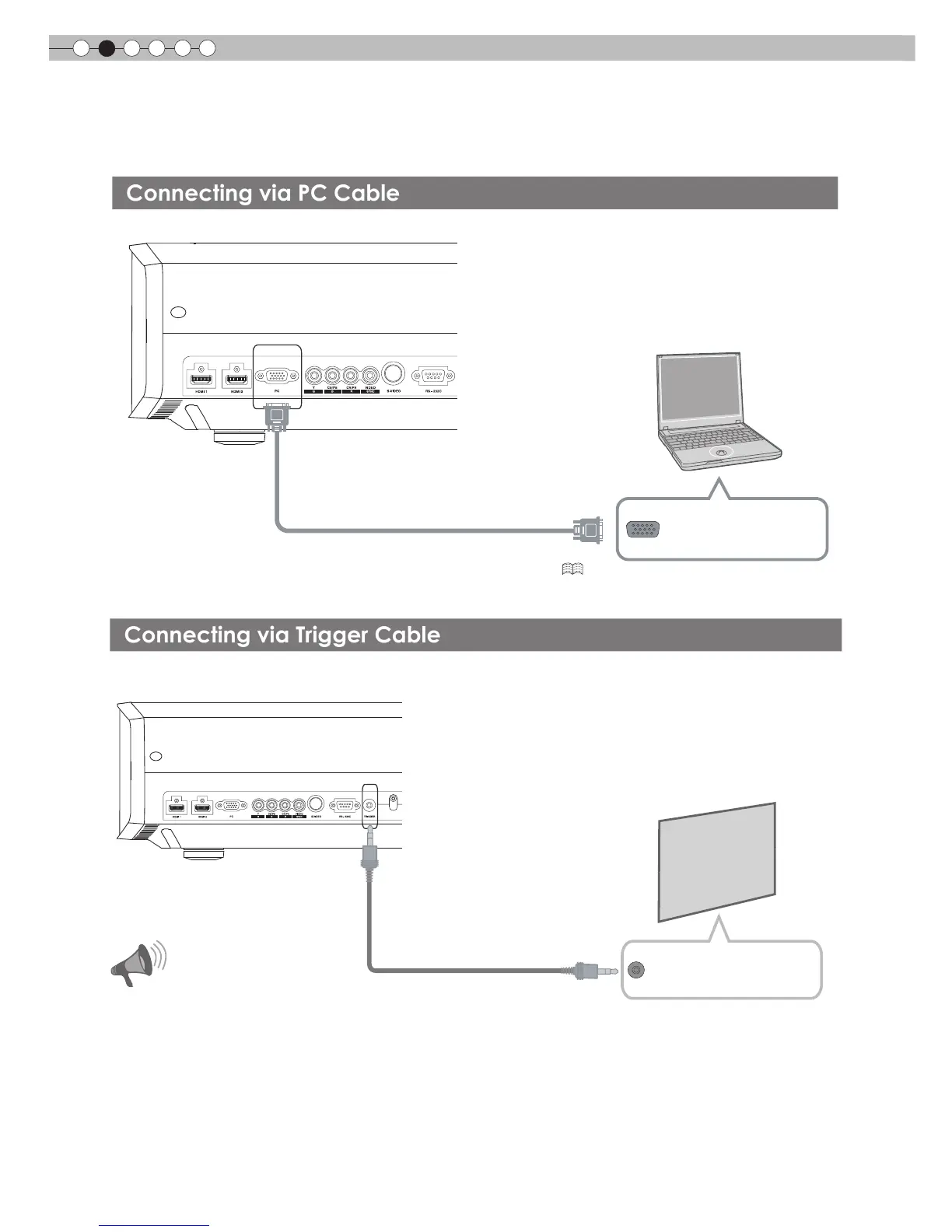
Connecting via Trigger Cable
CAUTION
Trigger cable
(sold separately)
To Trigger output terminal
This unit
Trigger input terminal

To PC input terminal
PC cable
sold separately
VGA output terminal
Notebook PC
Connecting via PC Cable
This unit
For information on supported input signals, please refer to  . ( P58)

Table of Contents

Other manuals for JVC DLA-RS15

Related product manuals