15
Getting Started
ENGLISH
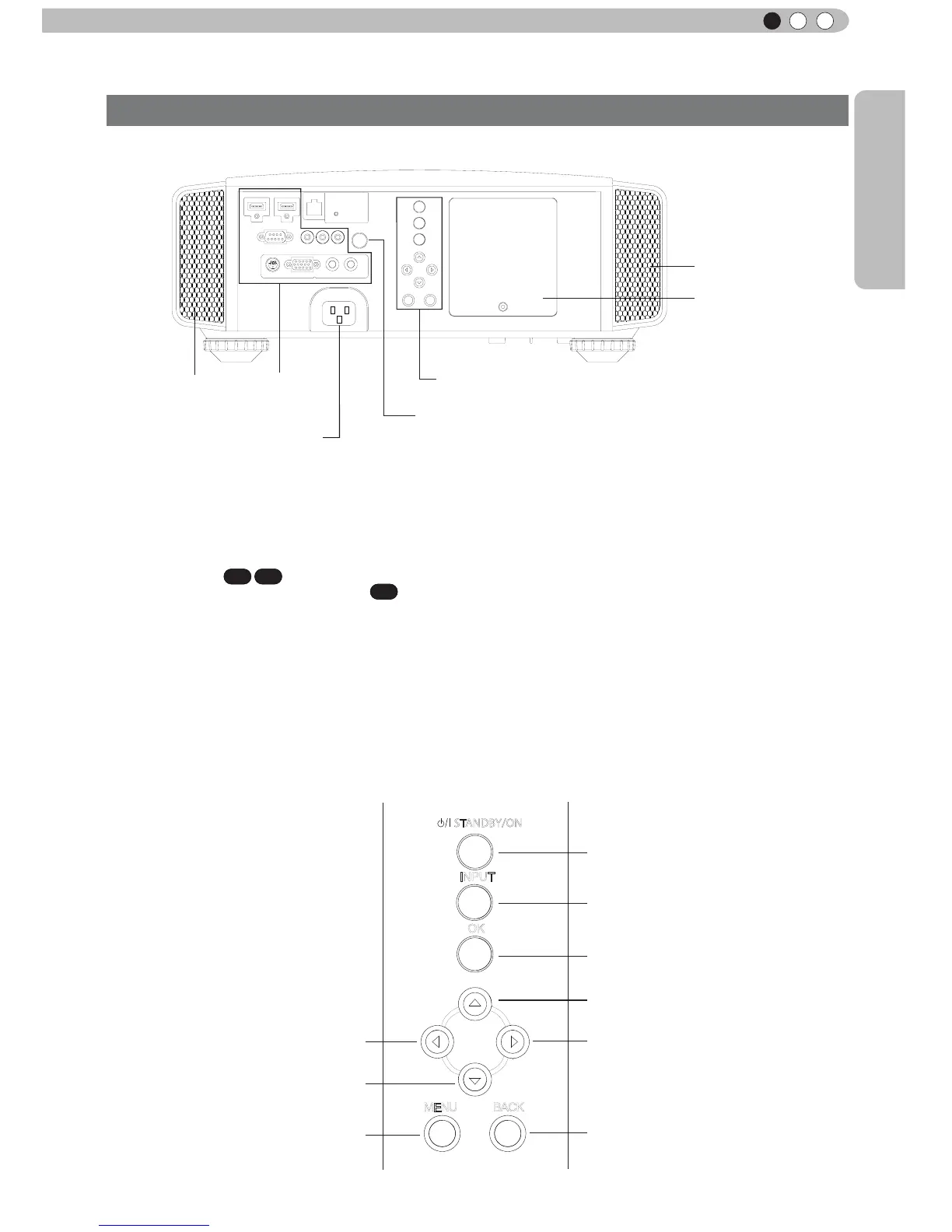
Main body - Rear
Controls and features (continued)
⑧ Input terminal
There is also a terminal other than the input
terminal for video images, such as those used
for controlling or optional equipment. This
illustration is
X7 X9
. Please see
“
About input
terminals
”
for detailed information
X3
about
terminals. (Reference page: 18)
⑨ Lamp Cover
When replacing the light source lamp, remove
this cover. (Reference page: 60)
⑩ Operation panel
See the following illustration
“
Control panel
”
for
more details.
⑪ Light receiving section of the
remote control (rear)
Please aim the remote control at this section
when using.
* There is also a light receiving section at the
rear.
⑫ Power input terminal
This is the power input terminal. It is
connected via the supplied power cord.
(Reference page: 31)
To turn on/off the power
To switch input
To select or conrm
Up button
Right button
Left button
Down button
To display the menu
To r
eturn to the previous menu
STANDBY/ON
MENU
BACK
INPUT
OK
⑤ Inlets
⑨ Lamp Cover
⑩ Operation panel
⑫ Power input
terminal
⑧ Input
terminal
⑤ Inlets
⑪ Light receiving section
of the remote control (rear)
■
Operation panel



 To Next Page