EasyManua.ls Logo

JVC DLA-X7 - Masking the Surrounding Area of; An Image

JVC DLA-X7
79 pages
Print Icon
To Next Page IconTo Next Page
To Previous Page IconTo Previous Page
Loading...
Operation
35
ENGLISH
MEMO
●
Masking is available only
when high definition images
are input.
2
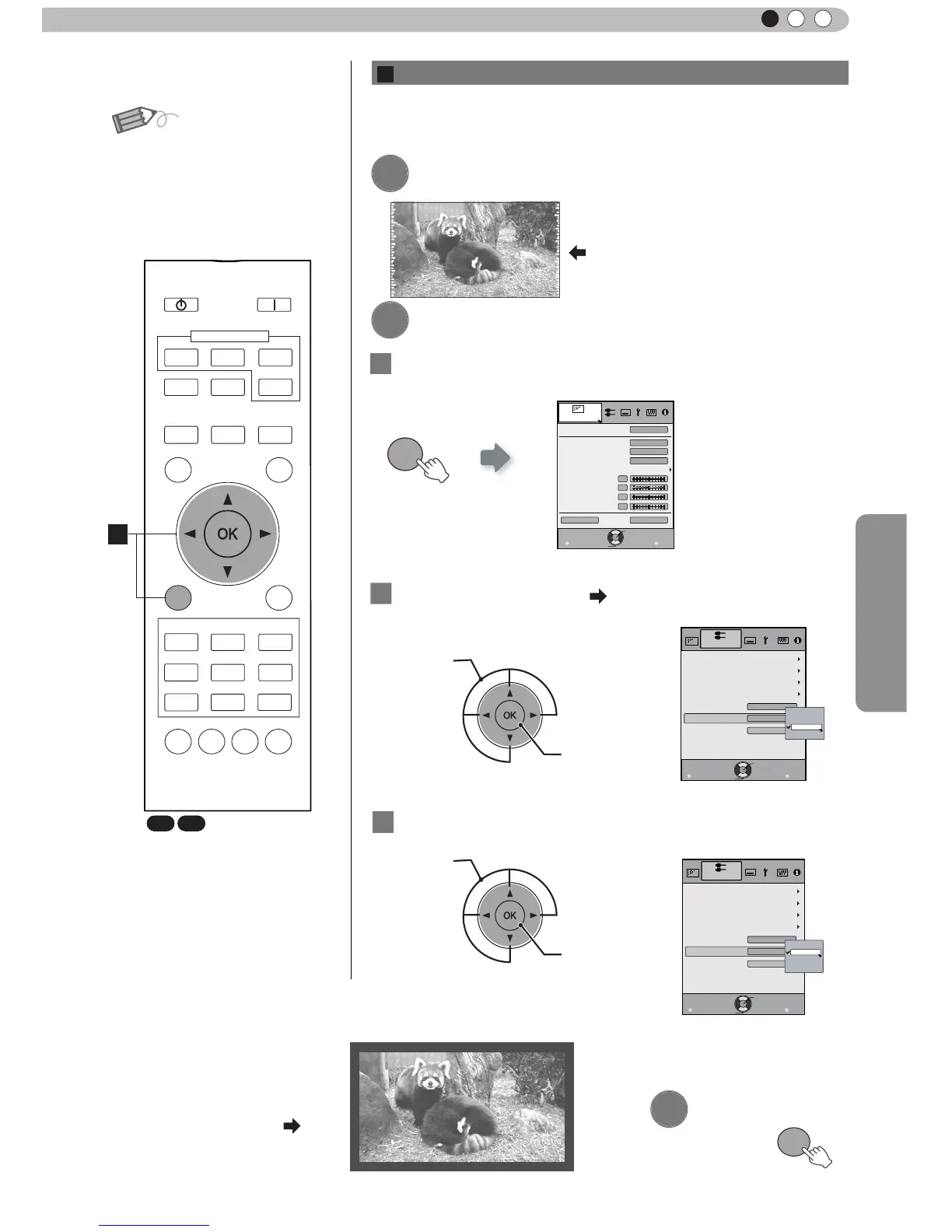
Mask the image
② Confirm
MENU
Picture Adjust
Reset
Advanced
Exit
MENU
BACK
Back
Select
Operate
Color Temp.
Gamma
Film Tone
Contrast
Brightness
Color
Tint
0
0
0
0
Color Profile
Picture Mode
Film
Film1
Xenon1
Film1
1
Display the setting menu
2
Select
“
Input Signal
”
“
Mask
”
① Select
② Confirm
Exit
MENU
BACK
Back
Select
Operate
Aspect (Video)
Progressive
HDMI
COMP.
Auto
PC 
Picture Position
16:9
Off
Mask
2.5%
5%
Off
Custom
Input Signal
3
Set a mask value
① Select
Exit
MENU
BACK
Back
Select
Operate
Aspect (Video)
Progressive
HDMI
COMP.
Auto
PC 
Picture Position
16:9
5%
Mask
2.5%
5%
Off
Custom
Input Signal
Example:
When the
“
Mask
”
value is
changed from
“
Off
”
“
5%
”
3
To end
MENU
Images for which quality at the outer area has deteriorated
can be projected by masking (hiding) the surrounding area of
the projected image.
1
Image for which quality at the outer
area has deteriorated.
Project the image
B
Masking the Surrounding Area of an Image
BACK
HIDE
LIGHT
LENS AP.
C.M.D
PC
HDMI 1
STAND BY
ASPECT
HDMI 2
ANAMO
COMP.
LENS.
CONTROL
MENU
GAMMA
P.FILE
COLOR
ADJ.
PIC.
ON
FILM
NATURAL
STAGE 3D
USER1
USER2
THX
ANIME
CINEMA
PICTURE MODE
INPUT
TEMP
COLOR
B
X7 X9

Table of Contents