10
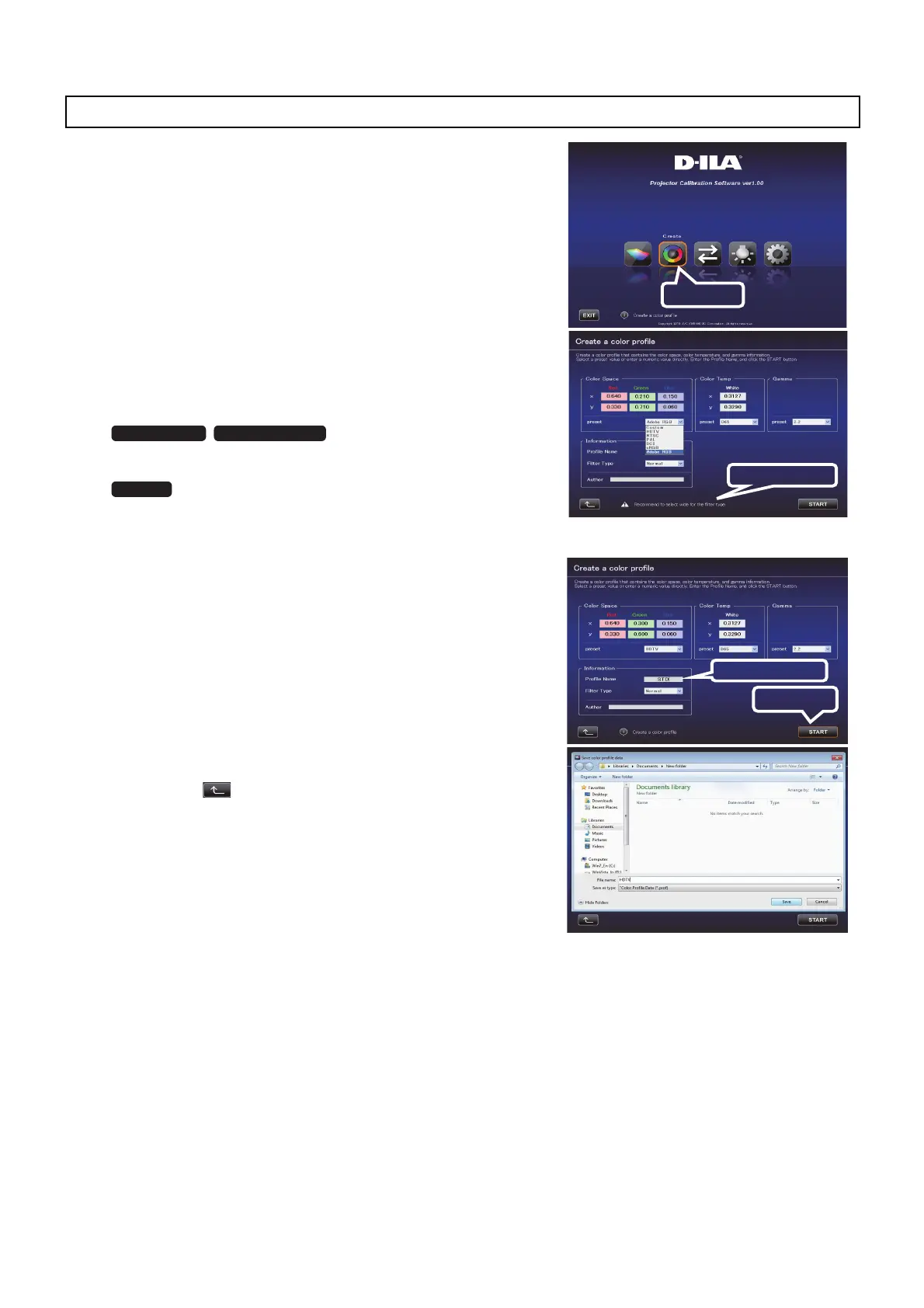
Use this feature to create a color profile that contains the color space,
color temperature, and gamma information.
1 Click the “Create” button.
2 Create a color profile.
Select a Color Space and a Color Temp setting from the pull-
down menu.
You can also enter a numerical value directly.
After Information is displayed,
follow the instructions to select a Filter Type.
Filter Type selection is not necessary. (Fixed at Normal)
Select a Gamma setting from the pull-down menu.
3 Enter a profile name.
(Not more than 10 one-byte ASCII characters. Extension of the
created profile is “prof”.)
Click the “START” button after entering the profile name.
* To apply the color profile data to the projector, import it to the
projector by using the Import feature.
Enter a file name and click “Save”.
You can enter the name of the creator in “Author”.
To exit, click
(to return to the top menu.)
Create a Color Profile.
Click
Information
X95R/X75R X900R/X700R
X500R
Prole Name
Click
JVC_PCS_manual.fm 10 ページ 2014年7月29日 火曜日 午後6時50分



 To Next Page
 Loading...