EasyManua.ls Logo

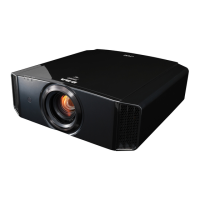
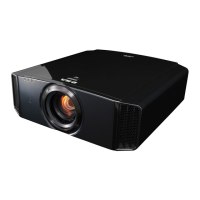
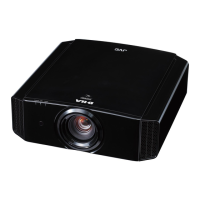
JVC DLA-X95R - User Manual

JVC DLA-X95R
260 pages
Print Icon
To Next Page IconTo Next Page
Loading...
.
D-ILA
PROJECTOR
DLA-X95R
DLA-X75R
DLA-X55R
DLA-X35
.
ENGLISH
FRANÇAIS
ESPAÑOL/CASTELLANO
INSTRUCTIONS
PC023482799
Getting Started Set up Operate Adjust/Set Maintenance Troubleshooting Others

Table of Contents

Questions and Answers

  • M
    Morgan KimAug 17, 2025
    What to do if JVC DLA-X95R remote control does not work?
    • M
      Michael AndrewsAug 17, 2025
      If your JVC Projector remote control isn't working, first ensure the batteries are correctly loaded, matching the polarities. If they are, try replacing them with new ones. Make sure there isn't anything blocking the path between the remote and the projector's sensor. Also, ensure you're not too far from the unit when using the remote. If you're using IR (infrared) 3D GLASSES with a 3D SYNCHRO EMITTER, try adjusting the emitter's orientation to avoid signal interference.
  • P
    Patricia RomanAug 19, 2025
    How to fix JVC DLA-X95R Projector power is not supplied?
    • B
      Brandon GibsonAug 19, 2025
      First, ensure the power cord is firmly inserted into the outlet. If the JVC Projector is in Standby mode, remove the power plug and properly close the lamp cover before reinserting the plug. Additionally, if the projector has just exited Cool­down mode, try turning the power on again.
  • R
    Ryan BruceAug 22, 2025
    What to do if JVC Projector projected image is dark?
    • N
      natalieglassAug 22, 2025
      If the projected image on your JVC Projector is too dark, check the lamp time in the “Information” menu to see if the lamp is near exhaustion. If it is, prepare to replace it as soon as possible. Also, adjust the “Picture Adjust” and “Lens Aperture” settings to improve image quality.
  • J
    Jerry SmallAug 25, 2025
    Why does JVC DLA-X95R power cut off suddenly?
    • R
      Robert DuffyAug 26, 2025
      If your JVC Projector is suddenly cutting off, check if the “Off Timer” is enabled and set it to “Off.” Also, verify whether “ECO Mode” is configured and, if so, disable it by setting it to “Off.”
  • C
    Christina DavisAug 27, 2025
    What to do if JVC DLA-X95R unit works, but stops abruptly?
    • D
      Daniel JacksonAug 27, 2025
      If your JVC Projector is stopping abruptly after a few minutes, ensure that the air inlets and exhaust vent are not blocked by leaving proper clearance around the unit. Also, check if the filter is dirty and clean it.
  • J
    Jillian FloresAug 30, 2025
    How to fix JVC DLA-X95R Projector color that does not appear or looks unnatural?
    • M
      Michelle FosterAug 31, 2025
      If the color on your JVC Projector doesn't appear correctly or looks unnatural, first ensure the AV device is properly connected. Then, adjust the “Color” and “Tint” settings accordingly. Finally, verify that the color space of the input signal is correctly set under the “Color Space” settings.
  • R
    Rachel EllisSep 2, 2025
    How to fix JVC DLA-X95R Projector video image that is fuzzy?
    • C
      Cameron HobbsSep 2, 2025
      If the video image on your JVC Projector is fuzzy, first adjust the focus. If that doesn't resolve the issue, ensure the unit is set at the correct distance from the screen.
  • M
    Michael MartinSep 5, 2025
    How to fix JVC DLA-X95R video images that are missing?
    • J
      Justin ElliottSep 5, 2025
      If video images are missing on your JVC Projector, check if screen mask has been configured and set “Mask” to “Off.” Also, verify if the display position is misaligned and adjust the “Picture Position” value so that the entire image appears on the screen.
  • D
    Diane WaltonSep 7, 2025
    Why I am unable to view 3D images on JVC DLA-X95R?
    • T
      Teresa SchmidtSep 7, 2025
      If you're unable to view 3D images on your JVC Projector, first ensure that the 3D GLASSES are turned on if you are using the PK­AG2 or PK­AG33D GLASSES. Check the battery (charge) of the 3D GLASSES and position them at an appropriate distance. Also, verify that the correct 3D format is selected in the setting menu; if it doesn't switch automatically, configure it manually.
  • K
    Kimberly PerezSep 12, 2025
    Why the lens cover does not close on JVC DLA-X95R Projector?
    • J
      Joseph SullivanSep 12, 2025
      If the lens cover on your JVC Projector does not close, check if “Lens Cover” is set to “Open”. If so, set “Lens Cover” under “Lens Control” in the setting menu to “Auto.”

JVC DLA-X95R Specifications

General IconGeneral
ModelDLA-X95R
Display TechnologyDLP
Native Resolution1920 x 1080
Lamp TypeUHP
Throw Ratio1.4 - 2.8:1
Lens ShiftVertical: ±80%, Horizontal: ±34%
3DYes
Projection Size60 - 200 inches
HDMI Inputs2
Brightness1300 ANSI lumens
Zoom2.0x
Lamp Life3000 hours (normal mode), 4000 hours (eco mode)

Related product manuals