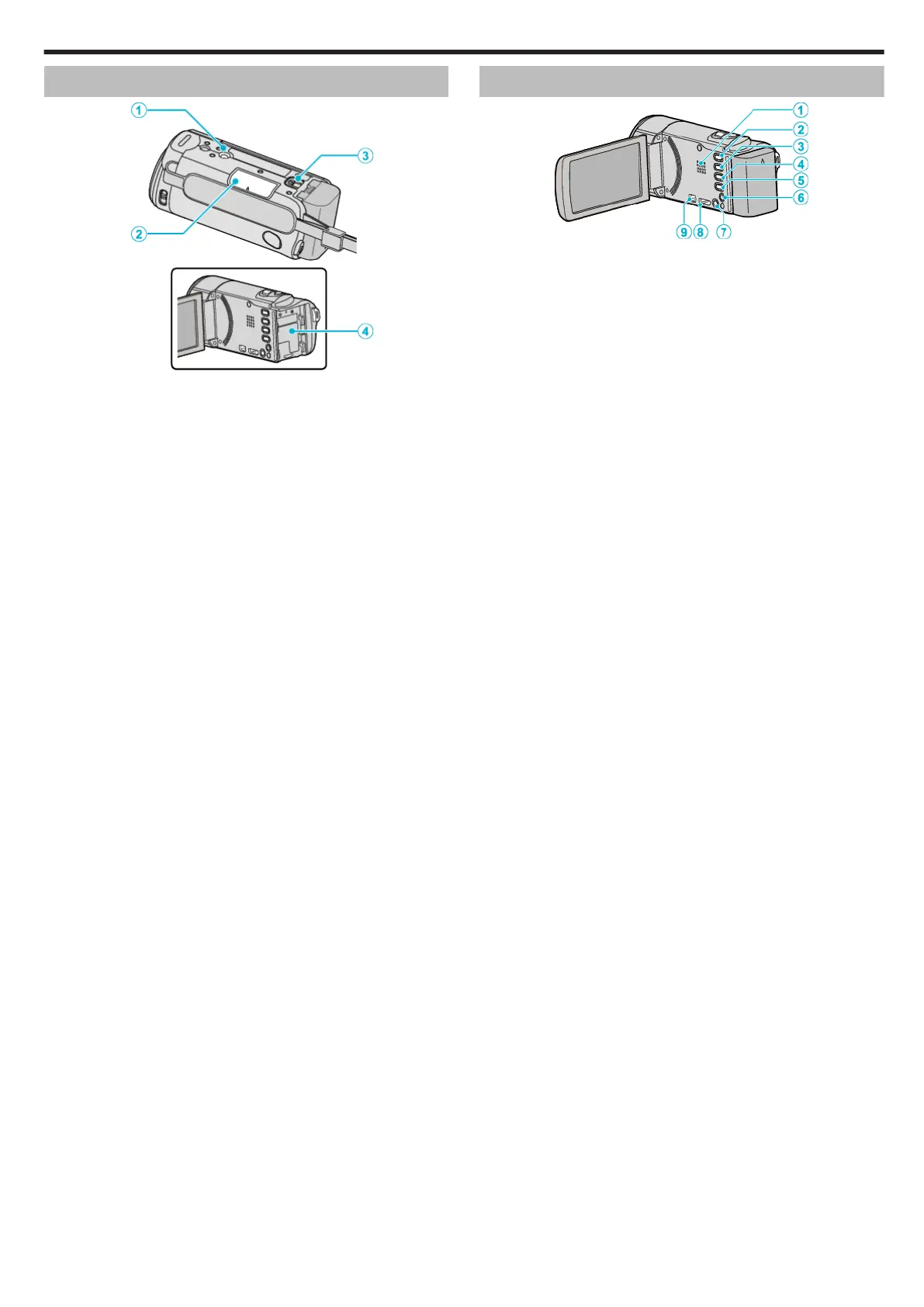
Bottom
.
1
Tripod Mounting Hole
“Tripod Mounting” (A p. 18)
2
SD Card Slot
0
Insert an optional SD card.
“Inserting an SD Card” (A p. 14)
3
Battery Release Lever
“Charging the Battery Pack” (A p. 13)
4
Battery Mount
Interior
.
1
Speaker
0
Outputs audio sound during video playback.
2
L (Play/Record) Button
0
Switches between recording and playback modes.
3
UP/< Button
0
UP: Scrolls/moves cursor on the icons upward
0
<: Reverse search
4
DOWN/> Button
0
DOWN: Scrolls/moves cursor on the icons downward
0
>: Forward search
5
OK/INFO Button
0
Confirms the selection. / Displays information as follows.
0
Recording: Displays the remaining time and battery power.
0
Playback: Displays file information such as recording date.
6
AV Connector
0
Connects to a TV, etc.
7
MENU (Menu) Button
8
HDMI Mini Connector
0
Connects to TV using an HDMI mini cable.
9
USB Connector
0
Connects to computer using a USB cable.
Names of Parts
73









 To Next Page