This document is a detailed user guide for the JVC Everio R camcorder models GZ-R435 and GZ-R430. It covers various aspects of the camcorder's operation, from initial setup and recording to playback, editing, copying, and troubleshooting.
Function Description
The JVC Everio R camcorder is designed for recording videos and capturing still images. It features a built-in battery and supports external SD cards for extended storage. The camcorder is equipped with a touch screen LCD monitor for intuitive operation and offers various recording modes, including Intelligent Auto and Manual, to suit different shooting conditions. It also includes features for applying creative effects to recordings and for specialized shooting scenarios like underwater recording, time-lapse, and self-timer. For playback, it supports normal video and still image playback, digest playback, and playback of files with defective management information. The camcorder can be connected to a TV for viewing and to a computer for file management, editing, and backup.
Important Technical Specifications
Camera:
- Power Supply: Using AC adapter: DC 5 V
- Power Consumption: 2.2 W (MONITOR BRIGHTNESS: 3 (standard)), 2.4 W (MONITOR BRIGHTNESS: 4 (brighter))
- Rated Current Consumption: 2A
- Dimensions (W x H x D): 60 x 59.5 x 122 mm (excluding grip belt)
- Mass: Approx. 290 g (camera only)
- Operating Environment:
- Allowable operating temperature: -10 °C to 40 °C
- Allowable storage temperature: -20 °C to 50 °C
- Allowable charging temperature: 10 °C to 35 °C
- Allowable relative humidity: 35 % to 80 %
- Image Pickup Device: 1/5.8” 2,510,000 pixels (CMOS, back-illuminated)
- Recording Area (Video): 1,280,000 to 2,290,000 pixels (image stabilizer: off)
- Recording Area (Still Image): 2,290,000 pixels (16:9), 1,710,000 pixels (4:3)
- Lens: F1.8 to F6.3, f= 2.9 mm to 116.0 mm
- 35 mm Conversion:
- Video: 40.5 mm to 1620 mm (image stabilizer: off)
- Still Image: 40.5 mm to 1620 mm (16:9), 49.5 mm to 1980 mm (4:3)
- Filter Diameter: 37 mm (screw pitch: 0.75 mm)
- Lowest Illumination: 3 lux
- Zoom (during video recording): Optical zoom: Up to 40x, Dynamic zoom: Up to 60x, Digital zoom: Up to 100x (GZ-R430), Digital zoom: Up to 200x (GZ-R435)
- Zoom (during still image recording): Optical zoom: Up to 40x
- LCD Monitor: 3.0” Wide, 230,000 dots, color LCD
- Recording Media: Built-in memory (4 GB), SD/SDHC/SDXC card (commercially available)
Connectors:
- HDMI Output Connector: HDMI mini connector
- AV Output Connector: Video output: 1.0 V (p-p), 75 Ω; Audio output: 300 mV (rms), 1 KΩ
- USB Connector: Micro USB Type AB, USB 2.0 compliant
Video:
- Recording/Playback Format: AVCHD standard (Video: MPEG-4 AVC/H.264, Audio: Dolby Digital 2ch)
- Extension: .MTS
- Signal System: PAL standard
- Video Quality (Recording pixel count/Average recording bit rate):
- UXP: 1920 x 1080 pixels, Average Approximate 24 Mbps
- XP: 1920 pixels x 1080 pixels, Average Approximate 17 Mbps
- EP: 1920 pixels x 1080 pixels, Average Approximate 4.8 Mbps
- Sound Quality (Audio): 48 kHz, 256 kbps
Still Image:
- Recording Format: JPEG standard
- Extension: .JPG
- Image Size (Recording pixel count):
- (16:9 aspect ratio) 1920 pixels x 1080 pixels (2M)
- (4:3 aspect ratio) 3680 pixels x 2760 pixels (10.15M), 1440 pixels x 1080 pixels (1.5M), 640 pixels x 480 pixels (0.3M)
AC Adapter (UIA312-0520):
- Power Supply: AC 100 V to 240 V, 50 Hz/60 Hz
- Output: DC 5 V, 2 A
- Allowable Operating Temperature: 0°C to 40°C (10°C to 35°C during charging)
- Dimensions (W x H x D): 49.8 x 26.3 x 68.2 mm (excluding cord and AC plug)
- Mass: Approx. 108 g
Usage Features
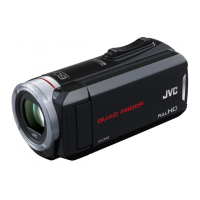
- Quad Proof Design: Waterproof (up to 5m for 30 min), Dust-proof (IP5X), Drop-proof (from 1.5m), and Freeze-proof (down to -10°C).
- Touch Screen Operation: The LCD monitor is a pressure-sensitive touch panel for navigating menus, selecting items, and controlling playback.
- Intelligent Auto Mode: Automatically adjusts camera settings for optimal video and still image recording based on detected scenes (e.g., skin beautification, group shots, low light, backlight compensation).
- Manual Recording Mode: Allows manual adjustment of focus, brightness, backlight compensation, white balance, and tele macro for precise control over recordings.
- Recording Effects: Includes "Grainy Monochrome" for film-like black and white, "Food" for appetizing food shots, and "Baby" for soft, gentle baby images.
- Image Stabilization (DIS/AIS): Reduces camera shake during video recording, with enhanced AIS for more effective stabilization in bright, wide-angle scenes.
- Time-Lapse Recording: Captures changes over time by taking frames at set intervals (1, 5, 20, or 80 seconds) and plays them back at accelerated speeds.
- Self-Timer: Offers 2-second or 10-second delays for both video and still image recording, useful for including the photographer or preventing camera shake.
- Self-Check Rec/Play: Records for a specified duration, then automatically plays back the scene and repeats the process, useful for checking sports or dance forms.
- Date/Time Recording: Records videos with the date and time displayed on the screen.
- Time Counter Recording: Records videos with a stopwatch counter displayed, useful for sports videos.
- Zoom Memory: Stores a preferred zoom position for quick recall.
- Silent Mode: Darkens the LCD monitor and mutes operation sounds for discreet recording.
- LCD Closed Recording: Allows recording to continue even when the LCD monitor is closed.
- File Management: Supports deleting unwanted files, protecting important files, and combining seamlessly recorded videos.
- Copying Functions: Enables dubbing files to a Blu-ray recorder, copying files to an SD card, and backing up files to Windows or Mac computers using provided software (Everio MediaBrowser 4) or direct connection.
- TV Connectivity: Connects to TVs via HDMI mini connector or AV connector for playback, with support for HDMI-CEC linked operations and adjustable video output settings (16:9 or 4:3).
- Mobile User Guide: Provides a QR code to access the mobile user guide for on-the-go assistance.
Maintenance Features
- General Cleaning: Wipe the unit with a dry, soft cloth. For stubborn dirt, use a cloth soaked in a neutral detergent solution, followed by a clean, damp cloth. Avoid solvents like benzene, thinner, or alcohol.
- Lens/LCD Monitor Cleaning: Use a lens blower to remove dust and a cleaning cloth for dirt. Avoid pressing forcefully on the LCD screen.
- Underwater/Beach Use Maintenance: After using in water or dusty environments, rinse the camera immediately with clean water and dry completely. Ensure the terminal cover is tightly closed before rinsing. For saltwater use, immerse in fresh water for about 10 minutes, replacing the water, then rinse. Open and close the LCD screen and operate buttons/zoom to dislodge sand/dust. Dry the camera thoroughly in a well-ventilated, shady area, placing it lens-down initially to dry the microphone and LCD area.
- Waterproof Packing: It is recommended to replace the waterproof packing once a year to maintain performance.
- Reset Function: A reset button is available to resolve malfunctions without erasing recorded data.
- Battery Care: Charge the built-in battery within a room temperature range of 10°C to 35°C. If the battery performance significantly degrades, it may need replacement (consult JVC service center).
- Firmware Update: The unit's functions can be updated via firmware updates available on the JVC homepage.

 Need help?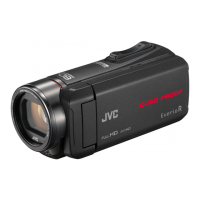






 To Next Page
 General