MasterPage: Heading0_Left
42 EN
EDITING
To use this camcorder as a player
NOTE:
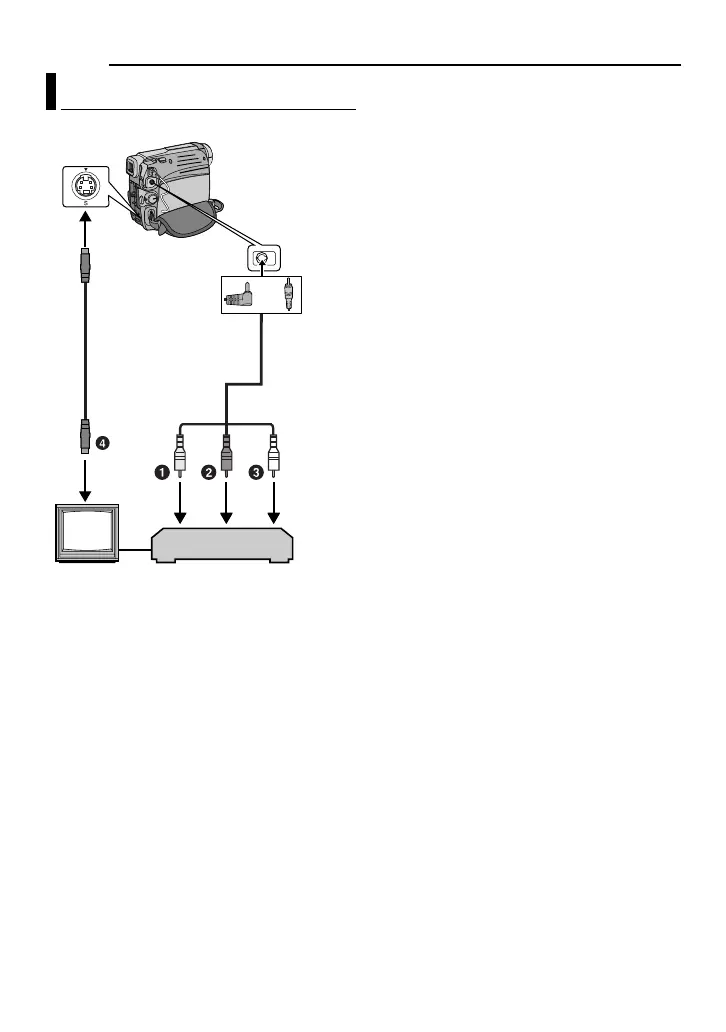
The S-Video cable is optional. Be sure to use the
YTU94146A S-Video cable. Consult the JVC
Service Centre described on the sheet included in
the package for details on its availability. Make
sure to connect the end with a core filter to the
camera. The core filter reduces interference.
1 Perform steps 1 - 6 ( pg. 23)
2 At the point you want to start dubbing, start
recording on the VCR. (Refer to the VCR’s
instruction manual.)
3 To stop dubbing, stop recording on the
VCR, then stop playback on the camcorder.
NOTES:
● It is recommended to use the AC Adapter as
the power supply instead of the battery
pack. (
pg. 13)
● To choose whether or not the following displays
appear on the connected TV
• Date/time
Set “DATE/TIME” to “ON” or “OFF”.
(
pg. 34, 35) Or, press DISPLAY on the
remote control to turn on/off the date
indication.
• Time code
Set “TIME CODE” to “OFF” or “ON”.
(
pg. 34, 35)
• Indications other than date/time and time code
Set “ON SCREEN” to “OFF”, “LCD” or “LCD/
TV”. (
pg. 34, 35)
Dubbing To A VCR
TV
VCR
To AV
connector
Audio/Video
cable
(provided)
S Cable
(Optional)
or
GR-D770AG_EN.book Page 42 Tuesday, December 5, 2006 1:47 PM


 To Next Page