64
7
RESET VIEWFINDER
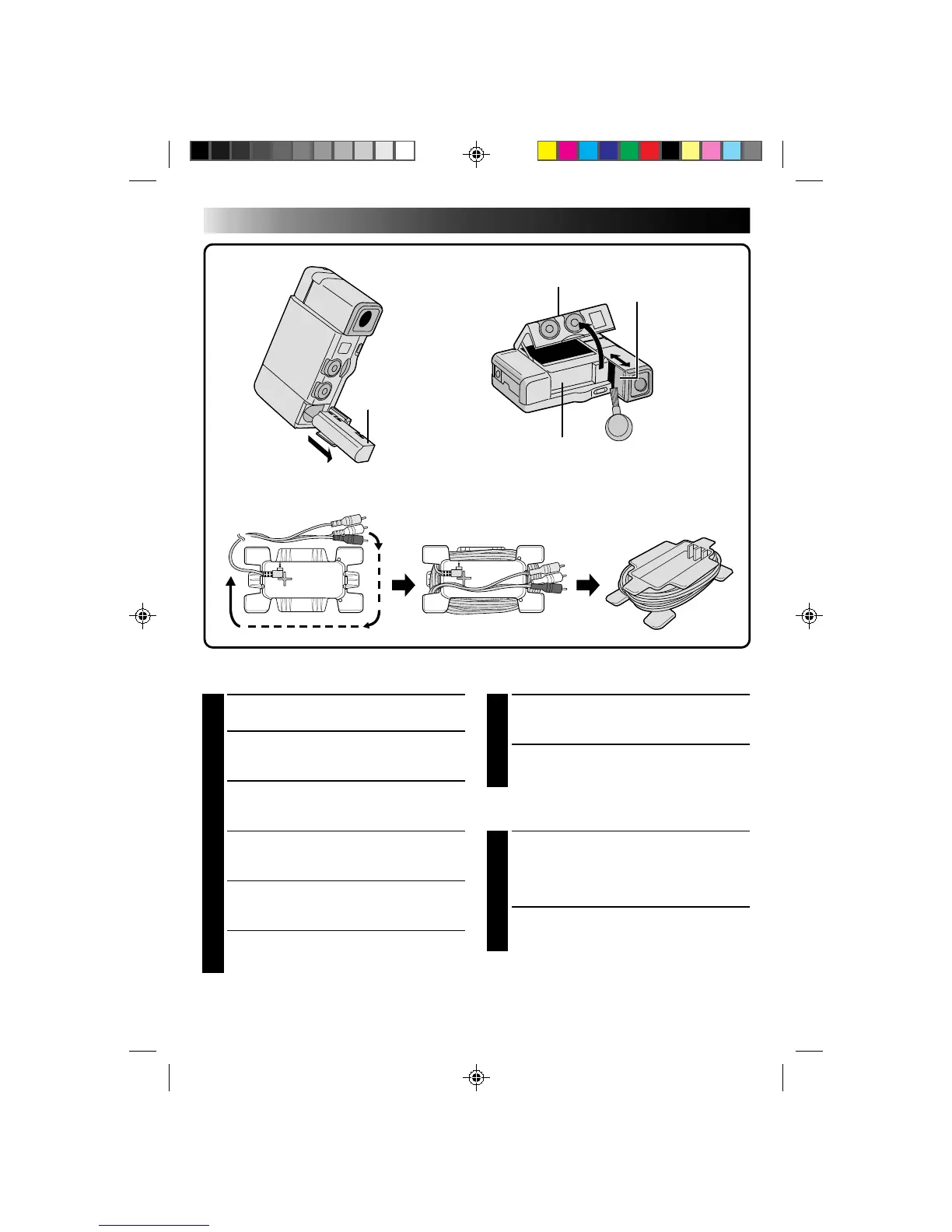
Close the viewfinder's cover and push the
viewfinder back in.
8
CLOSE CASSETTE DOOR
Audio/Video Cable And CAM Stand
1
WRAP CABLE AROUND STAND
Position the plug of the Audio/Video cable
(ø3.5 DV TV or VCR) as shown in the
illustration, then wrap the cable around the
stand in the direction indicated.
2
CONFIRM PLUG POSITION
Make sure the white, red and yelow plugs are
positioned as shown in the illustration.
Cleaning The Camcorder
1
CLEAN EXTERIOR
Wipe gently with a soft cloth.
2
CLEAN LENS
Blow it with a blower brush, then wipe gently
with lens cleaning paper.
3
REMOVE POWER SUPPLY
Remove the battery pack or disconnect the AC
Power Adapter/Charger.
4
OPEN CASSETTE DOOR
There is no power to the camcorder, so the
cassette holder won't open.
5
PULL OUT VIEWFINDER
Pull out the viewfinder and slide its cover
open.
6
CLEAN VIEWFINDER
Remove dust using a blower brush.
CASSETTE HOLDER
BATTERY PACK
AFTER USE
Audio/Video cable (ø3.5 DV TV or VCR)
CASSETTE DOOR
VIEWFINDER COVER
CAM STAND



 To Next Page