EN 31
Self-Timer
Once the camcorder is set, the camcorder operator can become part of the scene in a more natural way
adding the final touch to a memorable picture.
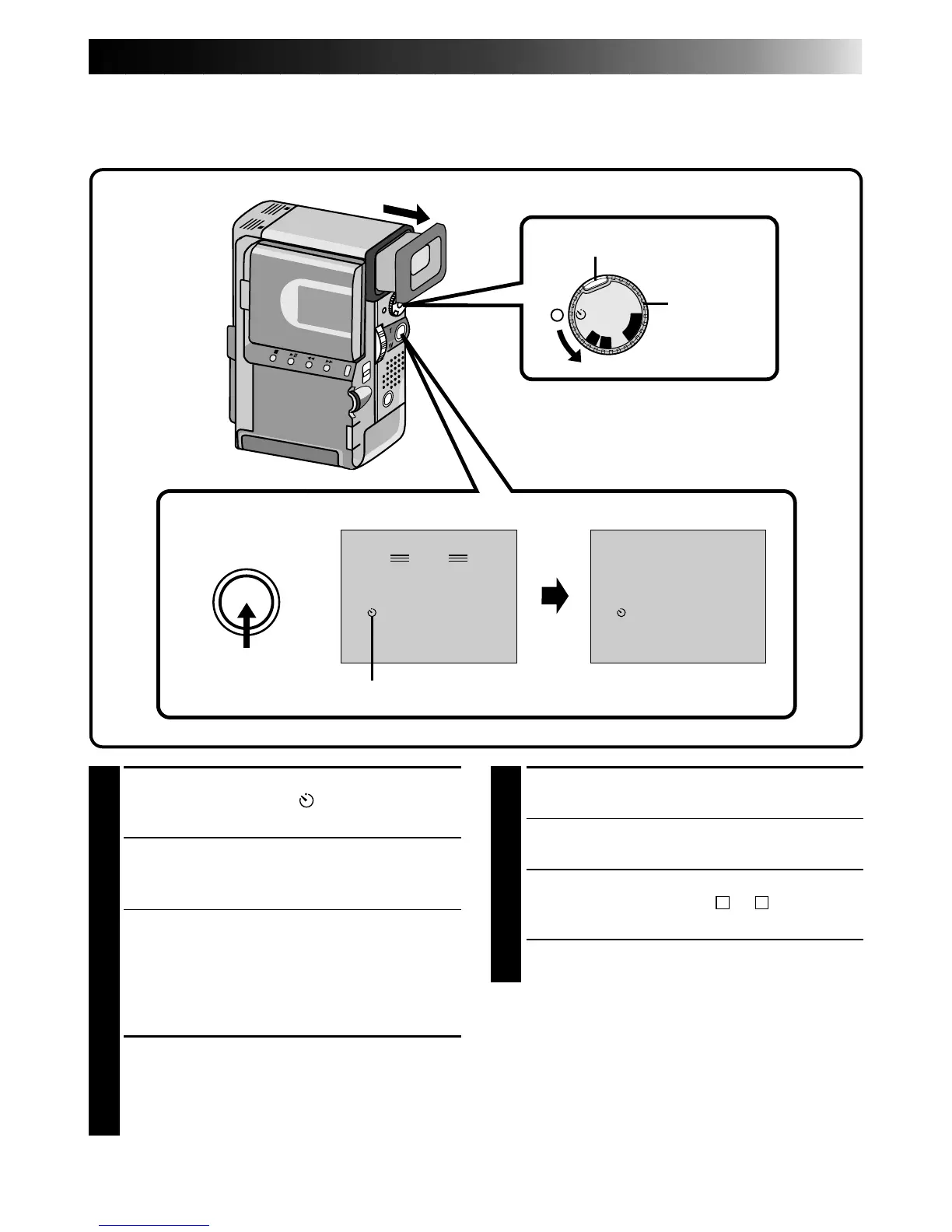
1
SELECT OPERATION MODE
Turn the Power Dial to “ ” while pressing
down the lock button located on the dial.
2
PULL OUT VIEWFINDER OR OPEN
LCD MONITOR
Pull out the viewfinder fully.
•The camcorder enters the Record-Standby
mode.
•You can tilt the LCD monitor upward to 180
degrees so that it faces forward and view
yourself while self-recording (with the
viewfinder pushed back).
3
ENGAGE SELF-TIMER MODE
Press START/STOP. The tally lamp lights and
begins blinking. After approx. 15 seconds, the
light stops blinking and stays on and recording
begins with a beep sound.
4
STOP SELF-TIMER RECORDING
Press START/STOP.
•The camcorder re-enters Record-Standby
mode.
5
END SELF-TIMER RECORDING
Set the Power Dial to the “
A
”, “
M
” or “OFF”
position.
•When turning to “OFF”, it is not necessary to
press down the lock button.
To Take A Snapshot In The Self-Timer Mode . . .
..... in step 3, press SNAPSHOT instead of
START/STOP. After 15 seconds, a 5-second still
with the shutter sound effect is recorded. After
that, the camcorder enters the Record-Standby
mode.
OFF
P
L
A
Y
A
M
5S
MANUAL
PAUSE
– – –
MANUAL
REC
444
Power Dial
Display
During recording
Lock button
START/STOP button
Self-Timer indication
After
15 sec.



 To Next Page