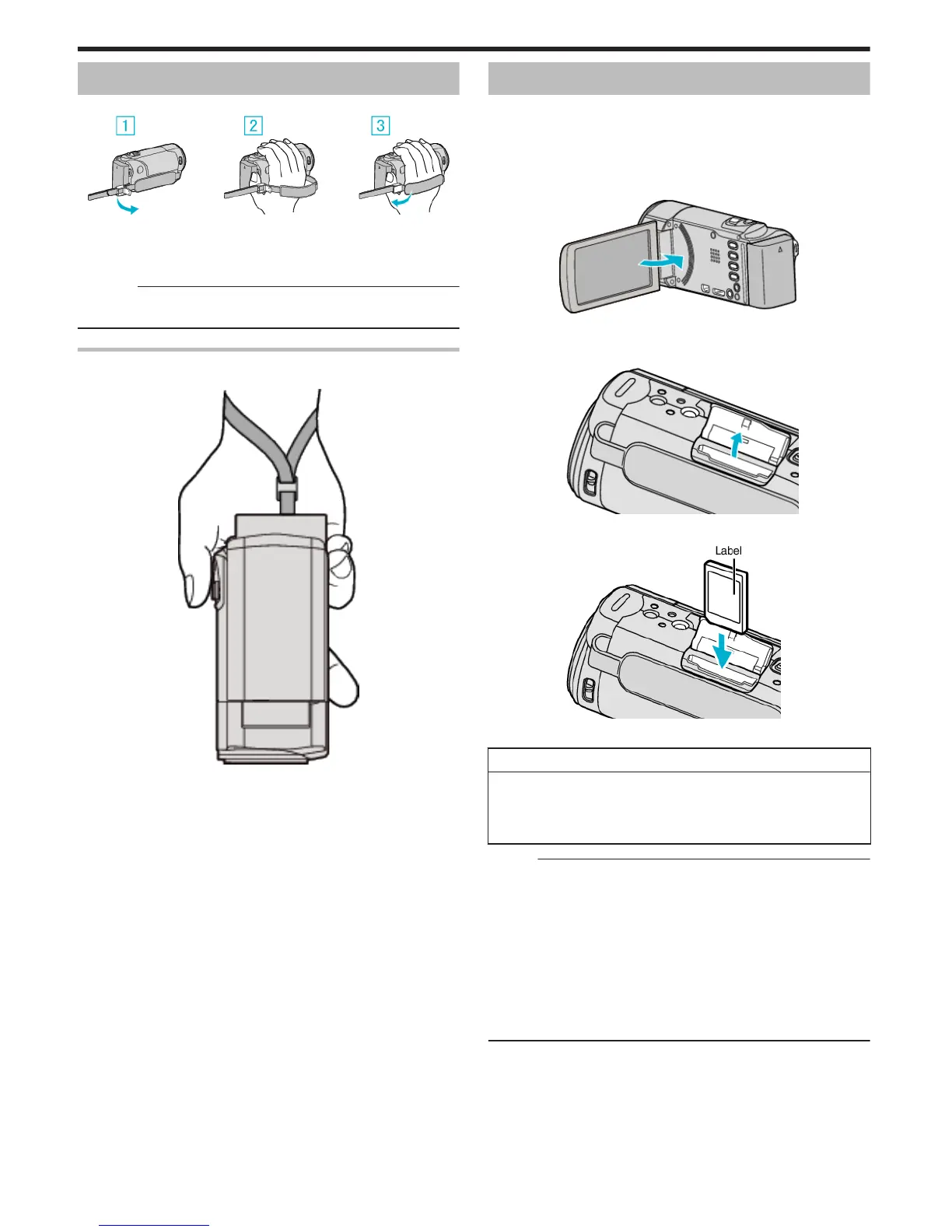
Grip Adjustment
.
A Open the lever on the strap lock
B Adjust the length of the belt
C Close the lever
Caution :
0
Be sure to fasten the grip belt properly.
If the belt is loose, this unit may drop and result in injuries or damages.
Using as a Hand Strap
Adjust the length of the belt and loop it around your wrist.
.
Inserting an SD Card
When a commercially available SD card is inserted, recordings can still be
made to the card without stopping when the remaining recording time on the
built-in memory runs out.
“Types of Usable SD Card” (A p. 15)
“Approximate Video Recording Time” (A p. 63)
1
Close the LCD monitor.
.
2
Open the cover.
.
3
Insert an SD card.
.
0
Insert with the label facing outward.
Warning
0
Make sure not to insert the SD card in the wrong direction.
It may cause damage to the unit and SD card.
0
Turn off the power of this unit before inserting or removing an SD card.
0
Do not touch the metal contact area when inserting the SD card.
Memo :
0
When “SEAMLESS RECORDING” is set to “ON”, recordings can still be
made to the SD card without stopping when the remaining recording time
on the built-in memory runs out.
“SEAMLESS RECORDING (GZ-EX355)” (A p. 209)
0
Both videos and still images can be recorded on one SD card. It is
recommended to confirm the video operation of the SD card before usage.
0
To record to the SD card, it is necessary to perform media settings.
0
To use SD cards that have been used on other devices, it is necessary to
format (initialize) the SD card using “FORMAT SD CARD” from media
settings.
“ FORMAT SD CARD ” (A p. 224)
Getting Started
14








 To Next Page