6
&
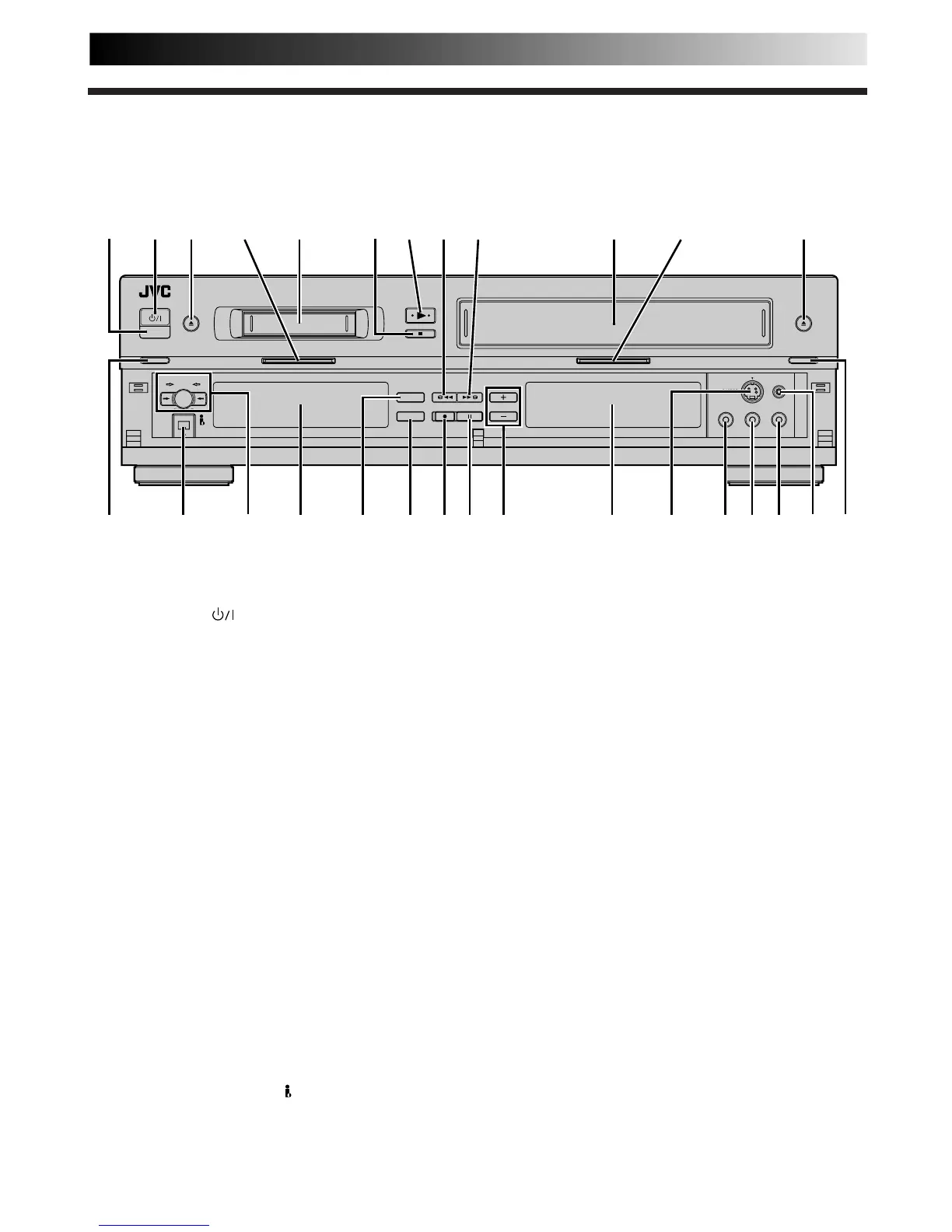
1Infrared Beam Receiving Window is where
remote control should be aimed when in use.
2 STANDBY/ON
Button turns recorder on/off
(loading a cassette also turns power on).
3 DV EJECT Button ejects DV tape during Stop mode.
Z pg. 12
4 DV Indicator lights when the DV button is pressed.
Z pg. 12
5 Mini DV Cassette Loading Slot is where cassette is
inserted; door closes, "cassette loaded" indicator
lights up on DV display panel.
6 STOP Button stops tape. Z pg. 12
7 PLAY Button plays back tape Z pg. 12; cancels
Pause, Still, Slow, Search modes. Z pg. 13
8 Rewind [REW] Button rewinds tape ; initiates high-
speed reverse search. Z pg. 12, 13
9 Fast Forward [FF] Button fast-forwards tape; initiates
high-speed forward search. Z pg. 12, 13
0 VHS Cassette Loading Slot is where cassette is
inserted; door closes, "cassette loaded" indicator
lights up on VHS display panel.
! VHS Indicator lights when the VHS button is pressed.
Z pg. 12
@ VHS EJECT Button ejects VHS tape during Stop
mode. Z pg. 12
# DV Button enables operations on DV deck. Z pg. 12
$ DV IN/OUT connector (i.Link*) enables connection
to digital video devices. Z pg. 40
* i.Link refers to the IEEE1394-1995 industry specification
and extensions thereof. The logo is used for products
compliant with the i.Link standard.
% Dubbing [DUB] Button starts Tape Dubbing.
Z pg. 34
Dubbing Direction [→/←] Buttons select dubbing
direction. Z pg. 34
Index
^ DV Display Panel provides clear view of various
displays and indicators for DV deck. Z pg. 77
& INSERT Button engages Insert Editing mode.
Z pg. 46
* A. DUB Button engages Audio Dubbing mode.
Z pg. 44
( RECORD Button starts regular recording (press once),
Instant Timer Recording (press twice); sets duration of
ITR. Z pg. 15, 17
) PAUSE Button stops tape temporarily during record-
ing Z pg. 15; stops tape temporarily during play-
back; plays back frame by frame with each additional
press. Z pg. 13
q TV PROG +/– Buttons select a preset position.
Z pg. 15
w VHS Display Panel provides clear view of various
displays and indicators for VHS deck. Z pg. 76
e S-VIDEO Input Connector enables S-VIDEO connec-
tion to camcorder or second recorder. Z pg. 40
r VIDEO Input Connector enables easy connection of
video output from another recorder or camcorder for
editing. Z pg. 40
t AUDIO Input Connector [L] enables easy connec-
tion of audio output (mono) from another recorder,
camcorder or other source for editing. Z pg. 40
y AUDIO Input Connector [R] enables easy connec-
tion of audio output (Hi-Fi) from another recorder,
camcorder or other source for editing. Z pg. 40
u Remote PAUSE Connector enables connection to
second recorder equipped with R.A. Edit connector,
or to JVC camcorder equipped with Master Edit
Control, for easy editing. Z pg. 40
i VHS Button enables operations on VHS deck.
Z pg. 12



 To Next Page