52 EN
P1 IN OUT
1 0 : 3 1 : 0 2
→
0 : 5 4 : 0 0
2 – : – – : – –
→
3
→
4
→
5
→
6
→
7
→
8
→
TC 0 : 0 0 : 1 0 TOTAL 0 : 2 2 : 5 8
64-program Editing Memory
(8 programmes x 8 scenes)
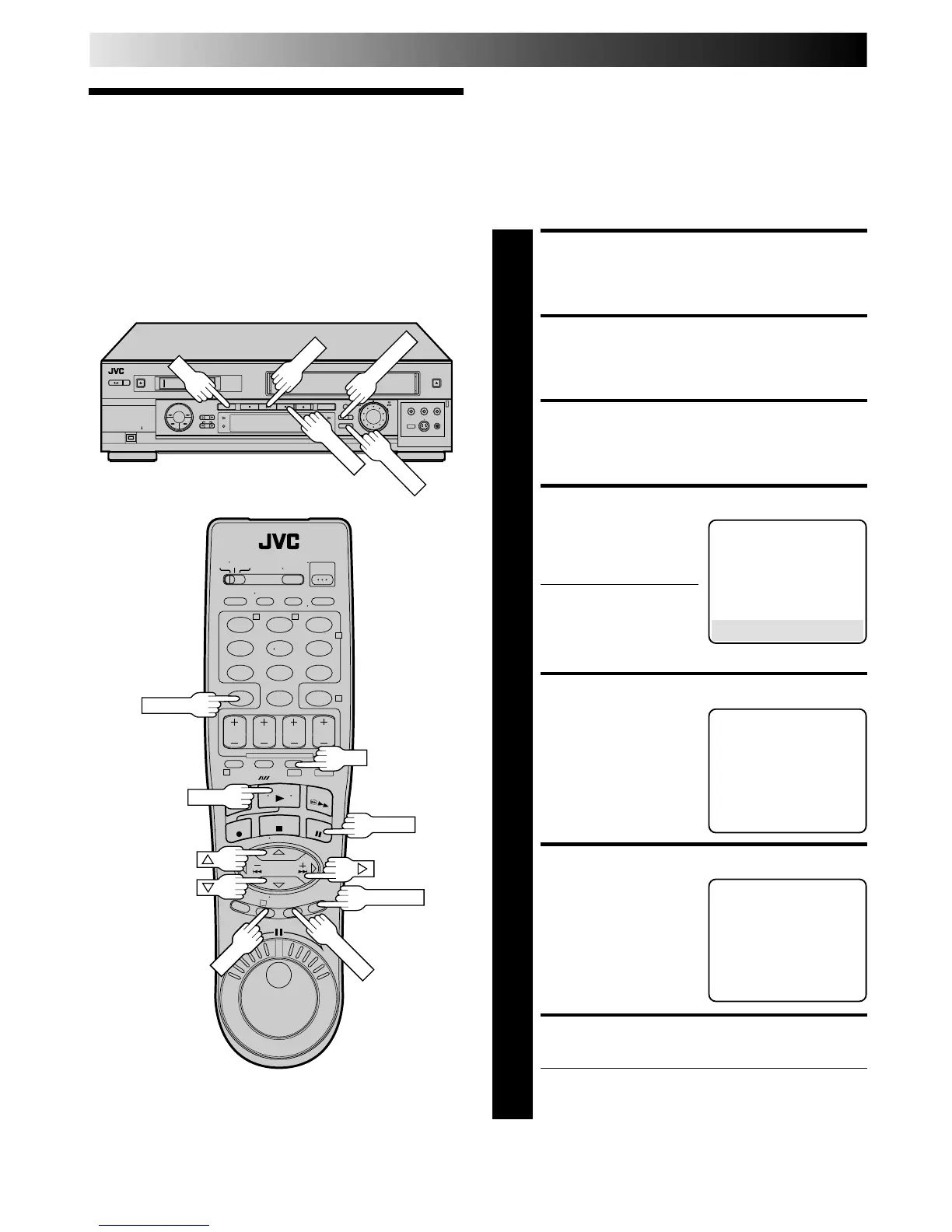
By using the Random Assemble Editing function, you can select
up to 8 scenes from a previously recorded Mini DV cassette and
automatically dub them onto a VHS cassette.
Random Assemble Editing is possible only when dubbing from
the DV deck to the VHS deck.
Random
Assemble
Editing
LOAD CASSETTES
1
Insert a VHS (or S-VHS) cassette and a Mini DV
cassette.
SELECT DV DECK
2
Press DV.
ACCESS R.A. EDIT SCREEN
3
Press R.A. EDIT. R.A. EDIT screen will appear.
SELECT PROGRAMME
4
Press
%
fi to move the
arrow to the programme
number you want to edit,
then press OK or
#
.
● To remove a programme
from the R.A. EDIT
screen, select the
programme number,
then press CANCEL for more than 2 seconds.
LOCATE EDIT-IN POINT
5
Press PLAY to start
playback and find the
point from where you
want the edited scene to
begin, then press PAUSE.
Then press IN/OUT. The
edit-in point appears on
the screen.
LOCATE EDIT-OUT POINT
6
Press PLAY to start
playback. Find the point
where you want the edited
scene to end, then press
PAUSE.
Then, press IN/OUT. The
edit-out point appears on
the screen.
REGISTER ADDITIONAL SCENES
7
Repeat steps 5 and 6.
● To change previously registered points, press
CANCEL. The registered points disappear, one at a
time, from the most recently registered point.
P1 IN OUT
1 – : – – : – –
→
2
→
3
→
4
→
5
→
6
→
7
→
8
→
TC – : – – : – – TOTAL 0 : 00 : 00
123
456
7
89
0
2
4
1
3
T W
DV S-VHS
DV
PLAY
PAUSE
TV PROG
OKOKOK
IN/OUT
R.A. EDIT
CANCEL
EDITING (cont.)
DV → VHS
→ P1 – – : – –
AM
– – / – – / – – – –
P2 – – : – –
AM
– – / – – / – – – –
P3 – – : – –
AM
– – / – – / – – – –
P4 – – : – –
AM
– – / – – / – – – –
P5 – – : – –
AM
– – / – – / – – – –
P6 – – : – –
AM
– – / – – / – – – –
P7 – – : – –
AM
– – / – – / – – – –
P8 – – : – –
AM
– – / – – / – – – –
PRESS (
+
, –
) , THEN (START)
DV
PLAY
IN/OUT
R.A. EDIT
PAUSE



 To Next Page