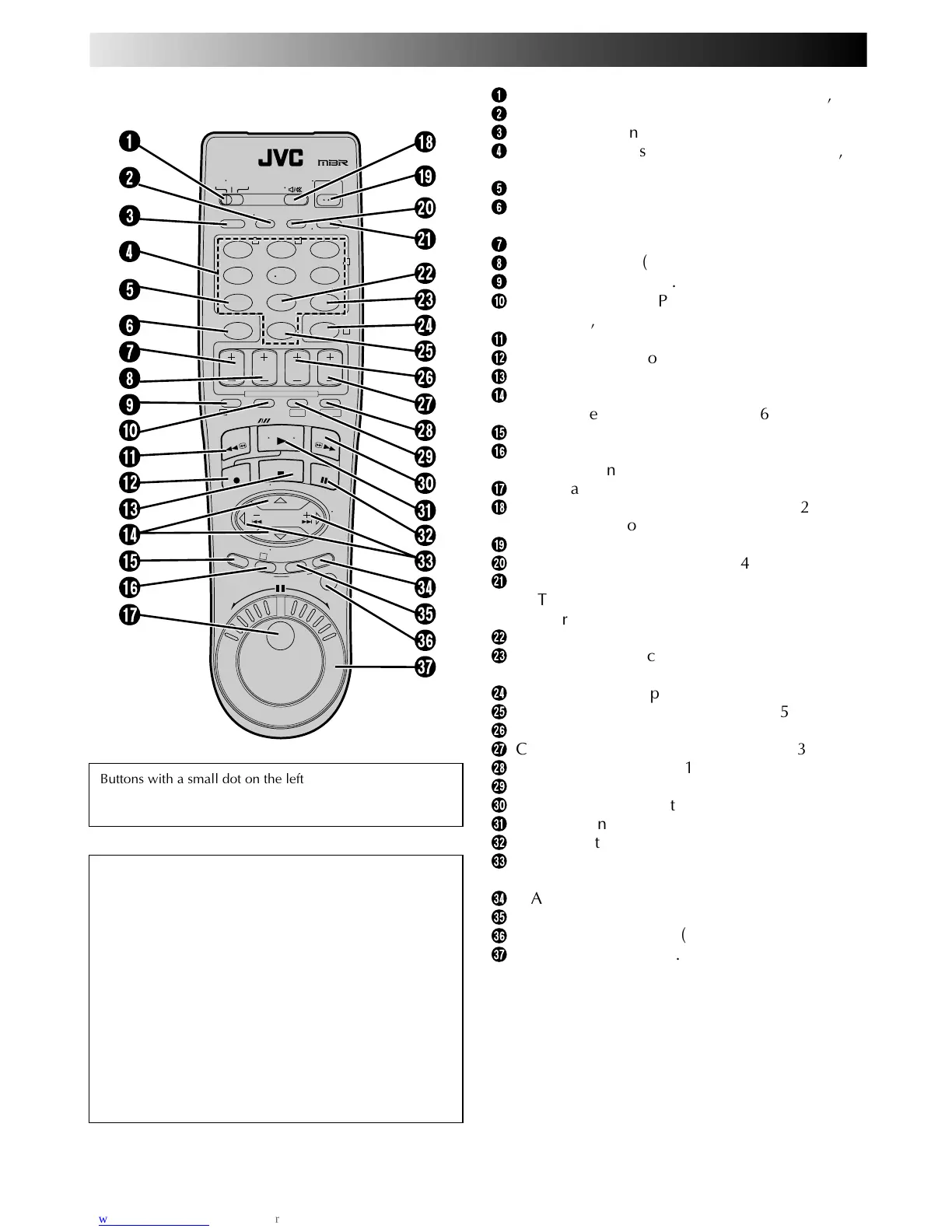
Buttons with a small dot on the left side of the name can
also be used to operate your TV with the VCR/TV/CABLE/
DBS switch set to TV. 墌 pg. 64
How To Use
The remote control can operate most of your VCR's
functions, as well as basic functions of TV sets, Cable
Boxes and DBS Receivers.
● Point the remote control toward the sensor window.
● The maximum operating distance of the remote
control is about 8 m.
NOTES:
●
When inserting the batteries, be sure to insert in the
correct directions as indicated under the battery cover.
●
If the remote control doesn't work properly, remove its
batteries. Replace with fully charged batteries and then
try again.
INDEX (cont.)
1
VCR/TV/CABLE/DBS Switch (墌 pg. 64, 65, 66)
2
TV/VCR Button (墌 pg. 64)
3
A/B Code Button (墌 pg. 67)
4
NUMBER Buttons (墌 pg. 22, 23, 40, 64, 65,
66)
5
DBS Button (墌 pg. 45)
6
CANCEL Button (墌 pg. 46)
Counter [C.] RESET Button (墌 pg. 28)
7
START +/– Button (墌 pg. 44)
8
STOP +/– Button (墌 pg. 44)
9
PROG. Button (墌 pg. 40, 44)
0
Recording Speed [SP/LP, SP/EP] Button
(墌 pg. 22, 23)
!
Rewind [REW] Button (墌 pg. 21)
@
Record [REC] Button (墌 pg. 22, 23)
#
STOP Button (墌 pg. 21)
$
%fi Button (墌 pg. 9)
TV Channel [CH] +/– (墌 pg. 64, 65, 66)
%
MENU Button (墌 pg. 9)
^
OK Button (墌 pg. 9)
START Button (墌 pg. 51, 53)
&
JOG Dial (墌 pg. 24)
*
Audio [A.] MONITOR Button (墌 pg. 32, 33)
TV Muting Button (墌 pg. 64)
(
Power On/Off Button (墌 pg. 9)
)
PROG. CHECK Button (墌 pg. 46)
q
DISPLAY Button (墌 pg. 28)
ENTER Button (墌 pg. 22, 23)
On-Screen Display [OSD] Button (墌 pg. 27)
w
DAILY Timer Recording Button (墌 pg. 41, 45)
e
WEEKLY Timer Recording Button
(墌 pg. 41, 45)
r
TIMER Button (墌 pg. 41, 45)
t
"AUX" Mode Select Button (墌 pg. 55)
y
DATE +/– Button (墌 pg. 44)
u
Channel [CH] +/– Button (墌 pg. 22, 23, 44)
i
S-VHS Button (墌 pg. 21)
o
DV Button (墌 pg. 21)
p
Fast Forward [FF] Button (墌 pg. 21)
Q
PLAY Button (墌 pg. 21)
W
PAUSE Button (墌 pg. 25)
E
™ £ (
@#
) Button (墌 pg. 24, 28)
TV Volume [VOL] +/– Button (墌 pg. 62)
R
R.A. EDIT Button (墌 pg. 52)
T
IN/OUT Button (墌 pg. 52)
Y
JOG/SHUTTLE Button (墌 pg. 24)
U
SHUTTLE Ring (墌 pg. 21, 24)



 To Next Page