72 EN
INDEX (cont.)
FRONT VIEW
DV IN/OUT
S-VHSDV
S-VIDEO
PAUSE
VIDEO
(M) L —AUDIO— R
A.DUBINSERT
CH
DV S-VHS
STARTR.A.EDIT
IN/OUT
S-VHS ET
F
–
1
DUB
POWER
EJECT
STOP PLAY PAUSE REC
EJECT
%$&^e() q
w
2715489
0
!
#
@
rt
3
y
u
io
6
*
INDEX
1
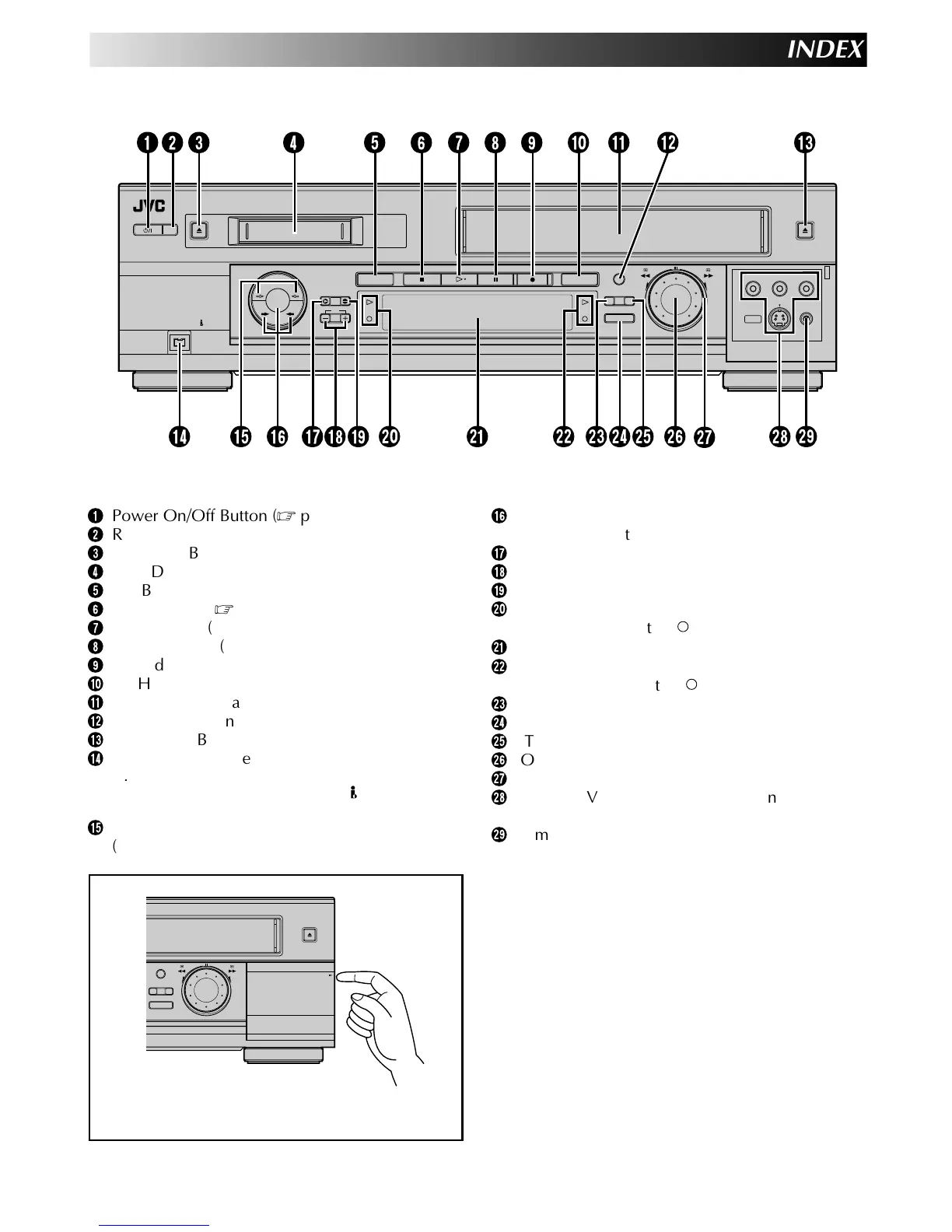
Power On/Off Button (墌 pg. 9)
2
Remote Control Sensor
3
DV EJECT Button (墌 pg. 21)
4
Mini DV Cassette Loading Slot
5
DV Button (墌 pg. 21)
6
STOP Button (墌 pg. 21)
7
PLAY Button (墌 pg. 21)
8
PAUSE Button (墌 pg. 22, 23, 24)
9
Record [REC] Button (墌 pg. 22, 23)
0
S-VHS Button (墌 pg. 21)
!
VHS Cassette Loading Slot
@
S-VHS ET Button (墌 pg. 38, 39)
#
VHS EJECT Button (墌 pg. 21)
$
DV IN/OUT connector (i.Link*) (墌 pg. 54)
* i.Link refers to the IEEE1394-1995 industry specifi-
cation and extensions thereof. The
logo is used for
products compliant with the i.Link standard.
%
Dubbing Direction [DV →/← S-VHS] Indicators
(墌 pg. 50)
^
Dubbing (DUB) Button (墌 pg. 50)
Dubbing Direction [→/←] Buttons (墌 pg. 50)
&
INSERT Button (墌 pg. 60)
*
CH +/– Buttons (墌 pg. 22, 23)
(
Audio Dubbing [A. DUB] Button (墌 pg. 58)
)
DV Play Indicator (#) (墌 pg. 21)
DV Record Indicator ( ) (墌 pg. 23)
q
Display Panel (墌 pg. 73)
w
VHS Play Indicator (#) (墌 pg. 21)
VHS Record Indicator ( ) (墌 pg. 22)
e
R.A.EDIT Button (墌 pg. 52)
r
IN/OUT Button (墌 pg. 52)
t
START Button (墌 pg. 51, 53)
y
JOG Dial (墌 pg. 24)
u
SHUTTLE Ring (墌 pg. 21, 24)
i
S-VIDEO/VIDEO/AUDIO Input Connectors
(墌 pg. 54, 58, 60)
o
Remote PAUSE connector (墌 pg. 58)
START



 To Next Page