ENGLISH
45SETTINGS
Continued on the next page
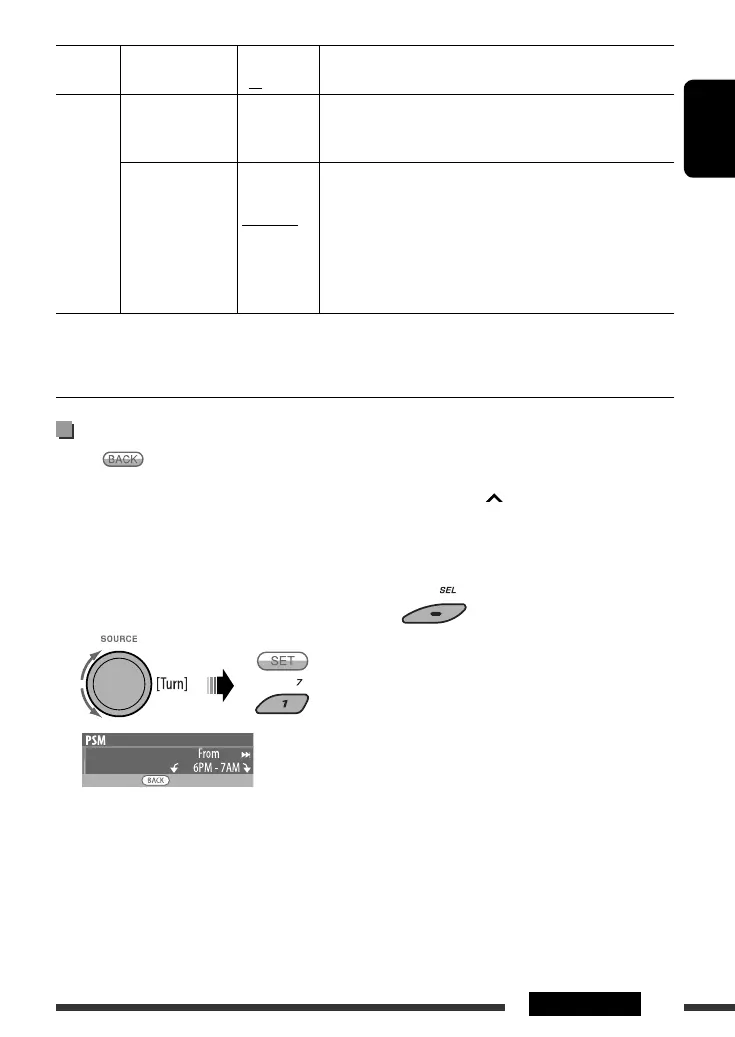
3 Adjust the dimmer start time.
1 Turn the control dial to set the dimmer start
time.
2 Press ¢ to select “To.” Then, turn the
control dial to set the dimmer end time.
4 Exit from the setting.
Setting the time for dimmer
• When is shown on the display, you can move
back to the previous screen by pressing number
button 3.
1 Follow steps 1 to 3 on page 42.
• In step 2, select “DISPLAY.”
• In step 3, select “Dimmer.”
2 Select “Time Set.”
Category Indication Item
( : Initial)
Setting, [reference page]
COLOR
Color Sel
Color selection
Initial: All
Source;
Color: Pale
: Select your favorite display color for each source (or for all
sources), [46].
Color Set
Color setting
Red
Green
Blue
—
Day Color
NightColor
00 — 11
00 — 11
00 — 11
: Create your own colors, and select them for the display color,
[46].
: User color during the day time *
10
.
: User color during the night time *
10
.
: Initial: Day Color: 07, NightColor: 05
: Initial: Day Color: 07, NightColor: 05
: Initial: Day Color: 07, NightColor: 05
*
10
Depends on the “Dimmer” setting.
EN42-49_KD-ADV8490[J]_2.indd 45EN42-49_KD-ADV8490[J]_2.indd 45 3/13/08 9:58:34 AM3/13/08 9:58:34 AM



 To Next Page