ENGLISH
50 SETTINGS
3 Assign a title.
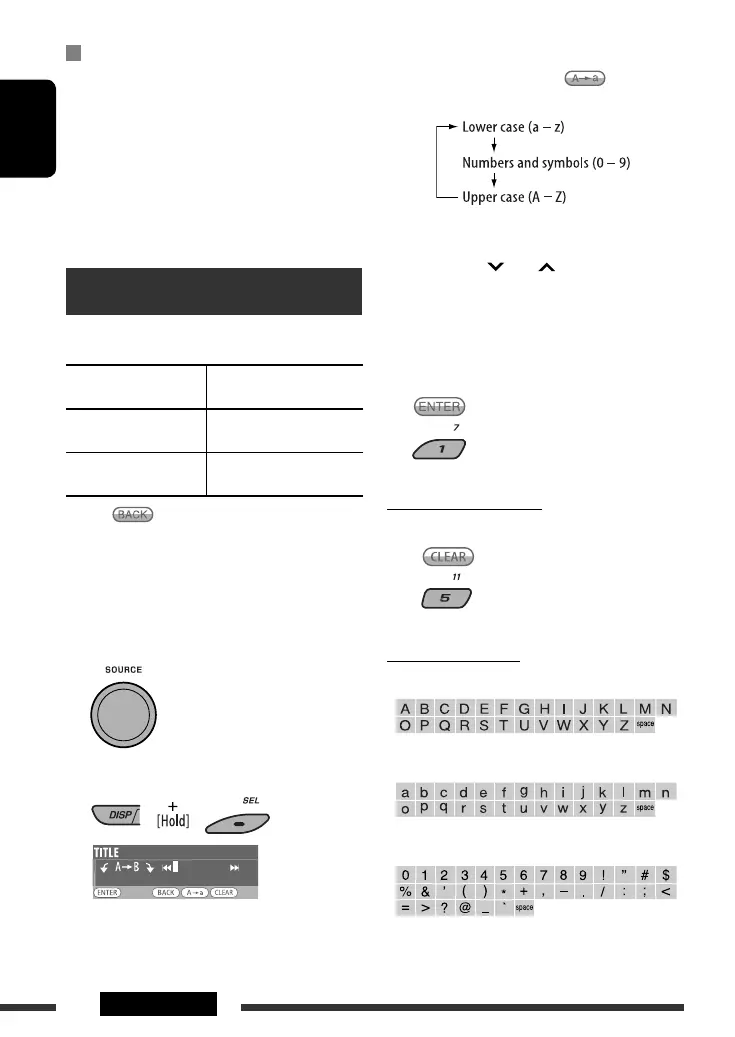
1 Press number button 4 ( ) repeatedly
to select a character set.
2 Turn the control dial to select a character. (For
available characters, see the right column.)
3 Use 4 /¢ to move to the next (or
previous) character position.
4 Repeat steps 1 to 3 until you finish entering
the title.
4 Store the title.
To erase the entire title
In step 3 above...
Available characters
Upper case
Lower case
Numbers and symbols
Audio Device *
2
Name of the connected Bluetooth audio player.
*
1
If the connected Bluetooth phone does not support
text message notification (via Bluetooth), the unit will
not receive any notification upon the arrival of a text
message
*
2
Appears only when a Bluetooth phone/audio player is
connected.
Title assignment
You can assign titles to station frequencies and external
components (EXT IN, LINE IN, or AV IN).
Sources
Maximum number of
characters
FM/AM tuner Up to 10 characters (up to
30 station frequencies )
External components
(EXT IN, LINE IN, or AV IN)
Up to 8 characters
• When is shown on the display, you can move
back to the previous screen by pressing number
button 3.
1 Select the sources.
• For FM/AM tuner: Tune into a station.
• For external components: Select “EXT IN,”
“LINE IN,” or “AV IN.” (see page 38).
2 Show the title entry screen.
EN50-57_KD-ADV8490[J]_5.indd 50EN50-57_KD-ADV8490[J]_5.indd 50 15/4/08 5:18:14 AM15/4/08 5:18:14 AM



 To Next Page