14
ENGLISH
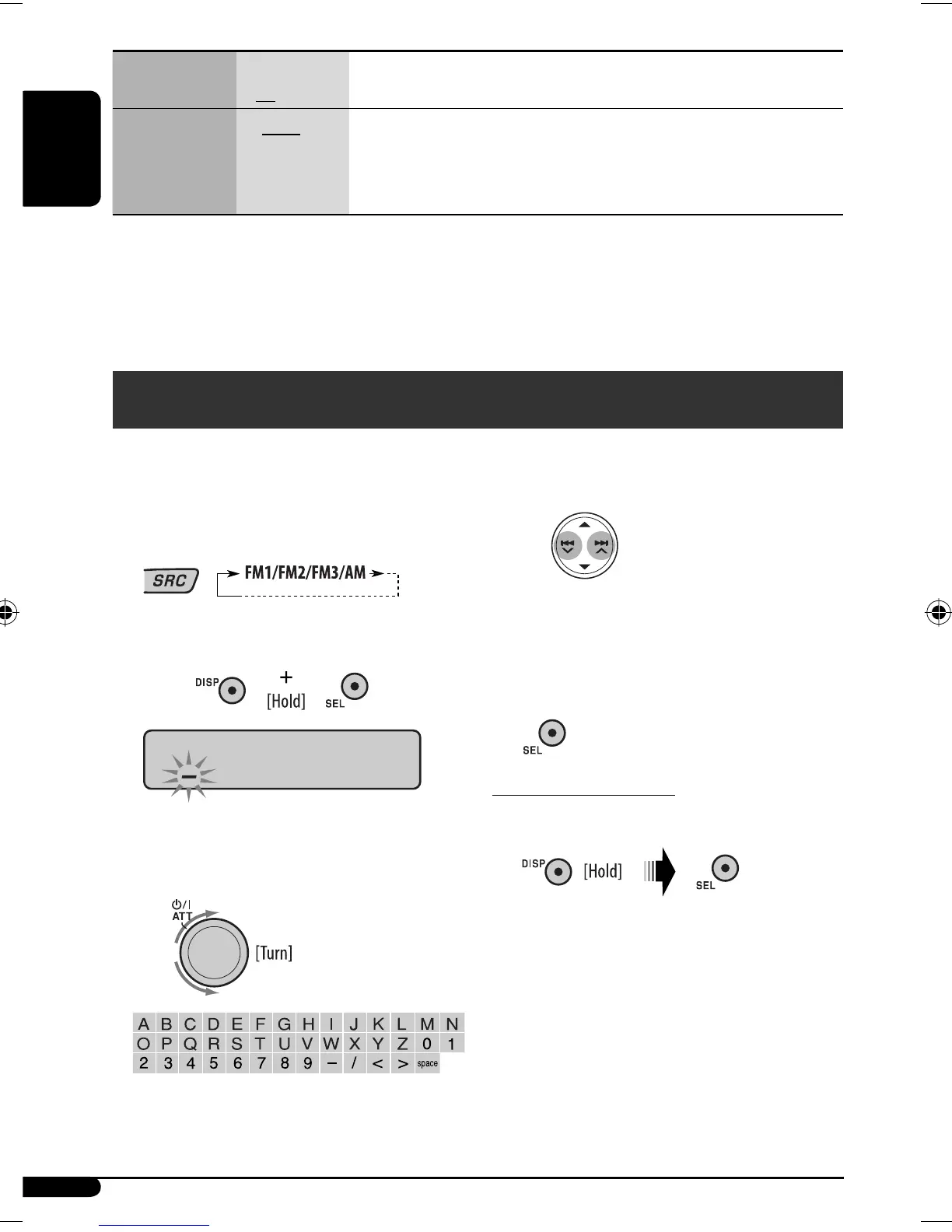
2 Move to the next (or previous) character
position.
3 Repeat steps 1 and 2 until you finish
entering the title.
4 Finish the procedure.
To erase the entire title
In step 2 on the left...
Indications Item
( : Initial)
Setting, [reference page]
IF BAND
Intermediate
frequency band
• AUTO
• WIDE
: Increases the tuner selectivity to reduce interference noises between
close stations. (Stereo effect may be lost.)
: Subject to interference noises from adjacent stations, but sound quality
will not be degraded and the stereo effect will remain.
*
1
If the power supply is not interrupted by turning off the ignition key of your car, it is recommended to select “OFF” to
save the car’s battery.
*
2
Some characters or symbols will not be shown correctly (or will be blanked) on the display.
*
3
Displayed only when “L/O MODE” is set to “WOOFER.”
*
4
Displayed only when one of the following sources is selected—FM, AM, CD, or USB.
Title assignment
You can assign names to 30 station frequencies (FM and
AM) and up to 8 characters for each station name.
1 Select FM/AM.
2 Show the title entry screen.
3 Assign a title.
1 Select a character.
EN14-19KD-G635[U]_f.indd 14EN14-19KD-G635[U]_f.indd 14 11/1/06 3:23:51 PM11/1/06 3:23:51 PM


 To Next Page
 Loading...