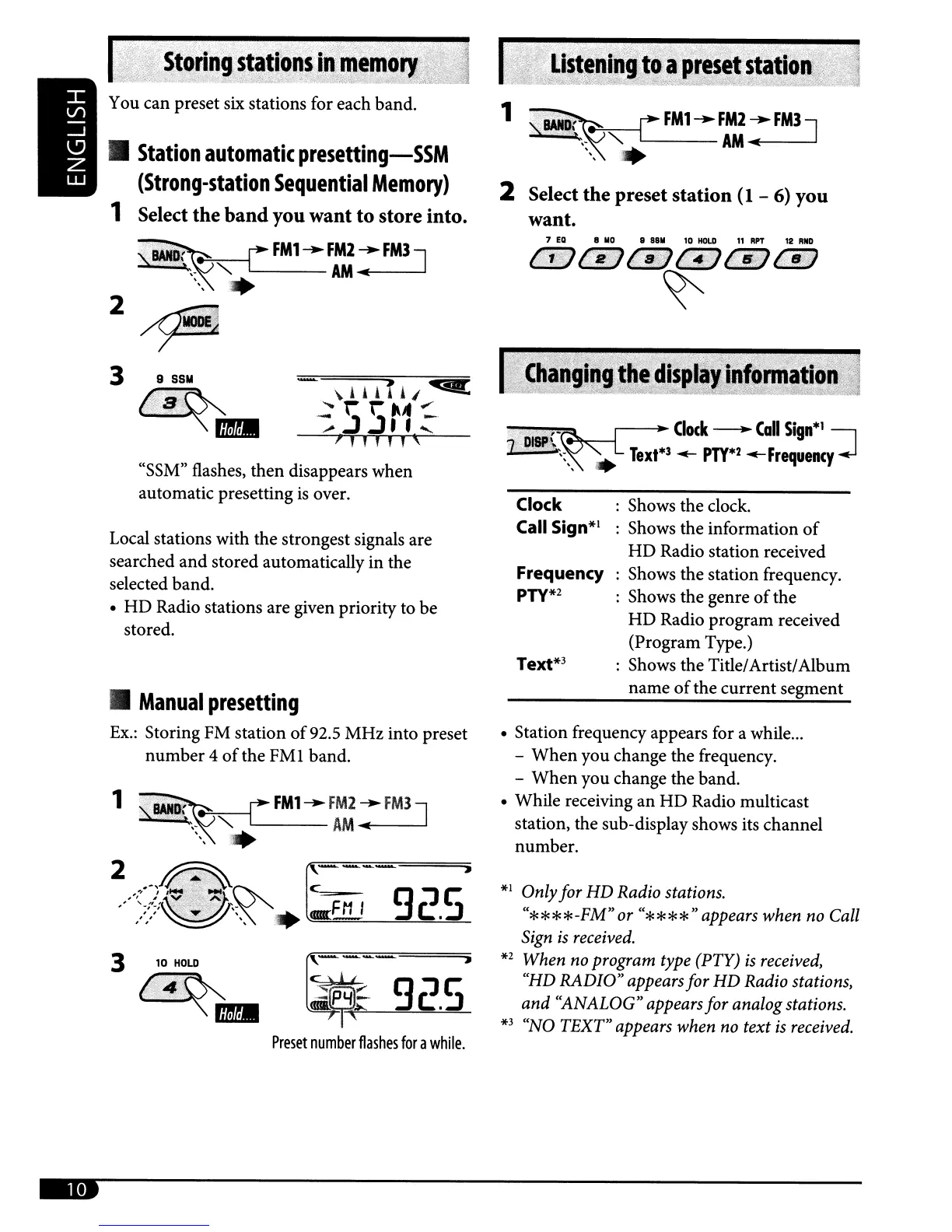
: Shows the clock.
: Shows the information
of
HD
Radio station received
: Shows the station frequency.
: Shows the genre
of
the
HD
Radio program received
(Program Type.)
: Shows the Title/Artist/Album
name
of
the current segment
Frequency
PTY*2
Text*3
Clock
Call Sign*1
.' , ' .. ,10 [ •
Clock
-
Call
Sign*'
I
2
DISP\~~;;
Text*3
...-
PTY*2
...-Frequency
~
*1
Onlyfor HD Radio stations.
"****-FM"
or
"****"
appears when no Call
Sign
is
received.
*2
When no program type (PTY)
is
received,
"HD
RADIO"
appears for
HD
Radio stations,
and
"ANALOG" appears for analog stations.
*3
"NO TEXT" appears when no text
is
received.
• Station frequency appears for a while
...
-
When
you change the frequency.
-
When
you change the band.
• While receiving
an
HD
Radio multicast
station, the sub-display shows its channel
number.
2 Select the preset station
(1
-
6)
you
want.
,,,,,,,
•
Manual
presetting
Ex.:
Storing FM station
of
92.5 MHz into preset
number
4
of
the
FMl
band.
c~
4, 9:J
c:
:"'lPYl~
c:
.:J
<BII.~""~---"'~~~
Preset
number
flashes
for
a
while.
Local stations with the strongest signals are
searched
and
stored automatically in the
selected band.
•
HD
Radio stations are given priority to be
stored.
"SSM" flashes, then disappears when
automatic presetting
is
over.
I;·,":·
.:
.
S!!ringstCl!i!n~
~~1~~m;~~:;~"1J~i
You can preset six stations for each
band
.
•
Station
automatic
presetting-SSM
(Strong-station
Sequential
Memory)
1 Select the
band
you want
to
store into.
"~
rFM1--FAMM2~FM3J
~,-
"'"
-.;
,
,
,
2?
3 9
SSM
~
'.;;L.;.··S.·;··.I:'.;
•....
".,
':;,t,
""','.'
)->
mDI



 To Next Page
 Loading...









