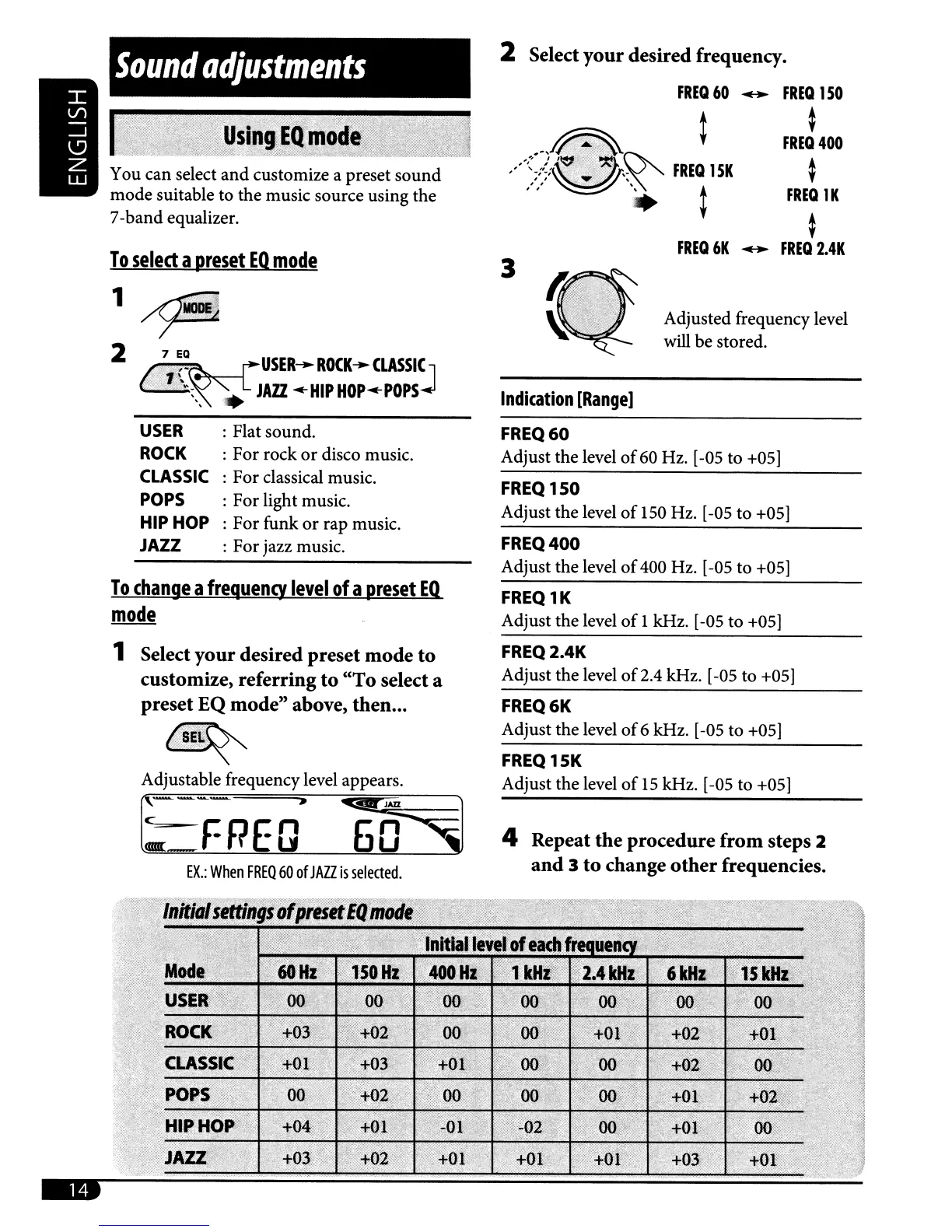
Adjusted frequency level
will
be stored.
4 Repeat the procedure from steps 2
and
3
to
change
other
frequencies.
FREQ
15K
Adjust the level
of
15
kHz. [-05 to +05]
FREQ
1K
Adjust the level
of
1 kHz. [-05 to +05]
FREQ6K
Adjust the level
of
6 kHz. [-05
to
+05]
FREQ
2.4K
Adjust the level
of
2.4 kHz. [-05 to +05]
FREQ400
Adjust the level
of
400 Hz. [-05 to +05]
Indication
[Rangel
FREQ
150
Adjust the level
of
150 Hz. [-05 to +05]
FREQ60
Adjust the level
of
60 Hz. [-05 to +05]
3
2 Select your desired frequency.
FREQ
60
..
FREQ
1
SO
~
FREQ
400
~
FREQ
1K
~
FREQ
6K
..
FREQ
2.4K
USER
....
ROCK
...
CLASSI~
•
JAZZ
'-HIP
HOP'-POPS
: Flat sound.
: For rock
or
disco music.
: For classical music.
: For light music.
: For funk
or
rap music.
: For jazz music.
7
EQ
USER
ROCK
CLASSIC
POPS
HIP
HOP
JAZZ
Sound
adjustments
r-FREQ'
6'f§1
EX.:
When
FREQ
60
of
JAZZ
is
selected
.
Adjustable frequency level appears.
To
change
a
frequency
level
of
a
preset
EQ.
mode
1 Select your desired preset mode to
customize, referring
to
"To
select a
preset EQ mode" above, then...
2
'?
You can select
and
customize a preset
sound
mode suitable
to
the music source using the
7-band equalizer.
To
select
a
preset
EQ
mode
..



 To Next Page