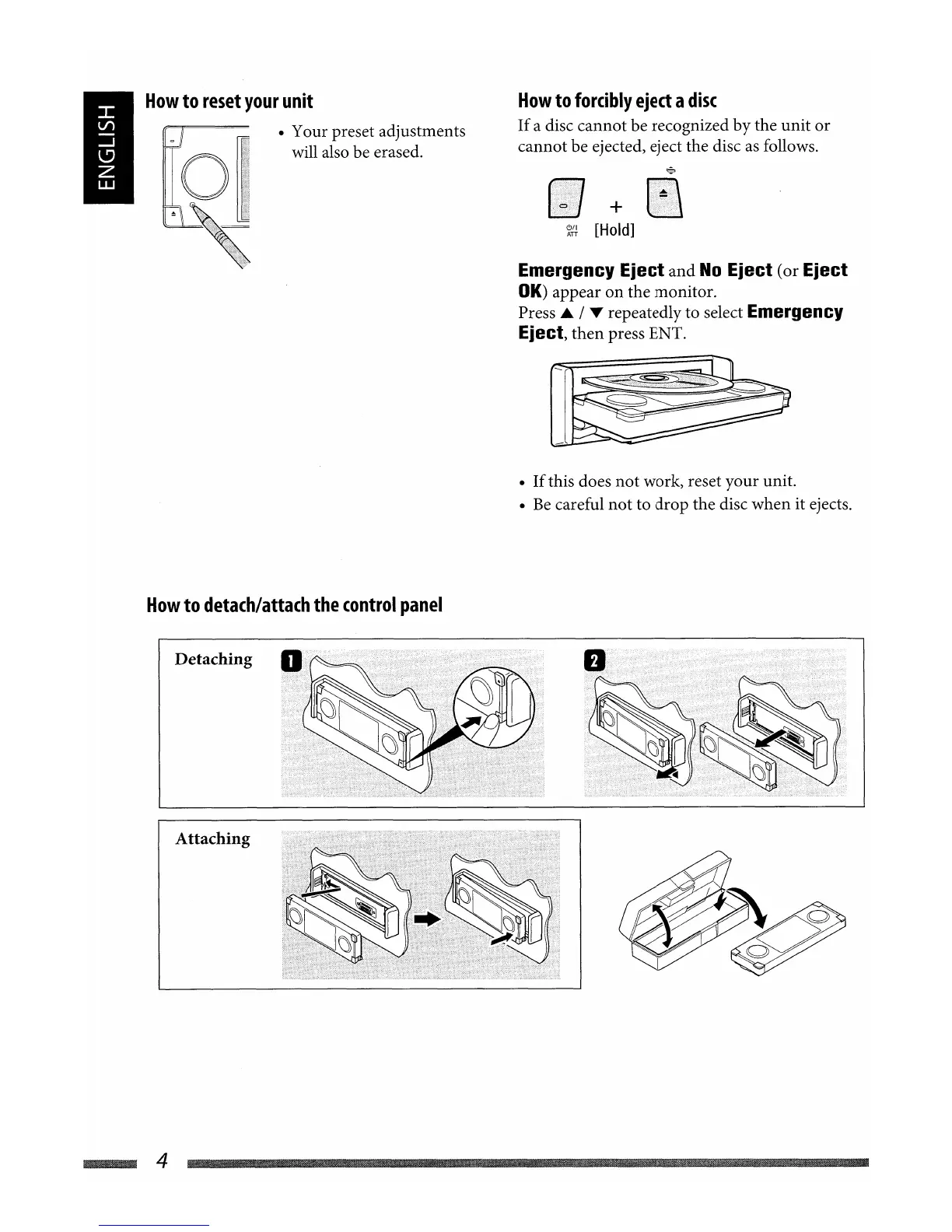
How
to
reset
your
unit
• Your preset adjustments
will also be erased.
How
to
detach/attach
the
control
panel
How
to
forcibly
eject
a
disc
If
a disc cannot be recognized by the unit
or
cannot be ejected, eject the disc
as
follows.
+
~{i
[Hold]
Emergency Eject
and
No
Eject (or Eject
OK)
appear on the monitor.
Press
..
/ T repeatedly to select Emergency
Eject,
then
press ENT.
•
If
this does
not
work, reset your unit.
•
Be
careful
not
to drop the disc when it ejects.
Detaching
Attaching
~4
How
to
reset
your
unit
• Your preset adjustments
will also be erased.
How
to
detach/attach
the
control
panel
How
to
forcibly
eject
a
disc
If
a disc cannot be recognized by the unit
or
cannot be ejected, eject the disc
as
follows.
+
~{i
[Hold]
Emergency Eject
and
No
Eject (or Eject
OK)
appear on the monitor.
Press
..
/ T repeatedly to select Emergency
Eject,
then
press ENT.
•
If
this does
not
work, reset your unit.
•
Be
careful
not
to drop the disc when it ejects.
Detaching
Attaching
~4


 To Next Page