Using
Bluetooth
@
devices-Cellular
phone/audio
player
For Bluetooth operations, it
is
required to connect the Bluetooth Adapter
(KS-
BTA200) to the CD
changer jack
on
the rear.
• Refer also to the instructions supplied with the Bluetooth Adapter
and
the Bluetooth device.
• Refer to the list (included in the box) to see the countries where you may use the Bluetooth®
function.
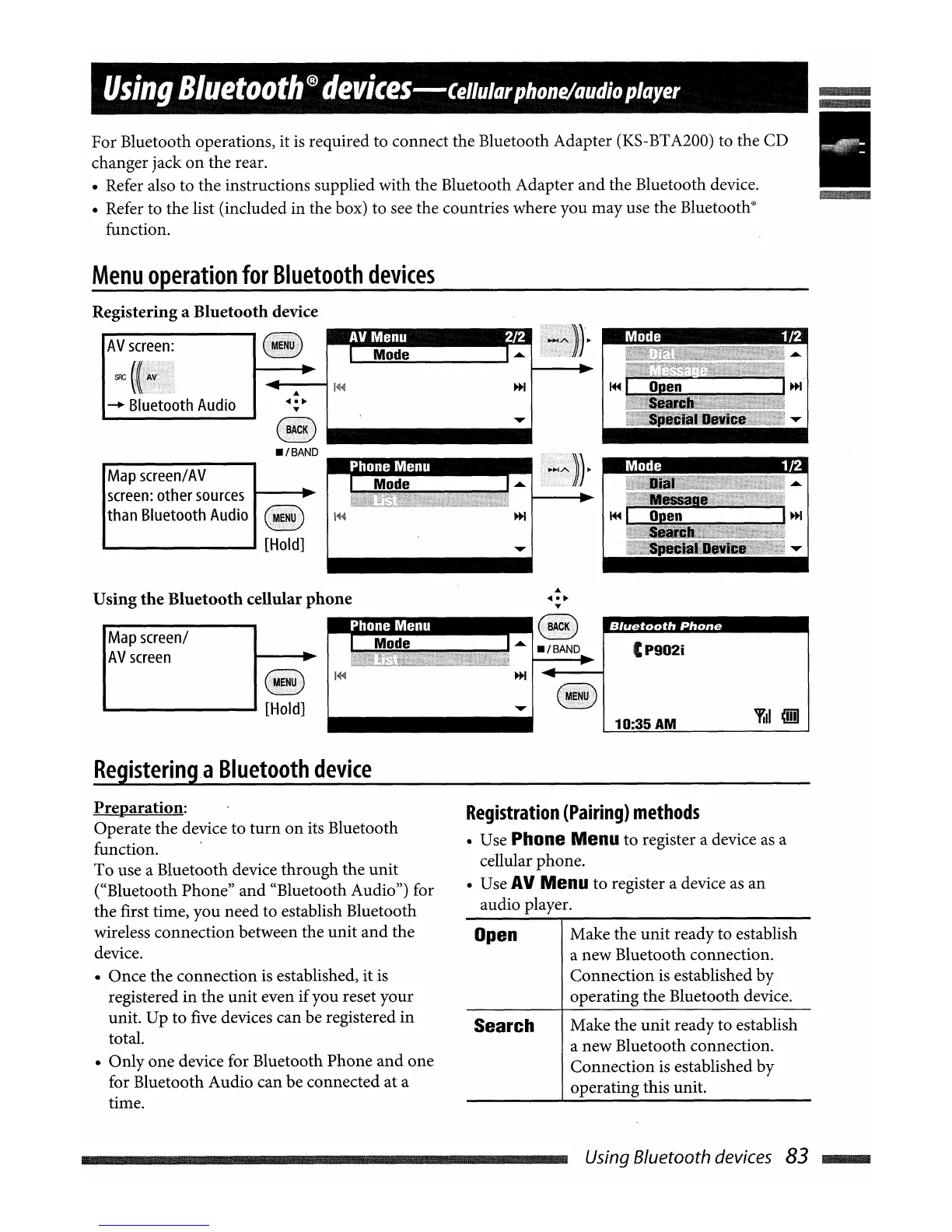
Menu
operation
for
Bluetooth
devices
Registering a
Bluetooth
device
AV
screen:
.rJ1'jm~IIIIIIIIIII
••
SRC
~
Bluetooth
Audio
Map
screen/
AV
screen:
other
sources
1----..
than Bluetooth
Audio
""-
-1
[Hold]
-
~
I
ODen
-
~
I 00
en
I~
I~
Using
the
Bluetooth
cellular
phone
Map
screen/
AV
screen
Registering.a
Bluetooth
device
Mode
Bluetooth
Phone
CP902i
10:35 AM
Preparation:
Operate the device to
turn
on
its Bluetooth
function. .
To use a Bluetooth device through the unit
((Bluetooth Phone"
and
«Bluetooth Audio") for
the first time, you need to establish Bluetooth
wireless connection between the unit
and
the
device.
• Once the connection
is
established, it
is
registered in the unit even
if
you reset your
unit. Up to five devices can be registered in
total.
• Only one device for Bluetooth Phone
and
one
for Bluetooth Audio can be connected at a
time.
Registration
(Pairing)
methods
• Use Phone Menu to register a device
as
a
cellular phone.
• Use
AV
Menu to register a device
as
an
audio player.
Open
Make the unit ready to establish
a new Bluetooth connection.
Connection is established by
operating the Bluetooth device.
Search Make the unit ready to establish
a new Bluetooth connection.
Connection
is
established by
operating this unit.
Using Bluetooth devices 83
....


 To Next Page