Select the initial disc
menu
language
(I@"
also [97]).
(English)
Alaska,
Pacific,
Mountain,
Central, Eastern,
Atlantic,
Newfoundl·and
(Initial
setting)
Select playback file type when a disc contains different
types
of
files.
Audio: Plays back audio files.
Still
Picture: Plays back JPEG files.
Video: Plays back DivX/MPEG files.
Activate this ifyour residential area
is
subject to DST.
Off: Cancels.
Auto: Automatically applies DST when necessary.
Select the on-screen language used for the external
monitor
connected to the VIDEO
OUT
plug. (English)
Select the initial audio language
(I@"
also [97]). (English)
Select the initial subtitle language
or
erase the subtitle (Off)
(I@"
also [97]).
Selectable
settings
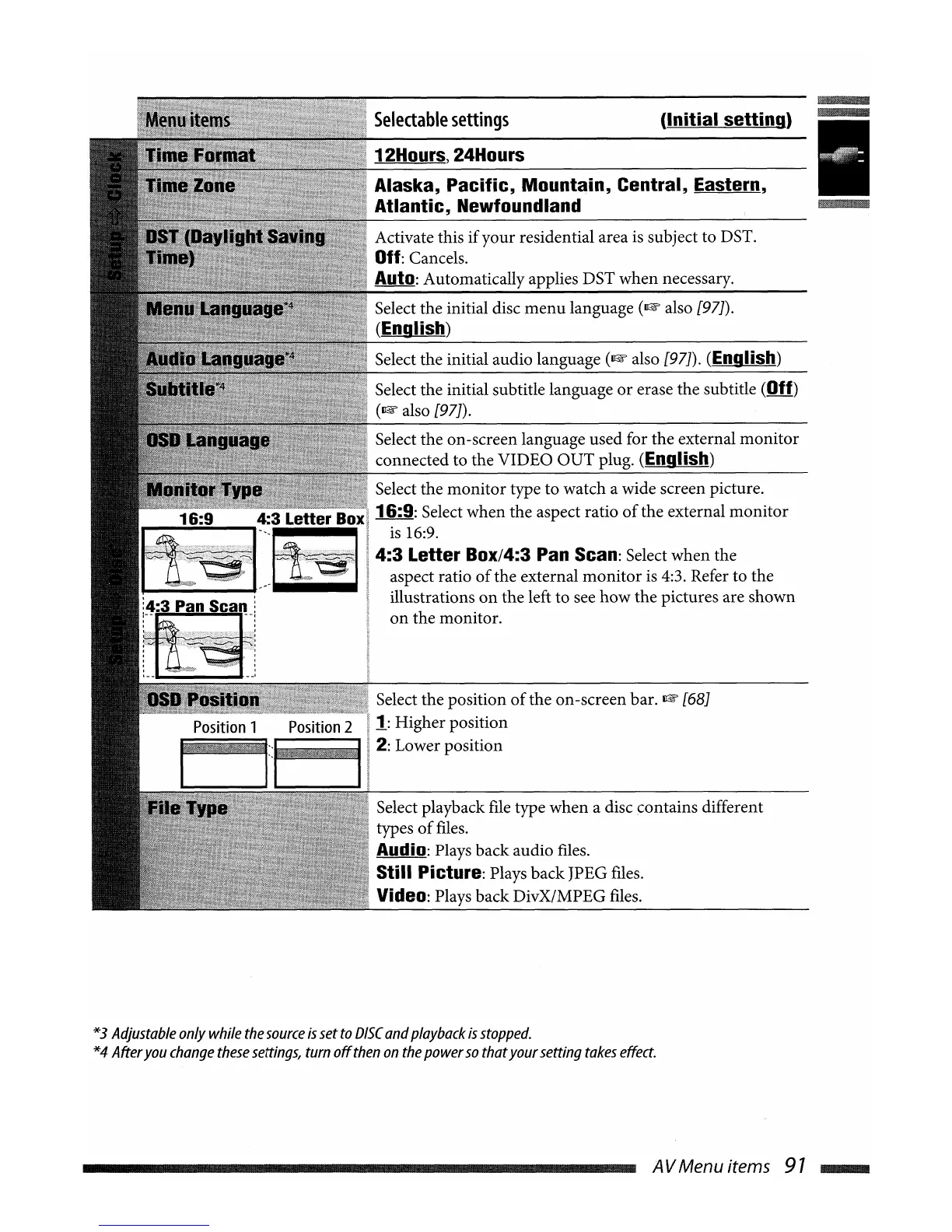
Select the monitor type to watch a wide screen picture.
16:9: Select when the aspect ratio
of
the external
monitor
is
16:9.
4:3
Letter
Box/4:3 Pan Scan: Select when the
aspect ratio
of
the external
monitor
is
4:3. Refer to the
illustrations
on
the left to see how the pictures are shown
on
the monitor.
12Hours, 24Hours
Select the position
of
the on-screen bar.
I@"
[68]
1:
Higher position
2: Lower position
4:3 Letter Box
--------':::6
*3
Adjustable
only
while
the
source
is
set
to
DISC
and
playback
is
stopped.
*4
After
you
change
these
settings,
turn
off
then
on
the
power
so
that
your
setting
takes
effect.
AVMenuitems
97
....


 To Next Page