C*2p902i
Calling
•..
Jack
09845671234
~
~l
10:35
AM
Bluetooth
Phone
Bluetooth
icon
lights
up
when
the adapter
is
connected.*l
l1
0
Status
ofthe
device*3
Signal
strength/Battery
remainder
*1
Blue:
The
device
is
connected.
White:
The
device
is
not
connected.
*2 C
Cellular
phone
S,
Cellular
phone
with
audio
function
*3
Appears
only
when
the
information
comes
from
the
device.
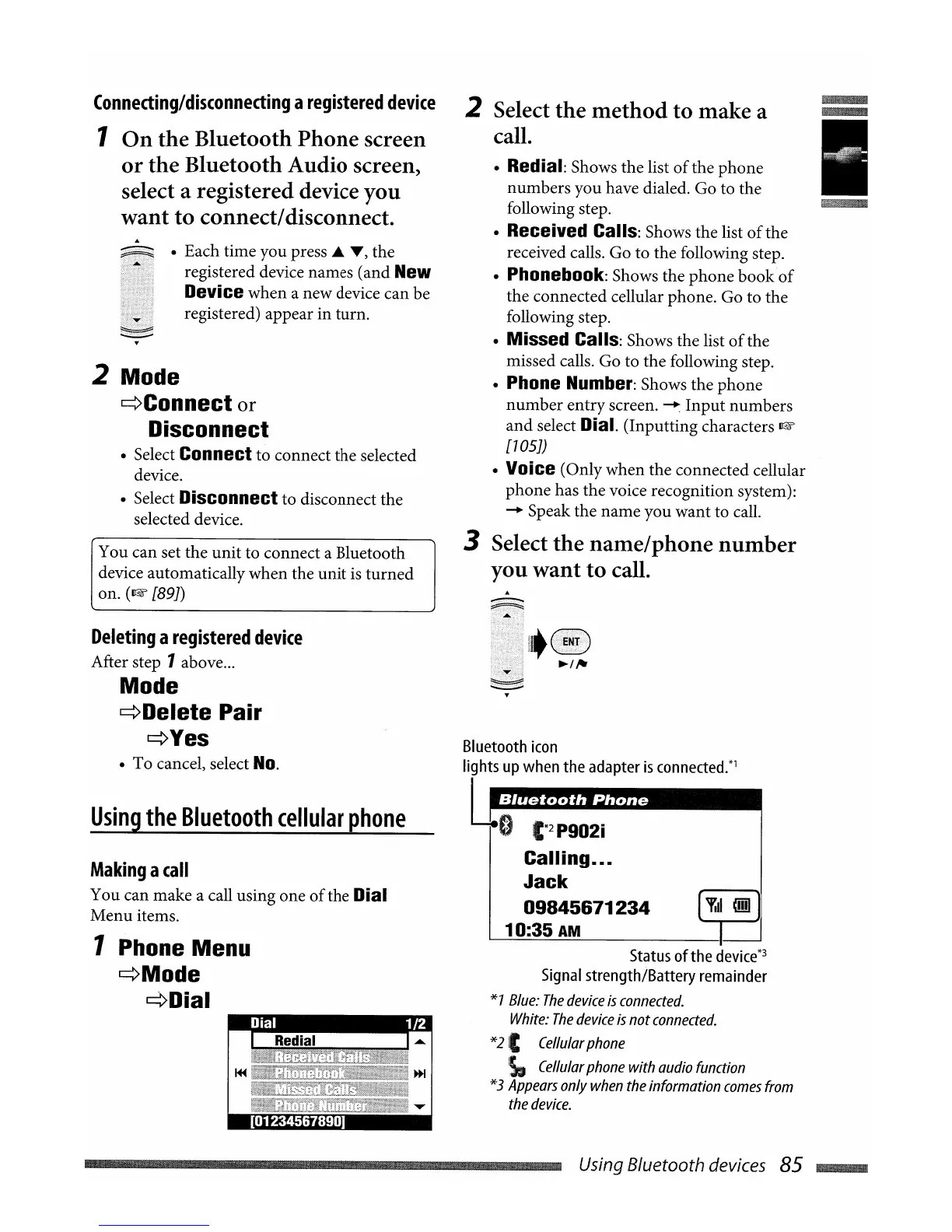
2 Select
the
method
to
make a
call.
• Redial: Shows the list
of
the phone
numbers you have dialed. Go to the
following step.
• Received Calls: Shows the list
of
the
received calls. Go to the following step.
• Phonebook: Shows the phone book
of
the connected cellular phone. Go to the
following step.
• Missed Calls: Shows the list
of
the
missed calls. Go to the following step.
• Phone Number: Shows the phone
number
entry screen.
~
Input
numbers
and
select Dial. (Inputting characters
~
[105])
• Voice (Only when the connected cellular
phone has the voice recognition system):
-+
Speak the name you want to call.
3 Select
the
name/phone
number
you
want
to
call.
• Each time you press ...
T)
the
registered device names (and
New
Device
when a new device can be
registered) appear in turn.
Making
a
call
You can make a call using one
of
the Dial
Menu
items.
I.
1 Phone Menu
~Mode
~Dial
You can set the unit to connect a Bluetooth
device automatically when the unit
is
turned
on.
(~[89J)
Using
the
Bluetooth
cellular
phone
Deleting
a
registered
device
After step 1above
...
Mode
~Delete
Pair
~Yes
• To cancel, select
No.
Redial
2 Mode
~Connect
or
Disconnect
• Select Connect to connect the selected
device.
• Select
Disconnect to disconnect the
selected device.
Connecting/disconnecting
a
registered
device
1
On
the
Bluetooth Phone screen
or
the
Bluetooth Audio screen,
select a registered device you
want
to
connect/disconnect.
[01234567890]
Using Bluetooth devices
85
~


 To Next Page