Selecting
tracks
on
the
list
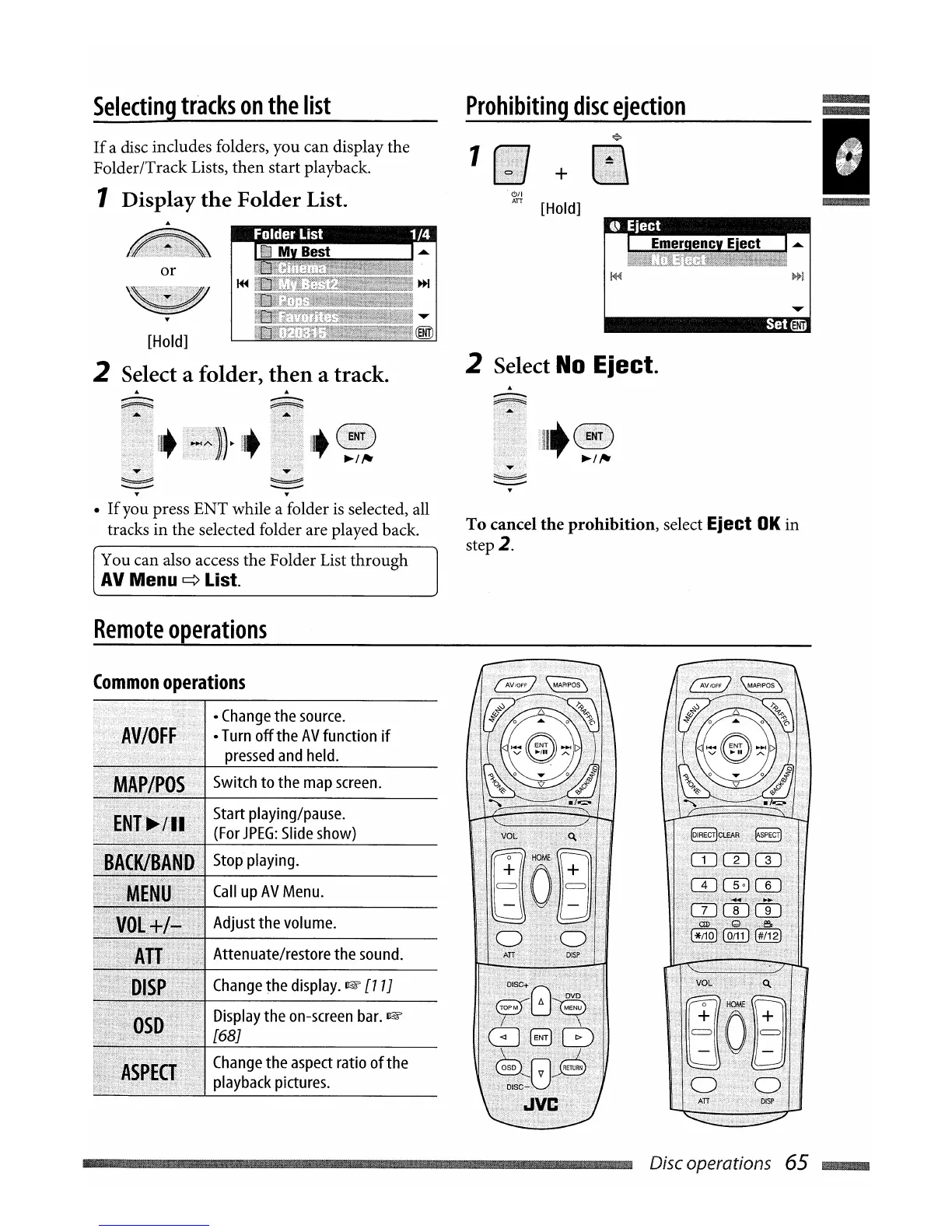
If
a disc includes folders, you can display the
Folder/Track Lists, then start playback.
1 Display
the
Folder List.
Prohibiting
disc
ejection
+
~{i
[Hold]
"".11"
III
M Best
I EliiefQencv Eiect I
...
or
[Hold]
2 Select a folder,
then
a track.
•
If
you press ENT while a folder
is
selected, all
tracks in the selected folder are played back.
You can also access the Folder List through
AV
Menu
~
List.
Remote
operations
Common
operations
. .
..
I·
Change
the
source.
_.
_ _ _
I·
Turn
offthe
AV
function
if
..
..
pressed
and
held.
Switch
to
the
map
screen.
Start
playing/pause.
(For
JPEG:
Slide
show)
Stop
playing.
Call
up
AV
Menu.
Adjust
the
volume.
Attenuate/restore the
sound.
Change
the
display.
~
[11J
Display
the
on-screen
bar.
~
[68J
Change
the
aspect
ratio ofthe
playback
pictures.
ENTl
2 Select
No
Eject.
To
cancel
the
prohibition,
select
Eject
OK
in
step
2.
Disc operations 65
~


 To Next Page