Rearranging
the
order
of
tracks,
albums
and
genres
Ex.
To
rearrange
the
order
of
tracks
in
an
album
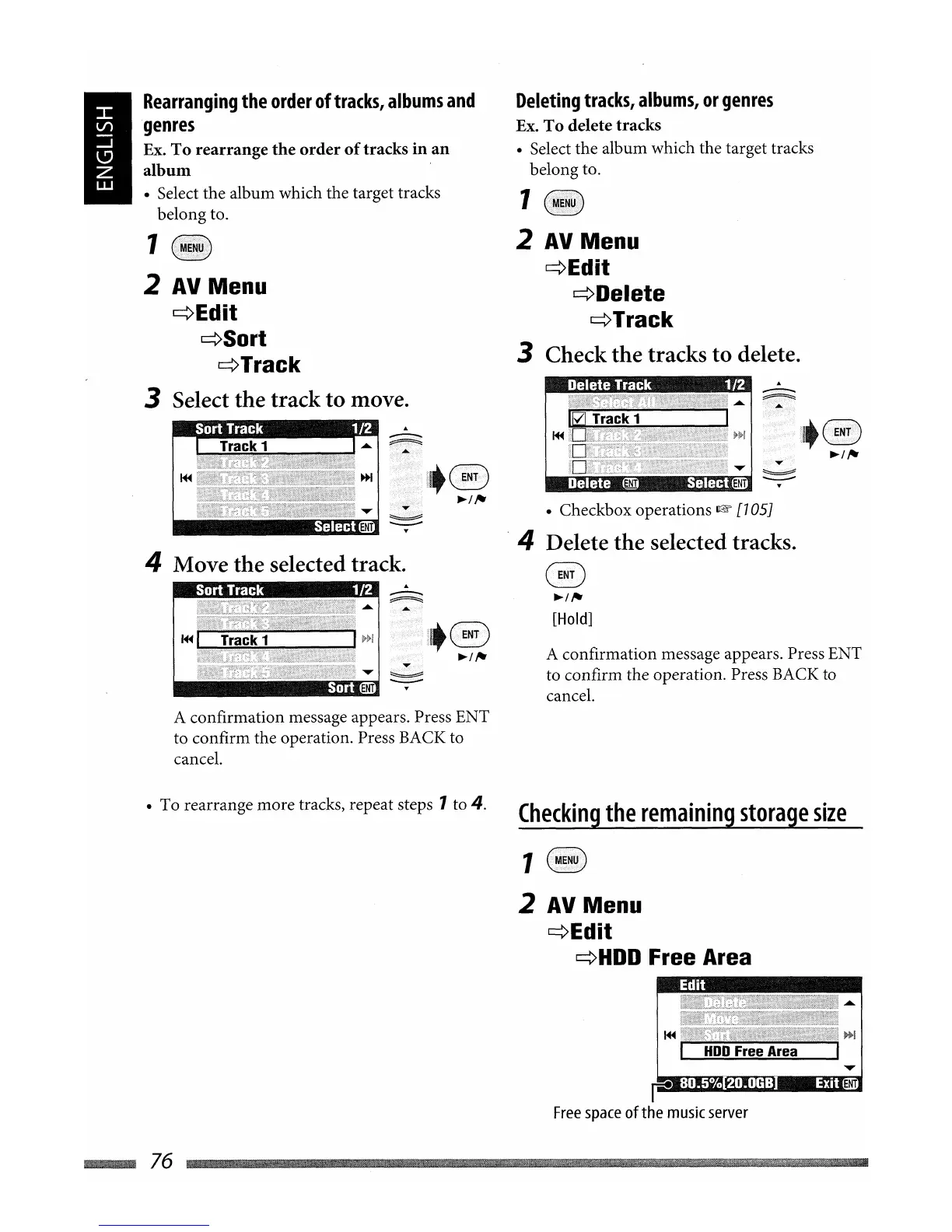
• Select the album which the target tracks
belong to.
A confirmation message appears. Press ENT
to confirm the operation. Press BACK to
cancel.
@
~/,.
[Hold]
Delete
track
1
L2
Deleting
tracks,
albums,
or
genres
Ex.
To
delete tracks
• Select the album which the target tracks
belong to.
1
2
AV
Menu
~Edit
~Delete
¢Track
3 Check
the
tracks
to
delete.
• Checkbox operations
l@'
[705J
.4 Delete the selected tracks.
I~
I Track I
PiH
II!iilill~
.....
I I i
..
ENT]
~
SelectmrJ
Sort
track
1
L2
4 Move the selected track.
1
2
AV
Menu
¢Edit
¢Sort
~Track
3 Select the track to move.
A confirmation message appears. Press ENT
to confirm the operation. Press BACK to
cancel.
• To rearrange more tracks, repeat steps
1 to 4.
Checking
the
remaining
storage
size
1
(B)
2
AV
Menu
¢Edit
¢HDD
Free Area
EDit
~76


 To Next Page