Calibration
Before using the Navigation System first time, it
is
required to calibrate the Navigation System.
• After deleting the calibration data
(1&
[46J
Reset Calibration)
or
changing the installation
angle
(1&
[46J
Installation
Angle), calibration
is
also required.
1 Display
the
map
screen.
POS
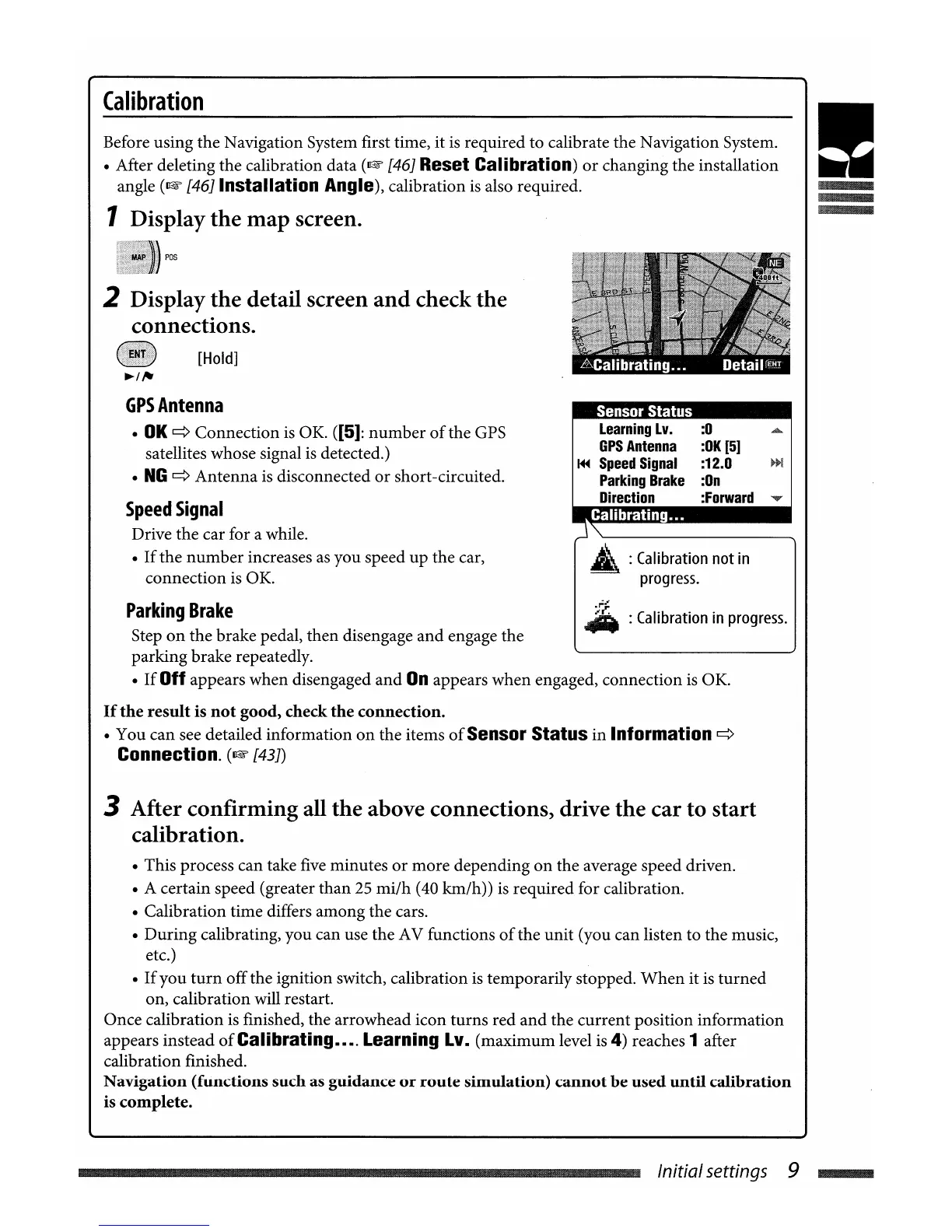
2 Display
the
detail screen
and
check the
connections.
[Hold]
GPSAntenna
•
OK
~
Connection
is
OK. ([5]:
number
of
the GPS
satellites whose signal
is
detected.)
•
NG
~
Antenna
is
disconnected
or
short-circuited.
Speed
Signal
Drive the car for a while.
•
If
the
number
increases
as
you speed up the car,
connection
is
OK.
Sensor Status
Learning
Lv.
:0
GPS
Antenna
:OK
[5]
~
Speed
Signal :12.0
~~!
Parking
Brake
:On
Direction :Forward
Calibrating•.•
~
:
Calibration
not
in
progress
.
.
r=;
..
:
Calibration
in
progress.
Parking
Brake
Step
on
the brake pedal, then disengage
and
engage the
parking brake repeatedly.
•
If
Off appears when disengaged
and
On
appears when engaged, connection
is
OK.
If
the
result
is
not
good, check
the
connection
.
• You can see detailed information
on
the items
of
Sensor Status in
Information
~
Connection.
(1&
[43J)
3 After confirming all the above connections, drive the car to
start
calibration.
• This process can take
five
minutes
or
more depending
on
the average speed driven.
• A certain speed (greater than
25
mi/h
(40 km/h))
is
required for calibration.
• Calibration time differs among the cars.
•
During
calibrating, you can use the AV functions
of
the unit (you can listen to the music,
etc.)
•
If
you
turn
offthe ignition switch, calibration
is
temporarily stopped.
When
it
is
turned
on, calibration will restart.
Once calibration
is
finished, the arrowhead icon turns red
and
the current position information
appears instead
of
Calibrating•••. Learning Lv. (maximum level
is
4)
reaches 1 after
calibration finished.
Navigation (functions such as guidance
or
route
simulation)
cannot
be
used
until
calibration
is complete.
Initialsettings 9
....
Calibration
Before using the Navigation System first time, it
is
required to calibrate the Navigation System.
• After deleting the calibration data
(1&
[46J
Reset Calibration)
or
changing the installation
angle
(1&
[46J
Installation
Angle), calibration
is
also required.
1 Display
the
map
screen.
POS
2 Display
the
detail screen
and
check the
connections.
[Hold]
GPSAntenna
•
OK
~
Connection
is
OK. ([5]:
number
of
the GPS
satellites whose signal
is
detected.)
•
NG
~
Antenna
is
disconnected
or
short-circuited.
Speed
Signal
Drive the car for a while.
•
If
the
number
increases
as
you speed up the car,
connection
is
OK.
Sensor Status
Learning
Lv.
:0
GPS
Antenna
:OK
[5]
~
Speed
Signal :12.0
~~!
Parking
Brake
:On
Direction :Forward
Calibrating•.•
~
:
Calibration
not
in
progress
.
.
r=;
..
:
Calibration
in
progress.
Parking
Brake
Step
on
the brake pedal, then disengage
and
engage the
parking brake repeatedly.
•
If
Off appears when disengaged
and
On
appears when engaged, connection
is
OK.
If
the
result
is
not
good, check
the
connection
.
• You can see detailed information
on
the items
of
Sensor Status in
Information
~
Connection.
(1&
[43J)
3 After confirming all the above connections, drive the car to
start
calibration.
• This process can take
five
minutes
or
more depending
on
the average speed driven.
• A certain speed (greater than
25
mi/h
(40 km/h))
is
required for calibration.
• Calibration time differs among the cars.
•
During
calibrating, you can use the AV functions
of
the unit (you can listen to the music,
etc.)
•
If
you
turn
offthe ignition switch, calibration
is
temporarily stopped.
When
it
is
turned
on, calibration will restart.
Once calibration
is
finished, the arrowhead icon turns red
and
the current position information
appears instead
of
Calibrating•••. Learning Lv. (maximum level
is
4)
reaches 1 after
calibration finished.
Navigation (functions such as guidance
or
route
simulation)
cannot
be
used
until
calibration
is complete.
Initialsettings 9
....


 To Next Page