ENGLISH
11
OPERATIONS & EXTERNAL DEVICES
REPEAT
TRACK RPT : Repeats current track
FOLDER RPT : MP3/WMA: Repeats current folder
RANDOM
FOLDER RND : MP3/WMA: Randomly plays all
tracks of current folder, then
tracks of next folders
ALL RND : Randomly plays all tracks
• To cancel repeat play or random play, select
“RPT OFF” or “RND OFF.”
• To return to the previous menu, press BACK.
Selecting the playback modes
You can use only one of the following playback modes
at a time.
1
2
3
[Turn] = [Press]
REPEAT Ô RANDOM
[Turn] = [Press]
Listening to the other external components
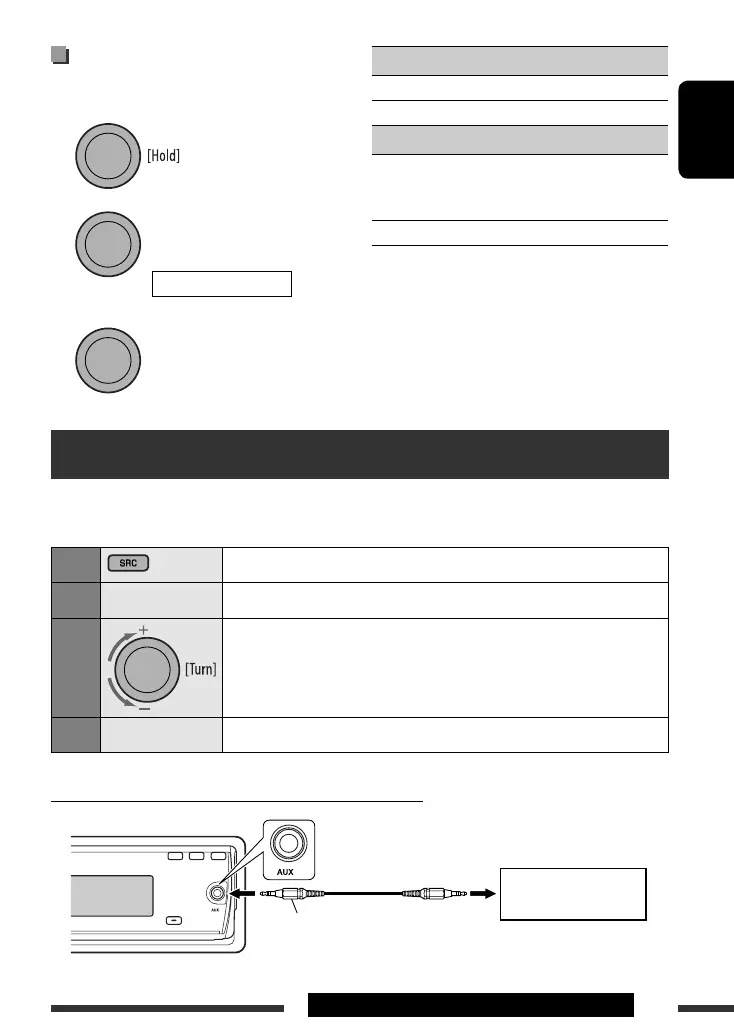
You can connect an external component to AUX (auxiliary) input jack on the control panel.
Preparation: Make sure “AUX ON” is selected in the “SRC SELECT” = “AUX IN” setting, see page 18.
1
Select “AUX IN.”
2
—
Turn on the connected component and start playing the source.
3
Adjust the volume.
4
—
Adjust the sound as you want (see pages 13 and 14).
Connecting an external component to the AUX input jack
3.5 mm stereo mini plug
(not supplied)
Portable audio player, etc.
EN10-15_KD-R507[EE]_1.indd 11EN10-15_KD-R507[EE]_1.indd 11 28/10/08 11:54:38 AM28/10/08 11:54:38 AM

 To Next Page
 Loading...