J
Jonathan BarberAug 26, 2025
What to do if 'Cannot Play' appears on JVC Car Receiver?
- JJoseph RodriguezAug 27, 2025
If “CANNOT PLAY” appears on your JVC Car Receiver, connect a USB device that contains playable audio files.



 To Next PageTo Next Page
What to do if 'Cannot Play' appears on JVC Car Receiver?
If “CANNOT PLAY” appears on your JVC Car Receiver, connect a USB device that contains playable audio files.
Why is sound interrupted during Bluetooth playback on JVC Car Receiver?
If the sound is being interrupted or skipped during playback from a Bluetooth audio player on your JVC Car Receiver, try reducing the distance between the unit and the Bluetooth audio player. You can also try turning the unit off and then on again, then try reconnecting. It is also possible that other Bluetooth devices might be trying to connect to the unit.
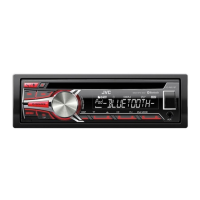
What to do if JVC KD-R794BT Car Receiver does not detect Bluetooth device?
If your JVC Car Receiver isn't detecting any Bluetooth devices, try searching for the device again from the Bluetooth device itself. Alternatively, you can reset the unit.
 General
| Audio system | MOSFET |
|---|---|
| MP3 playback | Yes |
| Audio formats supported | AAC, FLAC, MP3, WAV, WMA |
| DIN size | 1 DIN |
| Output power | 200 W |
| Product color | Black |
| Ready for iPod | No |
| Disc types supported | CD, CD-R, CD-RW |
| Audio output channels | - channels |
| Equalizer bands quantity | 11 |
| Maximum power per channel | 50 W |
| AM band range | 531 - 1611 kHz |
| FM band range | 87.5 - 108 MHz |
| Supported radio bands | AM, FM |
| Preset stations quantity | 24 |
| Display type | LCD |
| Display number of lines | 2 lines |
| Bluetooth version | 3.0+HS |
| Bluetooth profiles | A2DP, AVRCP, HFP, PBAP |
| Key illumination color | Red |
 Weight and Dimensions
| Weight | 1200 g |
|---|---|
| Dimensions (WxDxH) | 182 x 158 x 53 mm |
Statement of conformity with the European Union's Radio Equipment Directive.
Statement of conformity with the RoHS Directive on hazardous substances.
Key instructions for proper operation and essential safety precautions.
Identifies buttons, displays, and ports on the unit's front panel.
Step-by-step guide for powering, volume control, and source selection.
Identifies buttons, displays, and ports specific to the KD-R891BT model.
Guide to powering, volume control, and source selection for KD-R891BT.
Methods for tuning into FM/AM radio stations.
How to save and access favorite broadcast frequencies.
Guide to connecting and playing various digital media sources.
Step-by-step guide to connect a new Bluetooth device.
Managing incoming calls, answering, and rejecting them.
Steps for ending calls and managing active conversations.
How to initiate calls from history, phonebook, or by dialing.
Utilizing voice commands for making calls and controlling functions.
Connecting and playing music from Bluetooth audio devices.
Adjusting bass, mid, treble, and subwoofer levels manually.
Configuring subwoofer output level and crossover points.
Detailed setup for speaker outputs when using an external amplifier.
Fine-tuning crossover points, slopes, and phase for speaker outputs.
Comprehensive list of parameters for 2-way speaker crossovers.
Comprehensive list of parameters for 3-way speaker crossovers.
Setting speaker delay times for precise sound staging.
Guide to measuring distances and setting gain for time alignment.
Solutions for common sound, wiring, and radio problems.
Fixes for device compatibility, errors, and loading issues.
Solutions for Android playback errors and connection issues.
Fixes for Spotify app errors and Bluetooth connection loss.
Solutions for echo, noise, and poor sound quality during Bluetooth audio.
Solutions for issues controlling Bluetooth players and feature errors.
Essential safety warnings before performing wiring and mounting.
Step-by-step guide for installing the unit in a vehicle.
Step-by-step instructions for securely mounting the unit in a dashboard.
Illustrates wire connections and their functions using color codes.